About
Defend your kingdom with arcane power. The king trusts you. Probably a mistake.
What is Court Wizard?
What is Court Wizard?
Real-time strategy
Court Wizard is a 2D/3D real-time strategy game where you play as a powerful wizard defending your castle from relentless waves of attackers.
Cast devastating spells from your tower, support your defenders, and master the arcane arts to protect your king. Built entirely in Rust with the Bevy engine.
The king trusts you. Probably a mistake.
Blackhearth Games
Blackhearth Games
The studio
Court Wizard started as a hobby project — one developer learning Rust and game development from scratch. What began as a simple hobby with the Bevy engine grew into a potential business venture.
It is now the first title from Blackhearth Games, an indie studio born from the belief that a single developer with a little free time can build something the rest of the world might enjoy.
Made with passion for fantasy and magic.
Open Source & License
Open Source & License
GPL v3.0
Court Wizard is open source and licensed under GPL v3.0. The whole game is built in Rust, in the open.
Wishlist on Steam to follow along, or browse the source when it goes public.
No spells hidden behind closed doors.
Credits
Credits
Game Development
This game was created by David Yurek.
Built With
Bevy Game Engine
This game is built using Bevy, a refreshingly simple data-driven game engine built in Rust.
- License: MIT OR Apache-2.0
- Website: https://bevyengine.org/
- Repository: https://github.com/bevyengine/bevy
Rust Programming Language
This game is written in Rust, a language empowering everyone to build reliable and efficient software.
- License: MIT OR Apache-2.0
- Website: https://www.rust-lang.org/
Third-Party Licenses
This project uses the following open-source libraries (via Cargo dependencies):
- Bevy - Game engine (MIT OR Apache-2.0)
For complete license information, see the Cargo.lock file which lists all dependencies and their versions.
Sprite Art
All character and unit sprites are from the Liberated Pixel Cup (LPC) project on OpenGameArt.org.
- Source: http://opengameart.org/content/lpc-collection
- Licenses: OGA-BY 3.0, CC-BY-SA 3.0, GPL 3.0
- Full attribution: See
SPRITE_CREDITS.csvin the game directory for detailed per-file credits listing all contributing artists.
Original Artwork
Spell icons (assets/images/icons/) and static sprites (assets/images/static_sprites/) — including the menu backdrop, castle walls, and roulette wheel — were drawn by David Yurek for this project.
- License: GPL-3.0 (same as the rest of the project source)
Music
Music tracks are sourced from OpenGameArt.org and are licensed under CC-BY-SA 3.0. Tracks have been re-encoded/looped for use in this game.
- "Pixel River" by Trevor Lentz (menu music)
- Source: https://opengameart.org/content/pixel-river
- License: CC-BY-SA 3.0 — https://creativecommons.org/licenses/by-sa/3.0/
- "Sunshine Skirmish" by Trevor Lentz (battle music)
- Source: https://opengameart.org/content/sunshine-skirmish-loop
- License: CC-BY-SA 3.0 — https://creativecommons.org/licenses/by-sa/3.0/
Fonts
- Press Start 2P by Cody "CodeMan38" Boisclair (in-game UI)
- Source: https://fonts.google.com/specimen/Press+Start+2P
- License: SIL Open Font License 1.1 — https://scripts.sil.org/OFL
- Oxford Runes by Tilman Schalmey (fontasy.de) (rune symbols)
- Source: https://www.dafont.com/oxford-runes.font
- License: Free (DaFont "100% Free" category)
Controller Glyphs
Controller-button glyph fonts (Xbox, PlayStation, Steam Deck, Nintendo Switch) are by Kenney.
- Source: https://www.kenney.nl/
- License: CC0 1.0 Universal — https://creativecommons.org/publicdomain/zero/1.0/
Sound Effects
Sound effects are sourced from Pixabay.
- Source: https://pixabay.com/sound-effects/
- License: Pixabay Content License (free for commercial use, no attribution required)
Special Thanks
- The Bevy community for their excellent documentation and examples
- The Rust community for creating an amazing language and ecosystem
- The LPC community and all contributing sprite artists on OpenGameArt.org
- Trevor Lentz and the music contributors on OpenGameArt.org
- Pixabay and its sound effect contributors
- Kenney for the controller-glyph fonts
- Cody Boisclair for the Press Start 2P font
- Tilman Schalmey for the Oxford Runes font
This game is open source under the GNU General Public License v3.0. See LICENSE for details.
Privacy
Privacy Policy
Draft — pending legal review.
Effective date: 2026-04-14 Last updated: 2026-04-14
Summary
Court Wizard is developed by Blackhearth Games. We do not operate any servers that collect your personal data. We do not use third-party analytics, advertising, or tracking services. All of your game data stays on your own computer, with the exception of anything you choose to share through Steam's platform features.
What Data the Game Stores Locally
Court Wizard saves your progress and settings to a file on your own computer. This includes:
- Game settings (audio volume, display options, keybindings)
- Unlocked wizard types and achievements
- Run history and statistics
- Save data for in-progress runs
These files are stored in your operating system's standard application data directory:
- Windows:
%APPDATA%\court_wizard\ - Linux:
~/.local/share/court_wizard/ - macOS:
~/Library/Application Support/court_wizard/
You can delete these files at any time to remove all locally stored data. Doing so will reset your progress.
Steam Platform Data
If you play Court Wizard through Steam, your play session interacts with Valve's Steamworks APIs to support the following features:
- Achievements — unlocking an achievement notifies Steam so it appears on your Steam profile
- Stats — gameplay statistics that contribute to achievement progress
- Steam Cloud (if enabled by you) — syncs your save files to Valve's servers so you can resume on another machine
This data is handled by Valve under Valve's own privacy policy, which is available at https://store.steampowered.com/privacy_agreement/. Blackhearth Games does not receive personally identifying information from Valve — we see only anonymous aggregate statistics.
Multiplayer
Court Wizard's multiplayer mode uses peer-to-peer (P2P) networking over WebRTC. This means your game connects directly to another player's game without routing through a server operated by us.
A technical consequence of direct connections is that your IP address is visible to the player you are connected to, and theirs is visible to you. This is an inherent property of all peer-to-peer networking and is not something we collect, log, or store.
We do not operate a matchmaking server. Session data (moves, game state) is exchanged only between the two players and is not saved by us anywhere.
No Third-Party Tracking
Court Wizard does not use Google Analytics, Facebook Pixel, crash reporters, advertising SDKs, or any other third-party telemetry services. The game does not phone home.
Children's Privacy
Court Wizard is not directed at children under 13. We do not knowingly collect personal information from children. Because we do not collect personal information from anyone, no special data-handling procedures for children are required.
Your Rights (GDPR / CCPA)
Under the EU General Data Protection Regulation and the California Consumer Privacy Act, you have the right to:
- Access the personal data held about you
- Correct inaccurate personal data
- Delete personal data held about you
- Object to processing of your personal data
- Data portability
Because all of your Court Wizard data is stored locally on your own computer, you can exercise all of these rights yourself by accessing, editing, or deleting the save files listed above. Blackhearth Games does not hold any copy of your personal data that you would need to contact us to retrieve or erase.
Changes to This Policy
We may update this policy from time to time. The "Last updated" date above will reflect the most recent change. Material changes will be announced in the game's changelog and on the Court Wizard website.
Contact
If you have questions about this privacy policy, contact us at support@blackhearthgames.com.
Health & Safety
Health & Safety
Draft — pending legal review. Please read before playing.
Photosensitive Seizure Advisory
A very small number of people may experience a seizure when exposed to certain visual images, including flashing lights or patterns that may appear in video games. Even people who have no history of seizures or epilepsy may have an undiagnosed condition that can cause these "photosensitive epileptic seizures" while watching video games.
These seizures may have a variety of symptoms, including:
- Lightheadedness, altered vision, eye or face twitching
- Jerking or shaking of arms or legs, disorientation, confusion
- Momentary loss of awareness or loss of consciousness
- Convulsions
Stop playing immediately and consult a doctor if you or anyone else experiences any of these symptoms. Parents should watch for or ask their children about these symptoms — children and teenagers are more likely than adults to experience these seizures.
Reducing the Risk
You can reduce the risk of photosensitive epileptic seizures by:
- Sitting farther from the screen
- Using a smaller screen
- Playing in a well-lit room
- Not playing when you are drowsy or fatigued
If you or any of your relatives have a history of seizures or epilepsy, consult a doctor before playing.
Court Wizard Specifically
Court Wizard is a real-time strategy game with frequent bright particle effects and screen flashes during combat. Spells such as Chain Lightning, Meteor Fall, Wall of Fire, and Disintegrate produce rapid light effects. The Arcane Crystal and Black Hole spells produce large swirling visual patterns.
An optional CRT barrel distortion post-processing effect is enabled by default. If you experience motion discomfort, you can disable it from the Settings menu.
Eye Strain and Fatigue
To reduce eye strain, muscular fatigue, and other discomfort:
- Take a 10–15 minute break every 30–45 minutes of play
- Sit at a comfortable distance from the screen — about arm's length
- Adjust the brightness of your display so it is not too bright or too dim
- Avoid playing when you are tired or need sleep
- If your hands, wrists, or arms become tired or sore while playing, stop and rest for several hours before playing again
If persistent pain or discomfort continues, consult a doctor.
Repetitive Strain
Court Wizard is played primarily with a mouse. To avoid repetitive strain injuries:
- Keep your wrist in a neutral position
- Use a mouse pad with wrist support if needed
- Stretch your hands, wrists, and fingers regularly
- Stop playing at the first sign of pain, numbness, or tingling
Stop Playing and Consult a Physician If You Experience
- Convulsions, eye or muscle twitching, loss of awareness
- Altered vision or involuntary movements
- Disorientation or dizziness
- Any pain, numbness, tingling, or weakness in your hands, wrists, arms, neck, shoulders, or back
Emergency
If someone experiences a seizure, keep them safe by moving nearby objects away, do not restrain them, and seek medical help immediately.
Features
Six reasons the king keeps you around.
11 Wizard Archetypes
11 Wizard Archetypes
3 revealed · 8 locked
From the Rune Caster to the Meteorologist, each archetype plays completely differently — yes, one of them even uses poop magic. Three are revealed; the other eight unlock as you earn achievements.
Revealed
- Boring Ole Mage (Starter) — the reliable all-rounder: straightforward spells, no gimmicks, just solid arcane fundamentals to learn on.
- Randomancer (Chaos) — embraces chaos; your spells are drawn from the whims of fate, never the same run twice.
- Arcanorouter (Power) — master of mana flow; reroute arcane energy on the fly to power whatever the battlefield demands.
Locked — earn achievements to reveal:
- Something smells off…
- Spells? Where you're going, you don't need spells.
- Some wizards prefer a more… hands-on approach.
- The cauldron whispers to those who listen.
- The sky darkens. Something is brewing up there.
- Mysterious symbols. Mysterious results.
- Violence is never the answer… right?
- Some people just want to watch the world burn.
Unlock new wizards by earning achievements.
32 Spells & Talent Trees
32 Spells & Talent Trees
Arcane arsenal
9 talents per spell across 3 tiers. Build offense, control, support, and utility loadouts that match your wizard. The math is fine. Trust the wizard.
Roguelite Campaign
Roguelite Campaign
25 levels
25 levels, seeded runs, and difficulty sliders so you can dial the challenge to taste. Blame the RNG.
Endless Mode
Endless Mode
Survival
Infinitely scaling enemies. It gets ridiculous — that's the point.
Boss Fights
Boss Fights
Big threats
Ogre, Lich, Hags, and Dark Mage. They all want you dead. Specifically. Each demands a different plan.
Multiplayer Versus
Multiplayer Versus
Peer-to-peer PvP
Bring a friend. Destroy their kingdom instead. Peer-to-peer versus battles, wizard against wizard.
Co-op Multiplayer
Co-op Multiplayer
Online · Co-op
Connect to a fellow wizard and defend the kingdom together. Team up in both Endless and Roguelite modes — two wizards, one castle, twice the spells against the swarm.
Two wizards are better than one. Usually.
Screenshots
Click a screenshot for a caption.
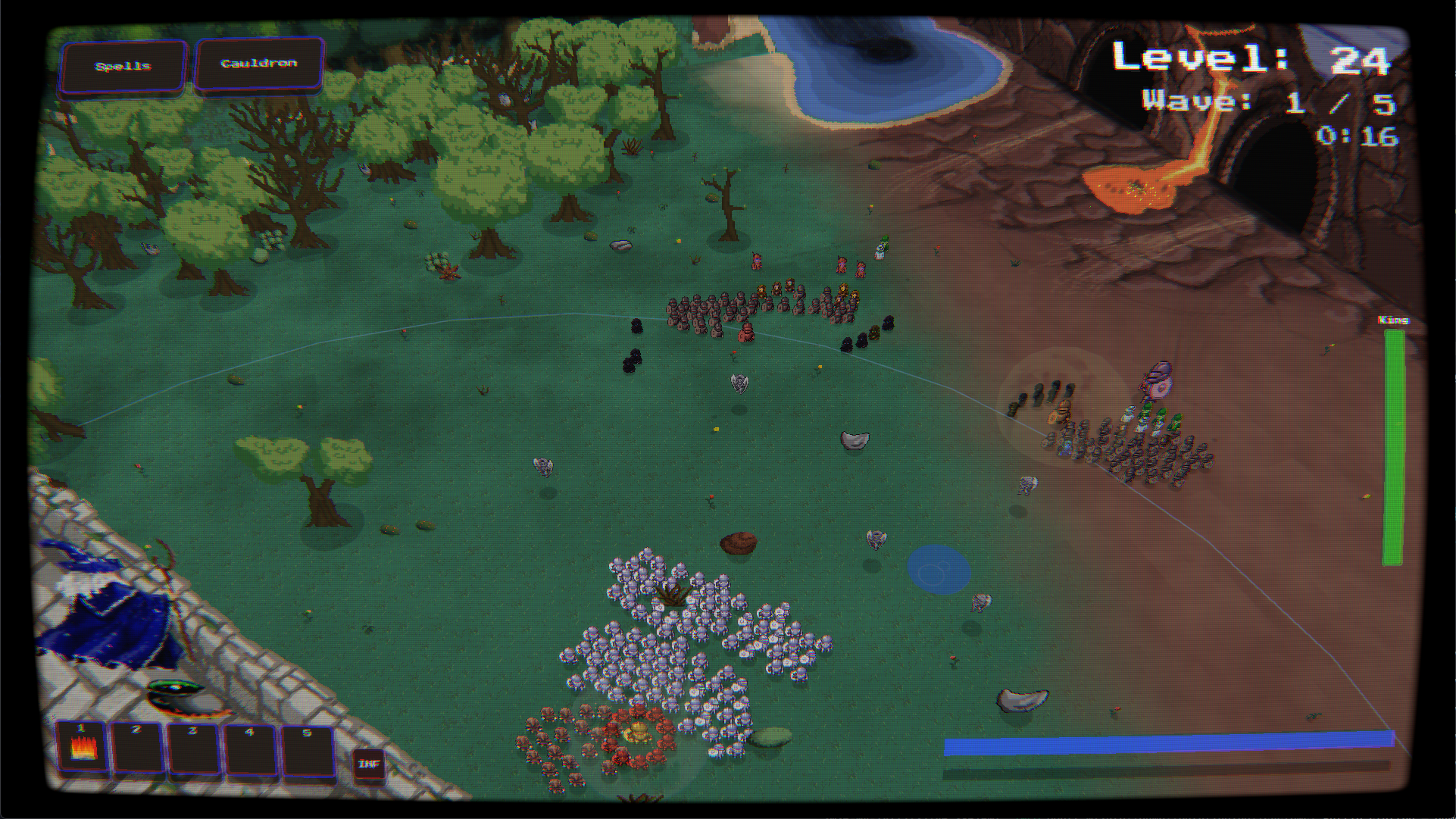 Gameplay
Gameplay
Casting spells from the tower as waves close in on the castle.
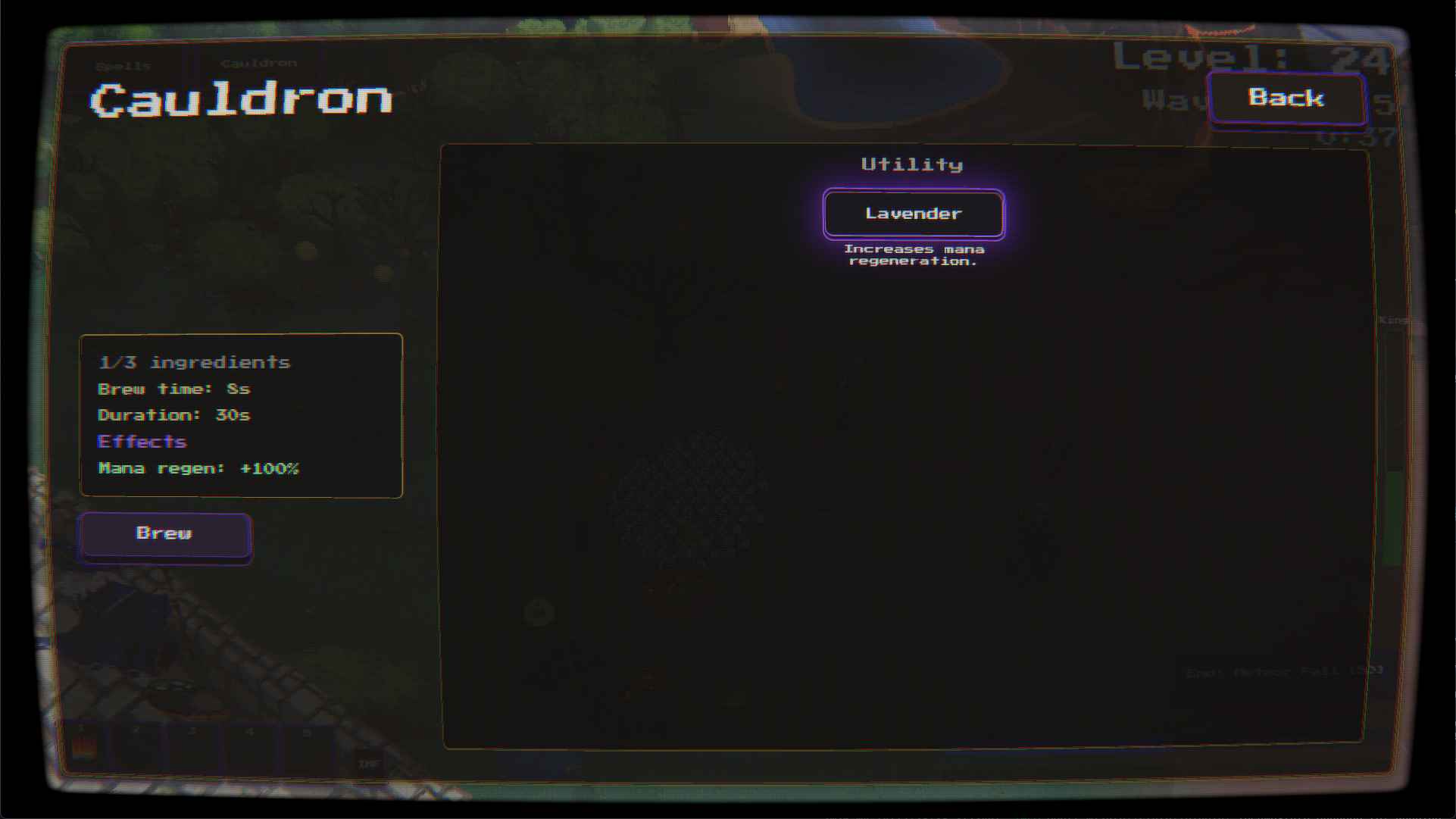 Brewing
Brewing
Mix ingredients dropped by enemies in the cauldron between the chaos.
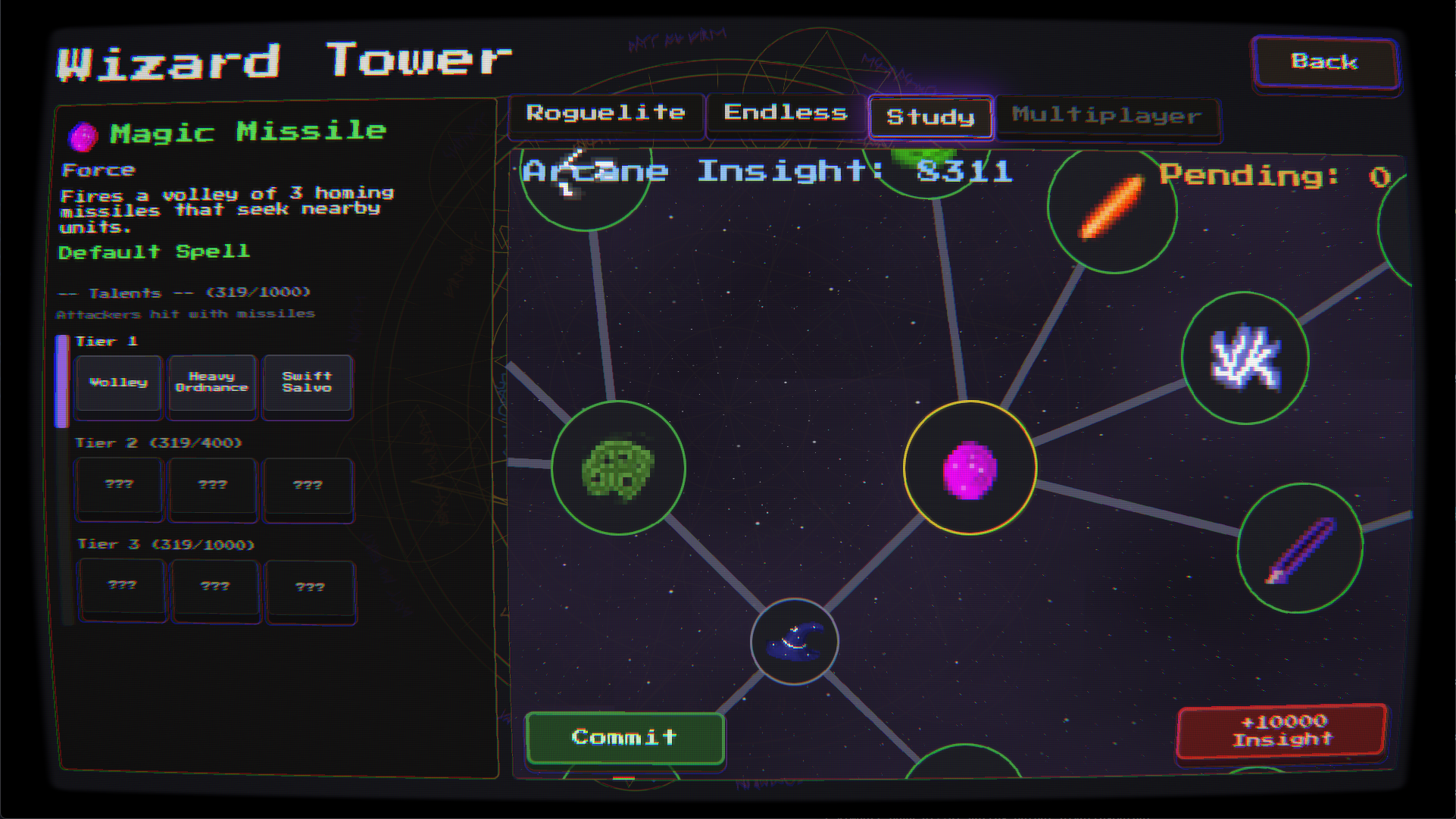 The Study
The Study
Research new spells and spend your Arcane Insight at the Wizard's Tower.
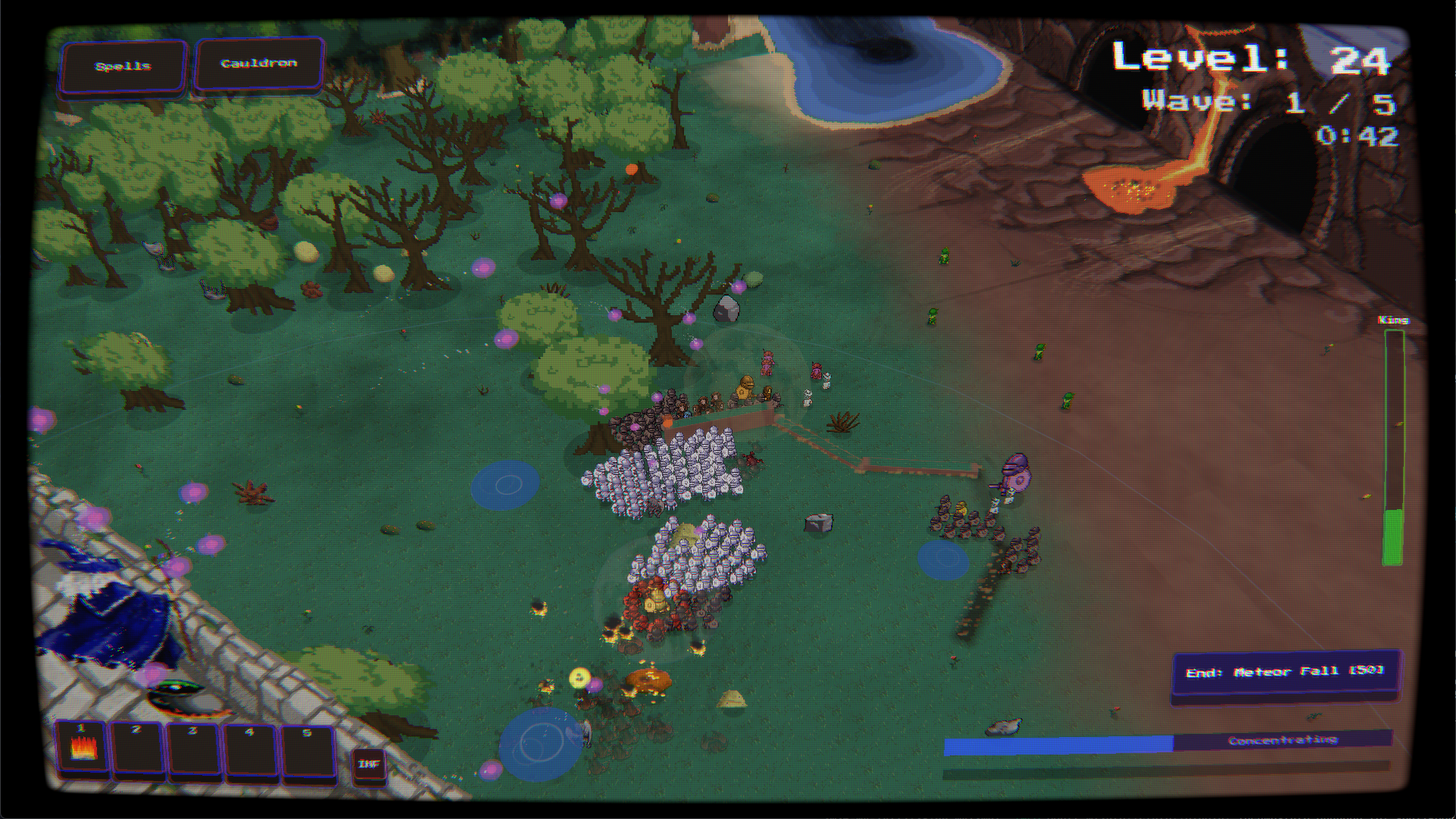 Battlefield Chaos
Battlefield Chaos
When the spells and the swarm collide, the screen earns its name.
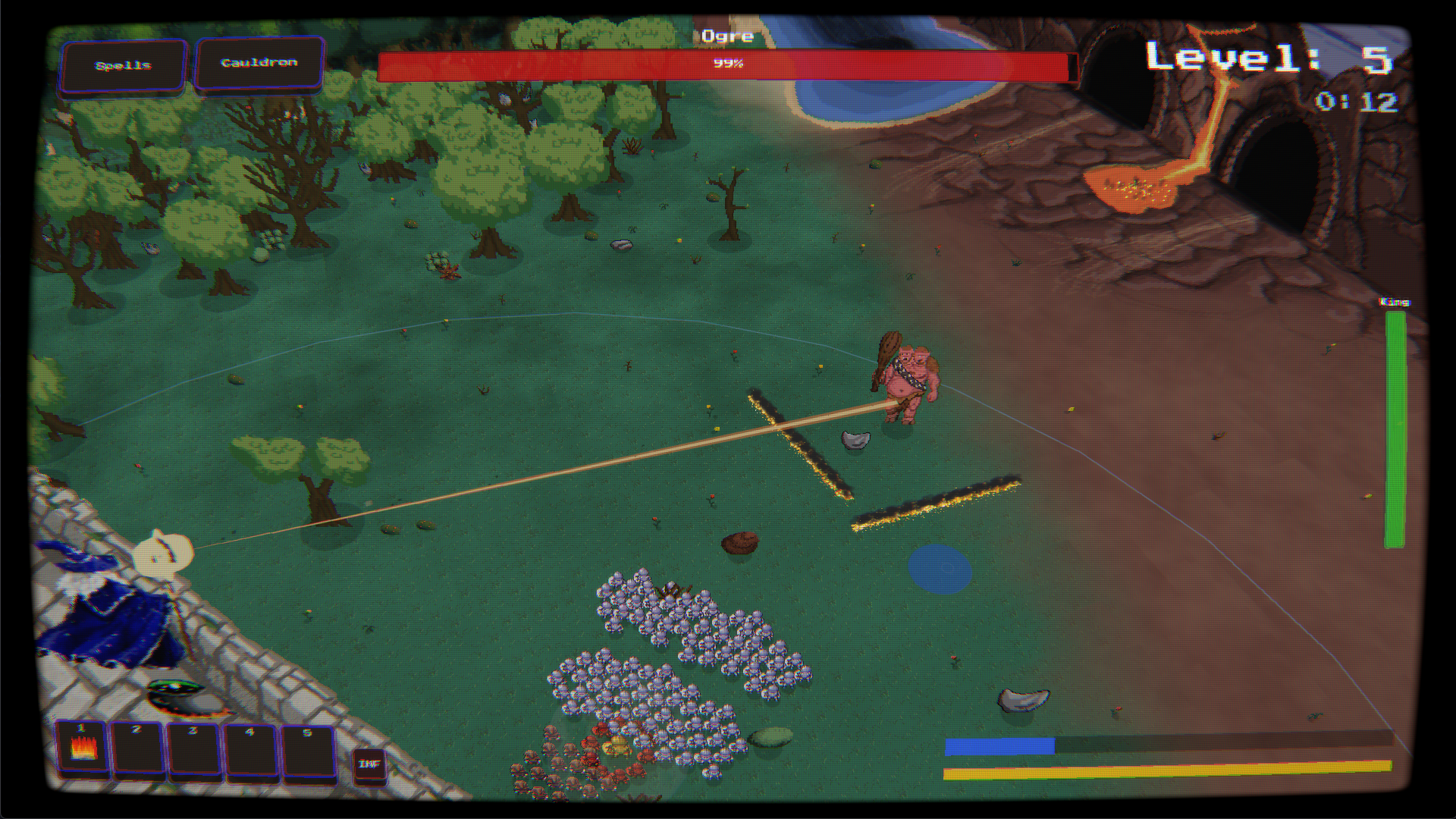 Ogre Boss
Ogre Boss
One of the bosses that wants you dead. Specifically.
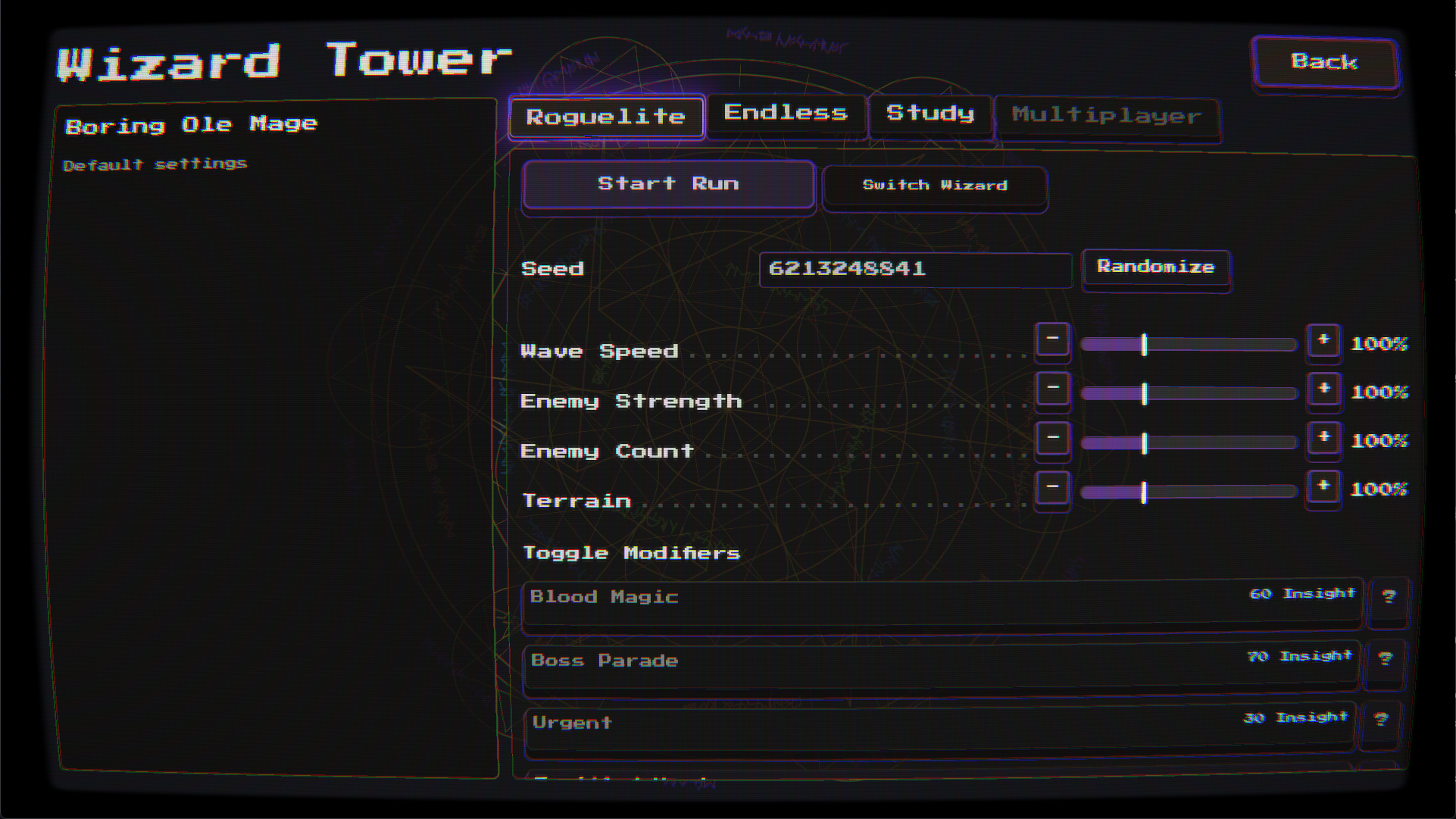 Roguelite Run
Roguelite Run
Seeded runs across 25 levels with difficulty sliders to taste.
Manual
How to play Court Wizard. Click a topic to expand it.
Overview
Overview
You are the Court Wizard. Defend the castle from waves of incoming enemies by casting spells. Keep the king alive and eliminate all attackers to advance. Each wave brings more and stronger enemies.
You stand atop your tower with the full arcane arsenal at your disposal — but mana is finite, enemies are many, and the king is a bit of a worrier. Choose spells carefully, time your casts, and brew a potion or two between the chaos.
Controls
Controls
- Mouse — Aim spells and interact with UI.
- Left Click — Cast spells (hold to channel).
- Escape — Pause game / open spell book.
- Keys 1–5 — Quick-cast from your action bar (most wizards).
- Q W E R / A S D F — Alternate action bars used by some wizard types.
Spell Book
Spell Book
Press Escape or click the spell button in the top-left to open the spell book. Spells are organized into four categories: Offense, Control, Support, and Utility. Click a spell to see its description, then Select to prime it. You can also assign spells to action bar slots (1–5) from here.
Action Bar
Action Bar
The action bar at the bottom-left shows your 5 quick-cast slots. Press 1–5 anytime to instantly prime that spell. To assign a spell, open the spell book and press a number key while hovering over it.
Casting Styles
Casting Styles
Different spells have different casting styles:
- Click — Click once to fire. (Magic Missile, Dispel)
- Hold — Hold to channel. (Disintegrate, Finger of Death)
- Placed — Hold to charge, release to place. (Guardian Circle, Entangle, Sleep)
- Drag — Click and drag to draw a line. (Wall of Dirt, Wall of Fire)
- Concentration — Persist until cancelled. (Squall, Meteor Fall)
Mana Management
Mana Management
- Each spell costs mana to cast.
- Mana regenerates over time.
- Watch your mana bar to ensure you can cast.
- Some powerful spells require full or near-full mana.
Concentration
Concentration
Concentration spells remain active until you end them. While concentrating, the spell's mana cost is reserved — your mana won't regenerate past the reserved amount. You can concentrate on multiple spells at once, but each one reserves more mana. Click the cancel buttons on the right side of the screen to end individual concentration spells and free up mana.
Cauldron Brewing
Cauldron Brewing
The cauldron lets you brew potions from ingredients dropped by defeated enemies. Click the cauldron icon to open the brewing menu, toggle ingredients on or off, preview the effects, and click Brew. Your wizard can't cast while brewing, and mixing multiple ingredients dilutes each effect — choose carefully.
Research & Progression
Research & Progression
Defeating enemies earns Arcane Insight, which you spend at the Wizard's Tower to research new spells. Spells are organized in research chains — unlock earlier spells to access more powerful ones. Some spells require a minimum number of total spells researched.
Wizard Types
Wizard Types
Different wizard types offer unique playstyles. Three are available to start — Boring Ole Mage, Randomancer, and Arcanorouter — and eight more remain locked until you earn their achievements. See 11 Wizard Archetypes under the Features tab for the full roster.
Tactical Tips
Tactical Tips
- Position walls and fire strategically to funnel enemies into kill zones.
- Teleport can reposition both enemies and allies.
- Guardian Circle gives temporary HP that can save units from death.
- Use Telekinesis to collect ingredient drops from across the battlefield.
- Combine Grease with fire spells for devastating explosions.
- Black Hole pulls enemies into a growing vortex.
- Brew potions between waves for maximum effect.
Changelog
Every version, newest first. Click a version for its notes.
v1.0.41 · 2026-09-04
v1.0.41
2026-09-04
Description
Every spell now tells you when it lands. Units struck by a spell flash in that spell's own colour and give off an impact sound, so a fireball thrown into a crowd reads at a glance instead of leaving you watching health bars.
Added
- Spells show you what they hit — any spell that damages a unit now flashes it in that spell's own colour, with a matching impact sound. A beam sweeping a line, a meteor landing in a crowd, a bolt picking off one straggler: you can see and hear exactly who was caught. Bosses do the same to your defenders, so you can tell at a glance who is under fire.
Changed
- Reduce Flashes now covers combat hits — with the setting turned on, hit flashes are dimmer, fire less often, and fewer of them appear at once, while still showing you which units are being struck.
Fixed
- Rapid attacks no longer strobe their target — the Warglock's machine gun and the Swordcerer's sword arc flashed a struck unit on every single hit, which flickered badly during sustained fire. They now flash at the same steady rate as everything else.
- Long battles no longer pile up finished sound effects in the background.
v1.0.40 · 2026-08-31
v1.0.40
2026-08-31
Description
The talent that makes your dirt walls permanent has moved to the front of its tree, so you can reshape the battlefield early instead of grinding for it. Walls and crystals carried between levels now keep the talents you built them with.
Changed
- Permanent walls come much earlier — Terraformer, the talent that makes your dirt walls stick around between levels, has moved from the last row of the Wall of Dirt talents to the first, and Quick Foundations has moved the other way. Your first and third rows of Wall of Dirt talents have been reset so you can choose again from the new layout; the progress you earned toward unlocking them is untouched.
Fixed
- Walls carried between levels keep their talents — a permanent wall arriving from a previous level came back as a plain wall, quietly losing its reinforcement, its frost aura, its regeneration and its spikes. It now brings all of that with it.
- Crystals carried between levels keep their talents too — permanent crystal turrets were dropping their talent bonuses the moment they moved to a new level.
- The main menu has its sky back — on larger screens most of the background was missing, leaving a flat grey field behind the menu buttons.
- Quarry Master now says what it actually does — its description made it sound like the wall lasted longer, when what it really does is let you draw a longer wall.
v1.0.39 · 2026-08-18
v1.0.39
2026-08-18
Description
A big under-the-hood update: Court Wizard now runs on a newer version of its engine, and should look and play exactly as before. The visible changes: a proper window icon, and multiplayer now needs both players on the same version.
Changed
- The game has moved to a newer version of its engine — a large rebuild of the foundations the game sits on, including how the screen effects and all the text are drawn. It should be invisible: everything is meant to look and play exactly as it did. If something does look off — the CRT curve, the scanlines, menu text, spell effects — that is worth reporting, because it wasn't intended.
- Multiplayer now needs both players on this version — someone still on the previous build will be turned away with a version-mismatch message instead of joining a match that might not stay in step. Update together and you're fine.
Fixed
- The game's window now shows the Court Wizard icon — it had quietly been falling back to a blank default one in the taskbar and window bar.
v1.0.38 · 2026-08-15
v1.0.38
2026-08-15
Description
The Arcane Crystal now takes on the character of almost any spell you feed it — grease, ice storms, war hymns, lightning rods — instead of only echoing damage. Reconnecting in multiplayer is also far steadier.
Added
- The Arcane Crystal now answers to most of your spellbook — it used to only react to six, all of them damage. Feed it a slick of grease, a healing plume, a war hymn, a swarm of vines, an ice storm, a lightning rod, and it takes on that spell's character instead: laying oil around itself, mending everyone nearby, rooting whatever wanders too close. The crystal has stopped being a damage multiplier and started being whatever you decide it should be that fight.
- Every charge has two halves — the moment a spell lands on the crystal you get a burst at full strength, and then a weaker version of the same thing repeats for the rest of the crystal's life. Hit it with something else and it changes its mind, though anything it already put on the ground stays there until it burns out on its own.
- The crystal changes colour to match what it's holding — you can tell a fire crystal from a frost one from across the battlefield, instead of trying to remember what you last threw at it.
- Haste doesn't overwrite the crystal, it winds it up — every other spell replaces what the crystal is doing. Haste layers on top, so you can charge it with something devastating and then make it do that twice as often.
- Wall of Dirt roots a crystal in place — an anchored crystal ignores a black hole's pull entirely, which is the counter to having your carefully placed crystal dragged off across the field.
- A Guardian Circle wards the crystal itself — the next thing that would destroy it gets shrugged off once.
- Dispel now shatters a crystal instead of quietly deleting it — it detonates, and the fuller its remaining life the bigger the blast. Your own crystal has become a bomb you can set off on purpose.
- Concentration spells can be handed off — charge the crystal with an ice storm and it keeps the storm going after you stop concentrating, giving you your reserved mana back while the sky keeps falling on them.
Changed
- A crystal swallowed by a black hole goes out with a bang — it used to simply blink out of existence.
- The score screen no longer offers routes that would abandon your co-op partner — with a friend still connected, "Next Level" and "Time Rewind" skipped the handshake that brings them along, so they sat in the tower while you played on alone. Head through the Wizard Tower instead; its Continue button starts the next level for both of you.
- Forfeit is gone from the co-op pause menu — there is nothing to forfeit when you are both on the same side, and the button did nothing at all. Use Disconnect.
- Leaving a co-op run now tells your partner — they return to the Wizard Tower straight away instead of waiting for the connection to go quiet.
Fixed
- Black holes no longer eat crystals that were meant to last — a permanent crystal caught in one would vanish and stay gone, including from later levels.
- Three spells were describing themselves wrong — Black Hole, Wall of Fire, and Entangle each listed a duration that didn't match how long they actually last.
- Dispel now works both ways in co-op — whichever of you cast a lingering spell, the other could not clear it away. Walls of fire, spike fields, grease, plague clouds and black holes summoned by your partner simply ignored your Dispel.
- Reconnecting after a dropped connection no longer wedges the second player — if a connection stalled and then completed a moment too late, the joining player could end up in a state where they never finished introducing themselves. Their partner sat on "Exchanging player info" forever, and every retry failed the same way until the joining player restarted the game entirely.
- Starting a fresh join while still connected no longer leaves the old session hanging around — joining a new game with a code while already linked to a co-op partner kept you listed in their lobby with a live connection you had walked away from.
- Reconnecting no longer degrades the game a little more each time — leftovers from a closed session could quietly intercept part of the next one. The first casualty was usually the introduction the two of you exchange on connecting, leaving both players stuck on "Exchanging player info"; after that it was the steady stream of battlefield updates, so your partner's army stuttered and froze a bit worse with every reconnect until someone restarted the game. Sessions now shut down completely before the next one starts.
- A closing connection can no longer disturb the one replacing it — the tail end of a session you had already left could arrive a moment too late and land on your new one, showing "Connection lost" on a perfectly good connection, or replacing your fresh connection code with the dead one from the session before. Your friend would then type in a code that could never work.
- Cancelling while hosting now takes effect immediately — backing out during the few seconds it takes to set up an online game was ignored until that setup finished, and a connection code was published for a game you had already left.
- Host Game now clears the previous session first — like Join Game already did. Hosting again right after disconnecting could fail because the old connection was still closing. Double-clicking the button no longer causes a failure either.
- An interrupted rematch no longer breaks multiplayer for the rest of the session — if a rematch fell through at the wrong moment, every trip back to the main menu afterwards quietly skipped its multiplayer cleanup, and nothing worked properly again until you restarted the game.
- A version mismatch now closes the connection it refused — the "you're on different versions" screen used to leave the connection and the Steam lobby wide open behind it, which then interfered with your next attempt.
- Your opponent disconnecting now cleans up straight away — the disconnect screen used to leave everything running until you clicked the button on it, so quitting or accepting an invite from that screen left an open connection and a live Steam lobby behind.
- Long co-op sessions stay smooth — playing alongside an Excremage partner slowly accumulated unused graphics data for as long as the game stayed open.
- The Arcane Crystal keeps its shape on your partner's screen — a crystal charged with Disintegrate showed up on the other player's screen as a featureless glowing ball, because the flare that belongs at the tip of a wizard's beam was being drawn on the crystal itself. Since a Disintegrate charge lasts the crystal's whole life, it never went away.
v1.0.37 · 2026-08-10
v1.0.37
2026-08-10
Changed
- Improvements to our build processes — changes to how updates are put together and delivered to you. Nothing in the game itself is affected.
v1.0.36 · 2026-08-10
v1.0.36
2026-08-10
Fixed
- Inviting a friend again after a failed connection now works — if a connection attempt failed or was cancelled, every later invite would quietly go nowhere: both players sat on "Connecting" forever, and the only way out was for both of you to restart the game.
- The Steam invite button no longer does nothing — after finishing a co-op game and returning to the tower, "Invite Friend on Steam" could stop responding entirely, with no message to explain why. It works again, and if an invite is already open it now says so instead of ignoring the click.
- Connection attempts that stall now tell you — a join that never completed used to leave you watching "Connecting via Steam relay…" indefinitely. You now get a plain-language explanation and a Try Again button after a short wait.
- Leaving the game closes your Steam lobby — quitting used to leave your lobby advertised to friends, so a friend clicking Join Game could be dropped into a session that no longer existed.
- A friend dropping out of co-op no longer breaks your next game — when your partner disconnected mid-level, leftover connection state could stop you starting a new session together until both of you restarted.
v1.0.35 · 2026-08-05
v1.0.35
2026-08-05
Fixed
- Turning off the CRT screen effect now sticks between sessions — the setting was saved and still showed as Off in Accessibility, but the scanlines, screen curve, and vignette came back every time the game was reopened, until you toggled the option off and on again.
v1.0.34 · 2026-08-04
v1.0.34
2026-08-04
Added
- You can see which spell is ready at a glance — the icon of your primed spell now floats and gently bobs above your wizard's head, so you no longer have to cast one to find out what's loaded. It swaps the instant you switch, and the Warglock's chosen gun appears the same way. It's especially handy for the Rune Caster and the Randomancer, who never picked the spell themselves — now you can see what your runes or the wheel actually handed you, long after the announcement has faded.
- The action bar marks the spell you have ready — the slot holding your primed spell now keeps a lit border, instead of only flashing for a moment as you press it.
- The spell menu shows your whole hotkey loadout — the five assignment boxes each display the icon of the spell bound to them, with the slot number tucked into the corner, so you can see everything you have equipped without clicking through spell by spell. The spell you're reading about also shows its icon beside its name.
Changed
- Sleep covers noticeably more ground — the spell's circle is 30% wider, so a single casting catches a good deal more of an advancing crowd. Anything that widens the circle further builds on the new, larger size.
Fixed
- The game no longer fails to launch on some Linux setups — on Wayland desktops with NVIDIA graphics, it could crash before the main menu ever appeared. It now starts through a more reliable display path by default. Steam Deck and other handheld sessions are unaffected and keep their native one, and anyone whose Wayland setup already worked well can launch with
COURT_WIZARD_WAYLAND=1to keep it. - The Warglock's selected gun is now actually highlighted — the action bar was meant to mark which of the five guns you had in hand, but the highlight was drawn somewhere it could never be seen.
- The action bar no longer stacks copies of itself — every trip into the spell book, cauldron, or pause menu quietly left another row of slots piled on the last one.
- The spell menu's hotkey boxes no longer disagree about which is picked — switching between spells could leave an old box still looking selected while the new one lit up as well.
v1.0.33 · 2026-08-01
v1.0.33
2026-08-01
Changed
- The results screen now tells you when a battle was a time travel trip — a "VICTORY" on a level you went back to replay no longer looks like it should have unlocked something. The screen now says plainly that level progress isn't recorded for time travel. Insight and your lifetime stats are still earned as normal.
Fixed
- New ingredient discoveries stay on screen long enough to read — while the battle is fast-forwarding between waves, the discovery notice used to flash past in a fraction of a second. It now stays up for the same few seconds no matter how fast the battle is running, and fades out smoothly instead of blinking away. Anything still waiting to be shown when a battle ends no longer lingers over the results screen.
- A boss from a later level no longer turns up on the wrong one — if a battle against a late-game boss ended before that boss made its entrance, it could arrive unannounced on a completely different level afterwards, and quietly stop you from winning that level until it did.
- Time travel no longer leaves your Endless progress on the wrong level — quitting to the menu partway through a trip to an earlier level used to strand the game there. Every battle after that was set up and labelled with the wrong level, and winning them counted for nothing. Coming back from a trip now always returns you to where you left off.
- Time travel no longer overwrites what you've built — revisiting an earlier level restores that level's battlefield for the trip, and those old surroundings could end up written over your real permanent structures and terrain for good, even if you closed the game partway through. Your real progress is now held safe for the whole trip and put back when you return.
v1.0.32 · 2026-08-01
v1.0.32
2026-08-01
Fixed
- Insight committed to a permanent wizard upgrade is no longer lost — insight you put toward Spell Damage, Spell Range, Cast Speed or Mana Cost now always stays on that upgrade. Previously, anything that didn't complete a whole rank on its own was spent and thrown away, so committing small amounts cost you insight and gave you nothing. Partial progress is now saved between visits, shown on the upgrade's ring as a partial arc, and carries over until the next rank is reached. Upgrades you've already earned are unaffected, and the study screen no longer lets you pour more insight into an upgrade than it can hold.
v1.0.31 · 2026-07-31
v1.0.31
2026-07-31
Fixed
- Enemies can no longer wander off the edge of the battlefield — powerful foes sometimes drifted past the edge of the field, where you couldn't see them or reach them with your spells. The battlefield now has invisible walls: units turn back as they near the edge, and the biggest threats and your King are held firmly inside the visible area so a fight can never slip out of view. Ordinary troops still get a little room to spill past the edge while brawling, so the line doesn't look painted on.
v1.0.28 · 2026-07-31
v1.0.28
2026-07-31
Changed
- An achievement is easier to go for — one of the trickier achievements no longer asks you to change your settings before you start. Play how you like; it now watches how you actually play. Controller players can earn it too.
v1.0.26 · 2026-07-31
v1.0.26
2026-07-31
Added
- Helpful spells now leave a subtle mark on the units they touch — units with a protective shield show a faint glow ring at their feet, hastened units trail little speed lines as they run, units carried by Battle Hymn's song have the occasional golden note rising above their heads, and units being mended in a healing field sparkle with a touch of green. All of it is easy to miss unless you're looking — but it's there when you want to check whether your blessing is still active. And remember: magic doesn't pick sides, so enemies caught in your circle wear the same marks.
Fixed
- Buff marks now show up for both players in multiplayer — shields, battle fury, haste and song marks cast by one player are now visible on the other player's screen too, instead of only appearing for whoever cast the spell.
v1.0.17 · 2026-07-28
v1.0.17
2026-07-28
Fixed
- No more flickering menus with a controller plugged in — if a controller with worn, drifting thumbsticks was connected while you played with mouse and keyboard, buttons and prompts could rapidly flash between mouse and controller styles. The game now only switches to controller mode when you actually press a button or move a stick on purpose, on every platform.
- Stray mouse bumps no longer interrupt controller play — nudging the mouse while holding a cast on the controller no longer cancels your spell or locks the controller out.
v1.0.15 · 2026-07-28
v1.0.15
2026-07-28
Changed
- Smoother Mac releases — improved the behind-the-scenes process that builds and delivers the Mac version, so Mac updates now arrive automatically alongside Windows and Linux.
- Intel Mac support made official — the system requirements now cover Intel Macs alongside Apple Silicon. One download works on both.
v1.0.13 · 2026-07-27
v1.0.13
2026-07-27
Added
- Artwork credits included with the game — the file crediting the game's artists now comes with every download.
Changed
- The Mac version is now a proper Mac app — Court Wizard on macOS is now a real double-clickable app with its own icon, and a single download works on both Apple Silicon and Intel Macs. The app is checked and approved by Apple, so it opens without any security warnings.
v1.0.10 · 2026-07-26
v1.0.10
2026-07-26
Changed
- Much faster cauldron brewing — brews now finish in a fraction of the time (a three-ingredient brew takes about 4 seconds instead of 12), so potions are finally practical to whip up in the heat of battle.
- Prettier brew finish — the burst when a brew completes now swirls with the same magical energy as the game's other spell auras, still tinted by the color of your ingredient mix.
- Finger of Death is now a true executioner's spell — instead of a fixed amount of damage, the beam deals exactly as much damage as its victim's full health. Any unprotected unit falls in one strike, but shields and protective blessings can save a unit from the killing blow. Bosses and Brutes are too massive for this trick and lose a fixed chunk of health instead.
- Finger of Death is much cheaper — casting it now takes a third of the mana it used to, so it can be part of your regular rotation instead of a once-in-a-while finisher.
- The Lich plays by the same rules — its death beam now also deals damage equal to its victim's full health, so a protective blessing on your King can save him from what used to be a guaranteed kill. The Lich also holds off targeting your King a little longer than before.
v1.0.8 · 2026-07-25
v1.0.8
2026-07-25
Changed
- Marching armies are now protected by shields — enemy waves walking to their battle positions glow with the same golden shield blessing that shielder enemies use, and can't be harmed, moved, or slowed by any spell until their wave charges into battle. The glow fades the moment the wave wakes up. No more wiping out an entire army before the fight even starts!
- No sneaky boosts during the march either — enemy healers and shielders can no longer patch up or protect their allies while those allies are still marching in, and helpful magic can't reach marching units at all. Nobody gets an edge until the battle actually begins.
v1.0.4 · 2026-07-24
v1.0.4
2026-07-24
Changed
- A new project README — the game's open-source homepage now doubles as a guided tour: how the project is set up, how the code is organized, and an introduction to the tools behind it (the Rust language and the Bevy engine).
v1.0.3 · 2026-07-24
v1.0.3
2026-07-24
Changed
- Wizard Tower button goes straight to the Study — after finishing a level, the Wizard Tower button on the score screen now opens the Study right away, so you can upgrade and swap your spells and talents without any extra clicks. When a co-op partner is playing with you, it opens your game mode screen instead so you can bring them straight into the next level.
v0.10.93 · 2026-07-18
v0.10.93
2026-07-18
Fixed
- More reliable auto-pause when a controller is unplugged — the game now also pauses if the controller you were just playing with disconnects right after you touched the mouse. Unplugging a spare controller you weren't using still won't interrupt your game.
v0.10.92 · 2026-07-08
v0.10.92
2026-07-08
Changed
- Pause menu now appears in fast-paced multiplayer — In versus and urgent co-op matches, opening the Steam overlay, unplugging your controller, or clicking away now brings up your pause menu, just like the pause button already does. The match keeps running for both players, since these fast-paced modes can't be frozen.
v0.10.90 · 2026-07-06
v0.10.90
2026-07-06
Fixed
- Cleaner controller layout heading — Removed the broken boxes that showed on either side of the controller layout name in Settings → Controls.
- Clearer study requirements — Removed a broken box that showed next to completed spell requirements on the study screen.
v0.10.89 · 2026-07-02
v0.10.89
2026-07-02
Added
- Deeper Steam controller support — controllers now run through Steam's controller system, so on-screen prompts and controls match your actual pad, with support reaching beyond Xbox to PlayStation, Switch, and Steam Deck controllers.
Fixed
- Controller navigation skips locked tabs — in the wizard tower, the shoulder buttons now step over unavailable tabs (like Versus when you're not in a match) instead of getting stuck on them.
- Select study nodes with a controller — you can now confirm a node on the study screen with a controller.
Changed
- Steadier study cursor — the study-screen cursor moves at a more controllable speed on a controller.
v0.10.78 · 2026-07-02
v0.10.78
2026-07-02
Fixed
- Controller setup in Steam — the game now hands Steam the correct controller layout, so its controls can be recognized and adjusted in Steam's controller settings.
v0.10.77 · 2026-07-01
v0.10.77
2026-07-01
Changed
- Cleaner Randomancer spin prompt — the keyboard spin cue is now a compact "Press Space" centered on the wheel.
v0.10.76 · 2026-06-30
v0.10.76
2026-06-30
Fixed
- Cast rune spells with a controller — build a rune sequence with the D-pad, then press the confirm button to cast it. This wasn't working on a controller before.
- Arcanorouter sliders respond to a controller — the D-pad now adjusts the resource sliders properly instead of barely moving them.
Changed
- Clearer controller direction prompts — abilities that use a direction (runes, weather, resource sliders, reload, and the spin wheel) now show plain up / down / left / right arrows on a controller, so it's obvious which way to press. The Randomancer's spin prompt also sits on the wheel now and clears out of the way while it spins.
v0.10.75 · 2026-06-30
v0.10.75
2026-06-30
Changed
- Controller button hints for every wizard type — the weather, resource-slider, and reload controls now show your controller's button glyphs (and the correct directions) when you play on a gamepad, matching the rune and spin prompts. On-screen key hints also reflect whatever keys you've bound in Settings → Controls.
v0.10.74 · 2026-06-28
v0.10.74
2026-06-28
Changed
- Sharper controller button prompts — on-screen controller glyphs now match your controller and your bindings more precisely, and the rune and spin prompts show the correct D-pad directions.
v0.10.73 · 2026-06-28
v0.10.73
2026-06-28
Added
- Full Steam controller support — the game now runs through Steam Input, so PlayStation, Nintendo Switch, and Steam Deck controllers are supported alongside Xbox pads, and you can remap any control from Steam's controller settings. On-screen button prompts match your controller and your own bindings, controllers rumble at the end of a battle, and a new Configure Controller button in Settings → Controls opens Steam's binding screen.
- The game pauses itself when you step away — opening the Steam Overlay or unplugging your controller in the middle of a battle now pauses the game automatically, so you won't come back to a lost run. In a co-op match, both players pause together. You can switch either option on or off under Settings → Gameplay.
v0.10.72 · 2026-06-18
v0.10.72
2026-06-18
Fixed
- Multiplayer menu buttons work for the joining player — after joining a friend's game through Steam, the buttons on the multiplayer screen (switch wizard, ready up, disconnect) were unresponsive. They now work as expected.
v0.10.71 · 2026-06-18
v0.10.71
2026-06-18
Fixed
- Steam invites now connect when the game is closed — accepting a friend's Steam invite while Court Wizard isn't running now launches the game and drops you straight into the multiplayer match, instead of stopping at the main menu.
v0.10.69 · 2026-06-17
v0.10.69
2026-06-17
Added
- Jump into a friend's game from anywhere — accepting a Steam invite now takes you straight to the multiplayer screen and connects you automatically: from the menus, from the middle of your own battle (you'll leave your current run), or even with the game closed, where Steam launches it and connects you for you. Joining from the Steam friends list works too.
v0.10.67 · 2026-06-15
v0.10.67
2026-06-15
Added
- Your lifetime feats now track on Steam — milestones like total victories, battles fought, enemies slain, friendly-fire mishaps, bosses defeated, spells cast, and time played are now recorded to your Steam profile. Many milestone achievements also show your live progress toward the next tier, and existing players keep credit for everything they've already accomplished.
v0.10.64 · 2026-06-15
v0.10.64
2026-06-15
Changed
- Talent unlock pacing tuned — Fireball's talent tiers now unlock at a steady pace through real use instead of almost immediately, while Telekinesis talents now unlock a little sooner.
Fixed
- The Ogre stays on the battlefield — the Ogre boss could sometimes charge clear off the edge of the screen and wander out of view. It now only charges toward spots that keep it on-screen.
v0.10.61 · 2026-06-15
v0.10.61
2026-06-15
Changed
- Jump straight into the next battle — the victory screen now has a Next Level button that takes you right into the next fight, so you can keep playing without stopping at the Wizard Tower every time. The Wizard Tower button is still there whenever you want to head back and spend your insight.
Fixed
- Your wizard is now completely untargetable — attacks could accidentally target your wizard and harm (or even instantly destroy) your character, making it vanish from the battle. Your wizard can no longer be damaged or killed, and nothing on the battlefield will target, chase, or single it out — not enemy attacks, not friendly helpers, not even your own spells. It simply stays safely in place doing what it does best: casting.
v0.10.55 · 2026-06-13
v0.10.55
2026-06-13
Fixed
- Fixed rare crashes during spells — units dying at just the wrong moment inside spell clouds, grease, and similar zone effects could occasionally crash the game. These are now handled safely, and the game is more resilient to this kind of timing hiccup overall.
v0.10.53 · 2026-06-13
v0.10.53
2026-06-13
Added
- Switch the controller button guide between layouts — the controller diagram in Settings now lets you flip between Xbox, PlayStation, Switch, and Steam Deck button styles. Highlight it and press left or right; it starts on whatever controller you have connected.
Fixed
- The battle tutorial now works on a controller — the in-battle walkthrough that points out your mana, action bar, spell book, and cauldron now appears (with controller button prompts) when you're playing on a controller, instead of only showing for mouse and keyboard.
- Reach the controller button guide with a controller — the button guide at the bottom of Settings can now be scrolled to and selected with a controller; you no longer need a mouse to see it.
- Wizard descriptions no longer get cut off — a wizard's full description now fits on screen when expanded, instead of being clipped at certain window sizes or in fullscreen.
v0.10.48 · 2026-06-12
v0.10.48
2026-06-12
Changed
- Smoother big battles — under-the-hood performance work keeps large fights running more smoothly.
- Consistent slow effects — chilling effects now slow enemies at the same rate regardless of your frame rate.
Fixed
- Co-op double-hits — several spells no longer apply their effects twice when playing co-op.
- Co-op teammate targeting — a teammate's spells now correctly strike the enemy wave instead of their own army.
- Co-op walls — both halves of a double-width wall now block enemies for your teammate too.
- Stacking potion buffs — when more than one potion effect is active they now combine and refresh on your army properly, instead of one being ignored.
- Spell research slider — dragging a spell's research slider can no longer overspend your Insight.
- Assorted combat fixes — large enemies connect their attacks more reliably, Teleport no longer mischarges mana in a rare case, and a turret-placement quirk was corrected.
v0.10.10 · 2026-06-10
v0.10.10
2026-06-10
Added
- New Co-op mode — invite a friend to fight alongside you. A second wizard joins your Endless and Roguelite battles on the castle wall, with their own spellbook and brewing cauldron, and you both defend the same king against the same waves. Your potion boosts stack, and the things you do together count toward each of your own progress and achievements.
- "Connected" badge in the Wizard Tower — a small green badge at the top shows when a friend is connected, with their name when you're playing through Steam.
Changed
- Reorganized the Wizard Tower's multiplayer screens — the Multiplayer tab is now just the connection screen, there's a separate VS tab for head-to-head duels that unlocks once you're connected, and the Study button is set off to the side.
- The host now sets up co-op for both players — once a friend joins, the host picks what to play (Endless, Roguelite, or a VS duel) while the friend stays on one multiplayer screen that mirrors the host's choice, shows the level or run about to start, and lets them pick a wizard and hit Ready. The host's start button waits, showing "Guest Not Ready," until the friend readies up — and the host never has to ready themselves.
- Enemies hit a little harder in co-op — while a partner is helping you in an Endless or Roguelite battle, the attackers fight more effectively. The boost lifts the moment your partner leaves.
- Co-op battles keep going if your partner drops — if your friend disconnects mid-battle, the fight continues on your own and they can rejoin at the next level. (Head-to-head duels still end when someone disconnects.)
- Your battles remember when you played with a friend — Endless levels and Roguelite runs now record whether you played co-op, and who with.
- The partner wizard stands in a clearer spot — in co-op, the joining player's wizard now stands further back along the wall so both wizards and the shared cauldron read cleanly.
- Pausing in co-op now pauses for both players — when either player opens the pause menu, the game stops for both and the other player sees the menu pop up too. Only the player who paused can resume; the other sees a grayed-out button that says "Waiting for other player." Opening your spell book or brewing cauldron does not pause a co-op game, and if the Urgent run modifier is on, the game keeps running for everyone.
Fixed
- Finger of Death looks right in multiplayer — on the other player's screen it now grows into its proper cone shape as it charges, instead of appearing as a static tube.
- Backing out of hosting cleans up properly — if you choose Host Game and then leave the multiplayer screens before a friend joins, the connection is now fully closed and reset. A fresh connection code is only created when you choose Host Game again, so there are no leftover open connections.
v0.9.2 · 2026-06-04
v0.9.2
2026-06-04
Added
- Multiplayer matches now open with a 10-second setup phase — a countdown banner appears at the top of the screen and both armies hold still while it ticks down, giving you time to brew potions, raise walls of dirt, place your spells, and plan your opening. Nobody can be hurt during this window, so you can't be picked off before you're ready — and the battle kicks off automatically when the countdown hits zero.
Changed
- Wizards reach a little farther in multiplayer — every wizard's spell range is 5% larger in multiplayer matches.
- The Arcanorouter can't stretch its range during the setup phase — its range dial stays put while the countdown runs (the other dials still work), so it can't reach clear across the battlefield before the fight even begins.
Fixed
- Controller buttons work in multiplayer — on a controller during a multiplayer match, the Start button now opens and closes the pause menu, and the cauldron button now brings up the brewing cauldron, just like they already did in single-player.
- Action bar spell icons stay a steady size — when you switch between mouse/keyboard and a controller, the spell icons no longer briefly balloon or shrink; they now hold their size and only resize as the bar smoothly rearranges into the controller's ring layout.
- Action bar buttons reset cleanly when you switch controls — buttons could get stuck looking pressed-in (or a glitchy mix of pressed and not, especially in the controller's ring layout) after swapping between keyboard and controller. They now snap back to normal the instant you switch, while the button you're actually holding or pointing at still lights up.
- Brewing buff icons now show in multiplayer — the row of potion-boost icons and their countdown timers at the top of the screen now appears during multiplayer matches for both players, so you can keep track of your active healing, shield, and other brew boosts just like in single-player.
- The Alchemist's effectiveness brew now reaches the joining player's army — as the second player, the brew that makes your whole army fight more effectively wasn't being applied; it now boosts your units the same way it does for the host. As a bonus, this brew and poison effects no longer cancel each other out on the same unit, in both single-player and multiplayer.
v0.8.91 · 2026-06-04
v0.8.91
2026-06-04
Added
- The game clock now appears during multiplayer — if you have the clock turned on in settings, it now shows in the top-right corner during multiplayer matches too, not just single-player — handy for keeping an eye on the 90-second shield timer.
- The Meteorologist can control the weather in multiplayer — as either player you can now summon storms, blizzards, and droughts, and both players see the rain, snow, and heat-haze roll across the battlefield.
- The Swordcerer can take the field in multiplayer — both players can now send their wizard onto the battlefield as a sword-fighting avatar (move with WASD or a controller stick, and swing or fire with the mouse buttons or triggers), take damage and die out there, and each player sees the other's avatar charging around and fighting.
- You can forfeit a multiplayer match — a new Forfeit button in the pause menu (with an "are you sure?" confirmation) ends the game and hands the win to your opponent. Works whether you're hosting or joining.
Changed
- Every wizard type has been overhauled to work in multiplayer — most of the wizard classes had only ever been tested in single-player. They've all been gone through and fixed so they play correctly in head-to-head matches for both players (see the fixes below).
- The Psychopath wizard is not available in multiplayer — its goal of sacrificing its own army to win doesn't make sense in a match against another player, so it's been removed from the multiplayer wizard list.
- Annihilation beam now costs far less mana — because the annihilation beam is locked in place and can't be swept around like the normal beam, it now costs much less mana to keep firing instead of more. Works in both single-player and multiplayer.
- Arcane Barrage fires twice as fast — once it's active, the auto-firing missile barrage now sends out its volleys twice as often. Works in both single-player and multiplayer.
- You can no longer teleport your own King in multiplayer — teleporting the King out of reach was being used to play keep-away and drag matches out forever. The King now stays put; everything else still teleports normally. (Single-player is unchanged.)
- The King's spell shield now wears off after 90 seconds in multiplayer — previously the shield only dropped once you'd lost most of your army, so a player could hide behind walls and stalling tactics to keep it up forever. It now falls after 90 seconds no matter what, and a banner tells both players whenever a King's shield comes down — so matches can't be stalled out.
- Escape now leaves a finished multiplayer match — on the results screen after a multiplayer game, pressing Escape disconnects and returns you to the main menu, the same as clicking Disconnect.
- The Lightning Rod's Storm Spire upgrade now holds the tower up as long as you concentrate — instead of the rod fading on a timer, with Storm Spire it stays (reserving a little of your mana) until you choose to end concentration. Works in single-player and multiplayer.
- The Warglock's guns take longer to reload — every gun's reload time has been doubled.
- Two Meteorologists can now stack different weather — when both players control the weather, each can run their own condition at the same time: one can summon a storm while the other calls down a blizzard, and both sweep across the battlefield together instead of one replacing the other. Each player's weather only affects the other's King if it's an enemy effect.
Fixed
- The Warglock's guns work properly in multiplayer now — the gun-slinging wizard would fire a single shot and then start casting a spell instead. All five guns now fire, reload, and keep shooting normally, and the other player can see the gunfire, muzzle flashes, and flames.
- The Excremage's spells look and act right in multiplayer — its spells now turn the proper messy brown color and leave hit enemies stinking (so their own allies back away from them). The other player now sees the brown spells and the stink on their units too.
- The Rune Caster and Randomancer now work for the joining player — as the second player, building rune combinations and spinning the spell wheel did nothing at all. Both now work exactly like they do for the host.
- The Alchemist's cauldron now works for the joining player — as the second player, a brew would start but never complete. Brews now finish, and the boosts they grant — healing, shielding, extra damage, toughness, and speed — now reach your army.
- The Shepherd gets its support boost in multiplayer — the support-focused wizard's stronger healing and buffs now apply in multiplayer matches, not just single-player.
- The disintegration beam's sparks and smoke now show up for the other player — the burst of sparks and the smoke where the beam scorches the ground were missing on the other player's screen. They now appear for both players.
- Chain Lightning's Magnetic Pull now pulls on every cast for the second player — as the joining player, the upgrade that yanks struck enemies toward the lightning often didn't pull them at all. It now pulls every time you cast, just like it does for the host.
- Spell and battle sounds now stop when the multiplayer results screen appears — a lingering beam, weather, or battle-ambience sound could keep playing over the scoreboard. They now cut out the moment the match ends, the same as in single-player.
- The Swordcerer can pick where to step onto the battlefield in multiplayer — after choosing to enter the fray, clicking the ground had no effect; it now places your wizard where you click.
- The joining player finally has a cauldron — the brewing cauldron now sits next to your own wizard in multiplayer instead of over at the opponent's base, and its bubbling brew effect appears there too.
- The brewing menu's Back button now works in multiplayer — it closes the menu like it should (before, only the Escape key did).
- The Rune Caster's rune buttons now react when you press their keys — they sat flat with no feedback; they now press in and light up as you tap their rune keys, just like the action bar buttons do for the number keys.
- The Randomancer no longer starts with a spell ready — it begins each match empty-handed and only casts whatever its spin wheel lands on.
- The Shepherd no longer starts with an attack spell — the support wizard begins with nothing offensive primed, and attack spells no longer show up in its action bar.
- The Arcanorouter's mana dial now makes spells cheaper, not pricier — raising the mana slider used to increase costs; it now lowers them, and the discount applies to every spell you cast (the speed dial correctly affects casting speed). The dial is capped at half off, so even stacked with a spell's own discounts it can't make a spell — like a held disintegration beam — nearly free.
- The joining player can hear the battle again — clashing-melee and crowd sounds now play for both players during a multiplayer match, not just the host.
- Your own spells no longer bounce off your own King — your King's protective shield was also stopping the spells you cast, so your own meteors, lightning, fire, and other area magic couldn't touch your own King — even though magic isn't supposed to pick sides. The shield now blocks only the enemy's spells; your own area spells affect your King the same way they affect the rest of your army. (Your King still can't be slowed or rooted by your own ground traps.)
- Rematches remember your wizard — starting a rematch now keeps you on the wizard you were already playing instead of resetting to the first one in the list.
- Controllers work during a match now — on a controller (including the Steam Deck), the right trigger casts spells and the face buttons open the spell book and cauldron during gameplay, in both single-player and multiplayer. Aiming no longer starts parked in the corner of the screen.
- The joining player's Swordcerer plays correctly now — the second player's sword-fighting avatar uses the proper wizard look (instead of a foot-soldier), its movement is no longer reversed, it moves at full speed, and its sword swing now shows on every strike.
- The Meteorologist's rain and snow now show for the joining player — storms and blizzards were only drawing their sky tint on the second player's screen; the rain and snowfall now appear too.
- Weather effects now clear when the match ends — leftover rain, snow, and sky tint no longer linger over the results screen, and pausing during a storm no longer wipes the weather.
- The Meteorologist's weather buttons are no longer cut off — the Storm/Blizzard/Drought buttons at the bottom of the screen were being clipped by the action bar above them; they now sit clear of it.
v0.8.72 · 2026-06-02
v0.8.72
2026-06-02
Added
- Multiplayer matches now end with a side-by-side scoreboard — the victory/defeat screen now compares both players across four stats: enemies your side defeated, your own units lost, total healing from your spells, and total damage from your spells. Your column sits in the center, your opponent's on the left, with the Rematch and Disconnect buttons on the right.
v0.8.71 · 2026-06-01
v0.8.71
2026-06-01
Fixed
- Mind Control now works for the joining player — as the second player you couldn't take over any of the host's units at all. You can now mind-control them just like the host can.
- Mind-controlled units now turn on their old allies — a controlled unit used to just keep marching along with its army. It now actively chases down and attacks the units it used to fight alongside, on both players' screens.
- Polymorph now works in multiplayer — when you turn an enemy into a sheep, the sheep now appears on the other player's screen too. And when your opponent polymorphs one of your units, it now properly becomes a harmless sheep instead of carrying on fighting.
- Entangle now actually holds enemies for the joining player — casting Entangle as the second player showed the vines but the enemies kept walking around. The roots now pin them in place like they should.
- Raised undead now look and fight right in multiplayer — units brought back with Raise the Dead now show the proper undead look on both screens (instead of looking like living soldiers or staying as corpses), are on the undead side, and attack both armies. Their lingering plague and explosion effects now harm every nearby living unit, not just one side.
- Shooting an Arcane Crystal with a Fireball no longer melts the game — hitting a crystal with a fireball could spray out thousands of fireballs and grind everything to a crawl. The crystal now sends out the right small handful instead.
- The King's health bar now works in multiplayer — the bar that tracks your King's health sat empty during multiplayer matches. It now fills and drains correctly, with each player seeing their own King's health.
- Battle Hymn and other speed buffs no longer make units one-shot the enemy — a unit under an attack-speed boost (Battle Hymn, Haste, and similar) was swinging many times per second and instantly deleting whatever it hit. Speed buffs now raise attack rate by the intended amount.
v0.8.67 · 2026-06-01
v0.8.67
2026-06-01
Changed
- The Wizard Tower now opens to Endless — The Wizard Tower hub opens on the Endless tab, and Endless is now first in the row of tabs at the top. It's the simplest way to play, so it makes a friendlier starting point — every other mode is still right there next to it.
v0.8.66 · 2026-06-01
v0.8.66
2026-06-01
Changed
- Magic Missile glows brighter — Magic Missile now gives off a stronger glow in both single-player and multiplayer.
- Multiplayer now requires both players to be on the same game version — if two players are on different versions, the game refuses the match up front with a clear version-mismatch message instead of letting them start a session that would slowly drift out of sync. Update together to play together.
Fixed
- Disintegrate's beam now looks right on your opponent's screen — the beam used to appear the wrong size, or barely show up at all, for the other player. It now renders at the correct size with its proper glow and bright flare, matching what the casting player sees.
- Fireball and Meteor explosions now appear on your opponent's screen — when one player's Fireball or Meteor hit, the other player saw the projectile fly in but no explosion (Meteor just showed an old orange circle). Both explosions now play in full with their sparks and smoke, and the burning ground a meteor leaves behind shows its flames instead of a flat orange patch — all for both players.
- Plague Wind now drifts and poisons on your opponent's screen — the poison cloud used to sit frozen and do nothing for the other player, and showed an old green circle instead of the cloud. It now drifts with the wind, shows its proper cloud, and poisons units the same way it does for the caster.
- Entangle's vines now appear on your opponent's screen — when one player cast Entangle, the other player saw nothing where the vines should be. The vine rings now show up for both players.
- Finger of Death and Wall of Fire now show their full effects on your opponent's screen — Finger of Death's beam was missing its glow, and Wall of Fire didn't kick up its burst of sparks, on the non-casting player's view. Both now render their complete effects for both players.
- You now hear your opponent's beam spells — channeled spells like the Disintegrate beam were silent for the other player. They now play their sound for both players, at the right volume for where the beam actually is.
- Mark of Death now works correctly in multiplayer — it lands on the enemy army instead of your own troops, and the floating death-mark now appears on both players' screens no matter who cast it (you used to only see marks you cast yourself, not ones your opponent cast). The mark no longer blinks out when the other player recasts, and its bonus talent effects apply correctly instead of risking double damage.
- Poisoned enemies now show their green tint on the other player's screen — when a unit is poisoned, the sickly green coloring now appears for both players, not just the one who applied the poison. The tint is stronger now too, so it's easier to tell which units are poisoned — especially the light-colored ones.
v0.8.57 · 2026-05-30
v0.8.57
2026-05-30
Changed
- Wall of Dirt now lasts the whole level — The dirt wall used to crumble after a short time, which made it almost useless. It now stays standing for the rest of the level and only clears when you start a new one.
Fixed
- The brewing menu no longer lets you over-fill a brew — Once you've picked the most ingredients a brew can hold, the remaining ingredient buttons now grey out instead of letting you click them with no effect. Remove one and the rest light back up.
- Brewing ingredients no longer run off the edge of the screen — Fixed a layout problem that could push part of the ingredient list past the side of the screen in the brewing menu.
v0.8.53 · 2026-05-29
v0.8.53
2026-05-29
Added
- You can now adjust settings during a multiplayer match — opening the pause menu in a multiplayer game shows a new Settings button alongside Resume and Disconnect. Clicking it opens the same settings screen you'd see in single-player; Back (or Escape) returns to the pause menu. Gameplay keeps running in the background while settings is open
Changed
- Black Hole no longer warps the screen around it — the gravitational lensing distortion that bent everything around the sphere is gone. Black Hole now renders as a plain opaque black sphere on both peers, matching the cleaner look we settled on
Fixed
- Spell web no longer jumps off-screen when you open the Study tab — on entering the Study tab in the Wizard Tower, the spell web would render way off to the left and only snap into place after you clicked or panned. It now appears in the right position from the moment the tab opens
- Spell web no longer jumps to the corner after committing insight — pressing Commit could make the entire web collapse to the top-left of the panel until you next interacted with it. The view now stays exactly where you left it after committing
- Enemy Dispellers no longer count toward your Dispel talent progress — dispels cast by enemy Dispeller units were being added to your Effects Dispelled total, inflating your progress toward the Dispel talent tiers. Only your own dispels now count
- Arcane Crystal's pink sphere of influence now appears on the other player's screen — when one player placed a crystal, the crystal itself showed up for the other player but the surrounding pink bubble that marks its range was missing. Both players now see the bubble
- Arcane Crystal now absorbs and re-fires spells in multiplayer no matter who cast it — when a crystal was placed by either player, projectiles flying through it (magic missiles, fireballs, meteors, disintegrate beams, chain lightning) silently ignored the crystal instead of being absorbed and split into smaller bursts. The crystal's talent effects (Resonance Cascade, Auto-Crystal turret, Crystal Network chain, etc.) also stayed dormant. Each player's crystals now work the same in multiplayer as they do in single-player
- Arcane Crystal mini-missiles now target the correct enemy team in multiplayer — when the guest cast an arcane crystal, the smaller missiles it fired (from absorbed spells, the Auto-Crystal turret, and Crystal Network chains) homed in on the guest's own troops instead of the enemy. Mini-missiles now correctly target enemies for both players
- Exiting the game no longer freezes the application or terminal — clicking Exit could hang the game (and the terminal that launched it) for tens of seconds after a played session, especially on macOS, while background network and rendering resources tried to clean up. The exit path now bypasses that cleanup the moment your save is flushed, so the app closes immediately every time
- Arcanorouter sliders now work for the guest in multiplayer — the guest's Range / Mana / Power / Speed sliders silently did nothing when adjusted. They now respond to input on both players' screens
- You can rejoin or rehost a multiplayer match without restarting the game — after disconnecting from a session (your friend left, you hit Disconnect on the pause or score screen, or the connection dropped), trying to start a new multiplayer match would fail to connect. You can now disconnect and start a fresh session as many times as you want
- Concentration's mana bar partition and Stop Concentrating button now appear in multiplayer — when you channeled a concentration spell (Magic Missile's Arcane Barrage, Meteor Fall, or Squall) in a multiplayer match, the dark-purple "Concentrating" section of your mana bar and the cancel button above the spell bar never appeared. Both now show correctly for whichever player is concentrating
- Lightning Rod's bolts now render as jagged crackling lightning on the other player's screen — when one player placed a Lightning Rod, the descending strike and the ground arcs from each impact rendered as flat straight lines on the other player's screen instead of jagged, forking, animated bolts. They now appear with the full crackling lightning effect for both players
- Chain Lightning arcs now appear properly on the other player's screen — the bolts and bouncing arcs from Chain Lightning were missing or barely visible on the receiving player's side. Each arc now renders as a full jagged crackling bolt for both players
- Common spell cast sounds now play on the other player's screen — most spell cast sounds were inaudible to your opponent (you heard your own cast, they heard silence). Magic Missile, Fireball, Chain Lightning, Dispel, Lightning Rod, Plague Wind, Banishment, Polymorph, Sleep, Mark of Death, Battle Hymn, Berserker Rage, Haste, Guardian Circle, Entangle, Mind Control, Healing Plume, Finger of Death, and Spike Growth now play for both players, with distance-based volume falloff measured from your own wizard. A handful of looping channeled sounds and impact effects will follow
- Both players no longer see the defeat screen at the end of the same match — occasionally a multiplayer match would end with both players seeing the Defeat screen instead of one win + one defeat. The winner now correctly sees Victory and the loser sees Defeat every time
- King's Guard now walks and faces the correct direction — the four elite guards orbiting the King were stuck on their idle frame and always faced forward, no matter which way they were actually moving. They now play their walking animation and turn to face the direction they're travelling
- Black Hole now works in multiplayer — Black Hole had no effect in a multiplayer match: the gravity well didn't pull units, didn't deal damage, and the Crushing Pressure, Event Horizon, Dimensional Rift, and Singularity talents didn't fire either. Both players can now cast Black Hole and its full talent set the same way they would in single-player
- The host detects when your friend closes the game — when the other player hard-quit (window close, Alt+F4, force quit, or a crash), the host could be left in a "live" match for half a minute or more before noticing nobody was there. The host now spots the dead connection within a few seconds and shows the disconnect screen
- Black Hole's growing sphere now appears on the other player's screen — the spinning, expanding black core was stuck at zero size on the non-casting player's view, so they only saw the empty space where it should be. The animation now grows and pulses the same way for both players
v0.8.43 · 2026-05-28
v0.8.43
2026-05-28
Added
- Steam users can now invite friends directly through the Steam overlay — pick "Invite Friend on Steam" in the Multiplayer tab and Steam pops up its friends list for you. Your friend gets a normal Steam invite they can accept, and the two of you connect through Steam's relay network without anyone copy-pasting a code. The old code-sharing path is still there for anyone who isn't on Steam, and you can join an invite straight from Steam's friend list right-click menu or from a Steam invite link
Changed
- Updated left wall and wall floor artwork — the side walls and the floor strip along the walls have new sprite art
Fixed
- Steam lobbies clean up properly when a match ends — quitting a Steam match (from the score screen, pause menu, or disconnect overlay) now correctly closes the Steam lobby. Previously the lobby could linger and your Steam friend list would still show you as "in game"
- Cancelling a Steam invite right after pressing the button no longer leaves a ghost lobby — clicking "Invite Friend on Steam" and immediately hitting Cancel used to leave the Steam overlay popping up seconds later for a session you'd already abandoned. Double-clicking the button also used to create two lobbies and leak the first
- Steam connection problems now show a clear error instead of spinning forever — if Steam couldn't open the P2P connection from either side, or if joining a lobby failed (full lobby, wrong game version, friend cancelled before you could connect), the screen used to sit on "Waiting…" or "Connecting…" indefinitely. It now flips to a clear failure message
- Steam disconnect messages are more specific — when your friend leaves a Steam lobby, the screen now reads "Your friend left the lobby" (or "disconnected" / "kicked" / "banned") instead of a generic "Connection lost"
- Cancelling on the Connect screen no longer clears unrelated Steam status info — Cancel used to wipe Steam rich-presence info unconditionally; it now only touches it when there's an actual lobby to leave
- Steam invites wait for the main menu before launching you into multiplayer — an invite arriving during the splash or studio screen used to skip straight past menu setup. It now waits until you're at the main menu or wizard tower
- Stale "Connection lost" messages from a cancelled code-share session no longer falsely fail a follow-up Steam session — leftover state from a cancelled code-share session could surface seconds later and break the next Steam session. That stale state is now drained while Steam is active
v0.8.41 · 2026-05-28
v0.8.41
2026-05-28
Fixed
- Status spells now actually take effect on the other player's units — sleep, root, polymorph, mind control, banishment, mark of death, haste, guardian circle, battle hymn, berserker rage, slow, stun, fog evasion, and knockback all silently did nothing when the guest cast them because the effect never made it to the host's authoritative army. Every one of these now lands properly on both sides, including the talent variants
- Polymorph turns the enemy into a sheep on both screens — the transformation only happened on the guest's local view; the host's unit kept fighting. The sheep now correctly appears, can't act, and reverts to the original unit on both sides
- Mind-controlled enemies actually fight for you on both screens — guest-cast mind control left the unit attacking its allies as before. The host now correctly flips the unit's targeting, and the unit rallies back to its origin when the spell wears off
- Raise the Dead works for the guest now — guest casts used to spawn phantom undead that only the guest could see. Both players now see the real raised undead with the correct HP, damage, and all the talent variants (Plague Bearer, Perpetual Unrest, Revenant Lord, Empowered Undead, Undead Detonation)
- Dispel actually clears effects on the other player's side — the bolt was visible but the host's spell effects and king shield kept ticking. Dispel now correctly removes the host's spell entities and shields when the bolt lands, and the expanding nullification ring is visible to both players
- Disintegrate beam now ignites trees and bushes on both screens — only one side saw the foliage catch fire from a disintegrate cast. Both sides now do
- Spell talent variants propagate to the other player's side — Lightning Rod (Chain Reaction, Tesla Coil, Lightning Nexus), Plague Wind (Plague Carrier, Choking Gas, Pandemic, Toxic Weakness, Twin Plumes, Necrotic Rot), Black Hole (Crushing Pressure, Event Horizon, Dimensional Rift, Singularity, Void Siphon), Wall of Fire (Scorched Earth, Spreading Flames, Firestorm, Searing Heat, Twin Walls, Consuming Inferno), Squall (Permafrost, Hailstones, Sleet Storm, Absolute Zero, Blizzard, Ice Age), Arcane Crystal (Resonance Cascade, Auto-Crystal, Crystal Network, Prismatic Explosion), and Fog Cloud (Blinding Mist, Concealing Veil, Disorienting Vapors, Phantom Fog, Choking Fog, Rolling Fog) all had their talent-driven extras silently dropped when the other player cast the spell. They now show up correctly on both sides
- Damage on the other player's side no longer double-counts — several spells were running their gameplay logic on both players' copies of the same effect, sometimes producing nearly double damage and double talent triggers. Black Hole, Lightning Rod, Plague Wind, Arcane Crystal, Squall (including Absolute Zero mana drain), Wall of Fire's Scorched Earth fires, fireball Napalm trails, and Volcanic Eruption mini-explosions now apply their effects exactly once, on the authoritative side
- Fog Cloud evasion now applies on the other player's side — units in the host's fog never gained dodge chance on the guest because of a zero-value bug in how the zone was reconstructed. Both players now get the talent's full effect
- King's protective shield drops correctly for both kings — both kings now independently lose their shield once their own team's army falls below 10%, opening each to direct spell damage in the late game
- Dispel ring, Squall storm reticle, Volcanic mini-explosions, Scorched Earth ground fire, and Napalm trail fires now appear on both screens — these were all local-only visuals before; everyone now sees the same battlefield
- Re-casting the same status spell on the same enemy now works in multiplayer — internal bookkeeping was blocking the second cast from registering on the other player's side after the first effect expired. Sleeping or mind-controlling the same unit twice in a row now works as expected
- Telekinesis is hidden in multiplayer — the spell pulls ingredient drops that don't exist in multiplayer matches anyway. It's no longer listed in the spell book or shown in the action bar; any slot you had it in shows up empty in multiplayer, and your single-player loadout is preserved
- Spell shield bubble around the king no longer disappears in the middle of a match for both kings — earlier fix only worked for the host's king; the guest's king kept the bubble forever. Both kings' shield mechanics are now in sync
- Cast flares and one-shot spell visuals now play on both players' screens for every spell — the colored flare that bursts from your wizard on each cast, the expanding aura bubbles for Sleep, Haste, Battle Hymn, Berserker Rage, Guardian Circle, Raise the Dead, and Teleport, the smoke poofs for Banishment and Polymorph, the floating motes for Entangle and Healing Plume, the Banishment lensing sphere, the Wall of Stone collapse dust, the Berserker Final Stand explosion sphere, and the doom-skull Mark of Death indicator were all local-only before. Everyone now sees them
- Brute and Ogre boulders now appear on the other player's screen — flying boulders thrown by brutes and the ogre boss, plus any pre-placed map boulders, were completely invisible on the guest's side. Both players now see every boulder fly, land, and persist as an obstacle
- Unit shadows, swaying trees, and pond reactions now appear for both players — the other player's units used to have no ground shadows, trees and bushes stood perfectly still, and ponds didn't ripple, fog up, or show frost tint when frozen. All three now match single-player on both sides
- Heat shimmer, black-hole lensing, and teleport ripple distortions now appear in multiplayer — these post-processing screen-warping effects only ran in single-player, leaving multiplayer fights looking flat. They now distort the view for both players
- Fire and aura shader animations now play for both players — fire glow shimmer, aura sphere ripples, and similar live shader effects were frozen on the guest's screen. They now animate at the same rate for both peers
- Aim line and spell range circle now work in multiplayer — the wizard's range indicator and the line showing where your spell will land only rendered in single-player. Both now display correctly for each player in multiplayer matches
- Multiplayer Warglock, Meteorologist, Arcanorouter, and Swordcerer now initialize correctly — these wizard classes had setup hooks tied to single-player only, so Warglock's guns failed to load, Meteorologist's weather overlay never appeared, Arcanorouter didn't reset between rounds, and Swordcerer's Enter the Fray button never spawned. All four now work in multiplayer too
- Multiplayer connection refuses mismatched game versions with a clear error — joining a match against a player on a different game version previously risked silent state corruption or a crash. The lobby now exchanges a version handshake first and shows a "Multiplayer version mismatch" message if you and your opponent aren't on the same version
- Spell hit particle counts now match between players — smoke poofs, sparks, mote bursts, and crumble dust were using a fixed count on the receiving side that didn't match what the caster spawned, so the same cast looked subtly different to each player. Counts now travel with the cast event and both players see the same burst
v0.8.26 · 2026-05-26
v0.8.26
2026-05-26
Added
- Multiplayer is back — host or join a game directly from the Multiplayer tab in the Wizard Tower, with no separate lobby screen. Host a game and share your code; your friend pastes it in to connect. Once you're both connected, each player picks a wizard and readies up, and the host starts the match
- Multiplayer battles are now properly rendered — the multiplayer arena now has the full visuals you'd expect: tiled ground, walls, the lava pool and water pond, plus boulders, trees, ponds, bushes, and flowers scattered around. A matching tree-and-bush forest backdrops each player's far wall so both sides have the same foresty feel. Both players see the same terrain layout, each from their own side of the arena, with walls and ground oriented correctly from their own perspective
- Cauldron is available in multiplayer — the Cauldron button now appears on the in-match HUD for both players. Open it mid-battle to brew an ingredient and apply the same buffs you'd get in single-player. Gameplay, projectiles, and the brew timer all keep ticking in the background while the menu is open, just like the Spell Book
Changed
- Multiplayer lobby reworked — the connection controls (Host Game, Join Game, Online/LAN) now sit in the right-hand panel like the rest of the game. Once you're connected, the left panel becomes a match-details view showing who picked which wizard and who's ready, with a Ready button for each player and a Start Game button for the host that unlocks once both players are ready. You switch wizard using the same picker the other game modes use. The Copy and Paste buttons sit right next to the code box with a confirmation message, and the connection mode reads plainly as "Online" or "LAN", defaulting to Online so you can play with friends anywhere
Fixed
- Multiplayer players now stay in sync — ready status and wizard choices weren't reliably reaching the other player, which could leave a match unable to start. Lobby updates now come through correctly
- All your unlocked wizards now show up in the multiplayer picker — wizards beyond the starter four were being silently dropped from the wizard-select list, even if you had them unlocked. Every wizard you've earned is now selectable in multiplayer
- Spells you cast as the guest now come from your own wizard — every spell visual, projectile, beam, cast flare, aim line, and gun shot was originating from the host's wizard on the guest's screen. They all now spawn from the guest's own wizard, and audio falloff is measured from each player's wizard too. Targeted spells (Guardian Circle, Entangle, Haste, Berserker Rage, Healing Plume, Spike Growth, Banishment, Polymorph, Mind Control) also now measure their range circle from the guest's own wizard instead of the host's
- Guest's wizard now stands on the castle wall — the guest's wizard sprite was floating off to the side of the castle instead of sitting on top of it. He's now correctly aligned with his castle wall
- Sleepwalking enemies on the guest's side now walk the right way — units put to sleep with the Dreamwalker talent on the guest's side were wandering toward the wrong corner of the map. They now walk away from the guest's own castle, as intended
- Multiplayer no longer spawns staging waves — attacker waves from single-player were leaking into multiplayer matches, marching in from off-screen in formation. Multiplayer now uses only the armies spawned at match start, no incoming waves
- Cleaner mirrored forest backdrop — the mirrored trees and bushes lining each player's far wall no longer occasionally end up overlapping nearby ponds or scattered terrain
- Smoother and more reliable multiplayer unit movement — the network layer was dropping large position updates whenever a smaller message arrived in the middle of one, which left the other player seeing units stutter, teleport, or vanish entirely. Position updates now arrive consistently and the battlefield stays in sync. As a knock-on, spells you cast as the guest now reliably appear on the host's screen too
- Multiplayer units now animate properly on both screens — the other player's units were sliding around without ever playing their walk or attack cycles, and dying units popped instantly into a corpse pose with no death frames. The same animation pipeline single-player uses now drives both players' views: walking, facing, attacking, and the full dying animation all play for every unit, on both sides
- Multiplayer no longer runs at 3× speed — single-player's "wave incoming" speed-up was leaking into multiplayer and locking matches at triple time. Multiplayer now always runs at the normal game speed
- Marching armies no longer all step in unison — when a fresh army first appeared on the other player's screen, every unit's walk cycle started on exactly the same frame, making them look like a single mass. Each unit's animation is now staggered by a small random offset, matching the look of single-player
- Multiplayer attackers charge from the moment the match starts — the opposing army was being treated as if it were in single-player's slow staging phase, so they marched at the off-screen speed used while waves form. Multiplayer armies are now active from spawn and head straight for their targets
- Disconnects are now caught everywhere — if your opponent drops their connection at any point, the lobby, loading screen, and live match all detect it cleanly and send you back to the right place with a clear message. Graceful disconnects (when the other player just closes the game) used to leave you stuck in the match with a frozen battlefield; now they trigger the same disconnect overlay as any other connection loss
- No more leftover battlefield in the wizard tower after a dropped match — if the connection died while the multiplayer arena was still loading, the half-built terrain and units would linger in the wizard tower scene. The arena now fully cleans up before you're returned to the tower
- Multiplayer king's guards now attack at the same speed as in single-player — the elite attack-speed bonus that applies to king's guards in single-player wasn't being given to either side's guards in multiplayer, leaving them swinging slower than expected
- Walking animation no longer flashes between idle and stride — the other player's units would slide across the field with their walk cycle flicking back to the idle frame every other tick. Their animation now plays smoothly while they move
- Clicking Join no longer immediately reports a disconnect — the lobby was treating the brief moment between clicking Join and the network coming up as a connection loss and dumping the player straight to a failure screen. The lobby now waits for the link to actually come up (or fail) before showing any error
- Wall of Stone rises out of the ground on the other player's screen — when your opponent cast Wall of Stone, the wall used to just pop into existence at full height. It now plays its rise-from-the-ground animation on both screens
- Wall of Stone no longer flickers at full height for a single frame — the rising-from-the-ground animation used to flash the wall at its final height for one frame before sinking down to start the rise. The wall now starts underground and rises smoothly from frame one
- Other player's units no longer keep walking in place during a network blip — if the connection paused for a second or two, the opposing army would stop moving but their walk animations kept looping. Their animation now winds down smoothly when no new updates are arriving
- Spells from one player now actually damage the other player's units — fireballs and similar attacks cast by the guest were lighting up visually on both screens but never dealt damage to the host's army. Spells now correctly land on the other side, including any leftover effects like burning over time
- Fire damage shows the burning effect on both players' screens — the smoke-and-spark visual that plays while a unit is on fire now appears on both players, not just the side that cast the fire spell
- Multiplayer fireballs match the look of single-player — the other player's fireball used to render as a slightly off, scale-mismatched ghost without its orange glow halo. It now uses the exact same projectile + glow visual you see when you cast it yourself
- Excremage's poop conversion now works in multiplayer for the guest player — picking the Excremage wizard correctly turns the guest's spells into poop damage on enemy units, matching how it behaves in single-player
- Friendly-fire fire damage on your own wizard now actually burns — catching your own wizard in your fireball used to deal the initial hit but never apply the lingering burn over time. The burn now stacks correctly
- Melee units no longer instantly delete each other — when two armies clashed, the attack-cooldown check let units swing every single frame after their first strike instead of once per cycle. Whole units were being deleted in a fraction of a second. Each unit's swing now lands exactly when its turn in the attack rotation comes around, the same pace as single-player. Also fixes a frame-rate dependency where the bug was much worse on higher-refresh displays
- Other player's unit animations now stay smooth — the walking and attack animations on the opposing army would flicker back to the idle pose every time a unit briefly paused. The host now sends each unit's actual motion to the other player, so the animation looks identical on both screens
- King's guards now appear and take damage on the other player's screen — the four elite guards next to each king were silently missing from the network snapshot, so the other player never saw them spawn, move, or die. They now sync just like the rest of the army
- Burning effect now shows on both players' screens — units set on fire only puffed smoke and sparks on the side that cast the spell. The burning visual now plays for the other player too, matching what they see locally
- No more mass first-frame deaths when armies first clash — every multiplayer unit spawned ready to swing the instant they touched an enemy, so 20+ attackers piling onto one defender all hit on the same frame and instantly killed it. Each unit's attack now lands at its own staggered point in the attack cycle, like single-player does naturally through wave staging
- Multiplayer no longer shows a loading screen — the brief multiplayer arena setup used to display a "Loading..." screen for about two seconds. Match setup now completes in a few imperceptible frames, just like single-player, and the screen is gone
- King's health bar now updates on the other player's screen — the king's health bar on the multiplayer HUD used to stay empty the entire match on the other player's side, no matter how much damage their king took. It now correctly reflects the king's current health for both players
- Spell shields no longer disappear in pairs — when one king's spell shield expired, the other king's shield bubble would also vanish even if it was still active. Each king's shield now ticks down independently
- Other player's swing animations now finish cleanly — units would occasionally freeze on their attack pose mid-swing instead of completing the strike and returning to their walking animation. Swings now play through to the end
- Spell damage on the other player's units no longer flickers — spell hits would briefly snap the target's health back up for a single frame before settling on the correct value, especially visible on the king's health bar. The hit now lands cleanly with no flicker
- Multiplayer network layer drops fewer messages under heavy traffic — when many large snapshots arrived overlapping, late-arriving pieces of already-dropped messages could trigger a cascade that lost other messages too. Stragglers are now ignored properly
- Cauldron and wizards always appear in multiplayer setup — in a rare timing race, the cauldron or one of the wizards could fail to spawn during match setup, leaving you with an unusable HUD button or a missing wizard for the whole match. Setup now waits for the assets and retries on the next frame instead of giving up
- No leftover multiplayer state after a finished match — internal pathfinding data from the multiplayer arena used to linger in memory after the match ended. It's now released as soon as you return to the wizard tower
- Other player's units now animate without restarting every frame — the walking and attack animations on the other player's side were being reset back to their starting frame on every single network update, leaving units looking glitchy and frozen in place. Animations now play through to completion just like they do on your own side
- Death animations on the other player's units no longer mess up nearby corpses — when a unit died on the other player's side, its death sprite frames were being written into a shared texture slot, which could momentarily swap the appearance of other already-fallen corpses to a dying pose. Each dying unit now animates in its own material so nearby corpses stay still
- Units already in mid-action now appear correctly the moment you see them — when a fresh army first showed up on the other player's screen (or when you joined an in-progress match), units that were already burning, frozen, electrified, or mid-swing would wait one extra update before their visuals appeared. They now show up in their current state from the very first frame
- King's aura matches single-player in multiplayer — the multiplayer king used to show a flat ground circle (or a translucent shield bubble) to mark his presence. Both players now see the same glowing aura halo around the king that single-player has always shown, on both sides of the arena
- Trees and bushes catch fire in multiplayer — fireballs, meteors, walls of fire, ground fires, and disintegrate beams now ignite trees and bushes on both players' screens. The foliage burns, smokes, and sparks for everyone — and damage to nearby units stays consistent on both sides
- King's protective shield now drops correctly in the late game — in multiplayer, the king's spell-immunity shield never actually dropped when his defending army was nearly wiped out, leaving him permanently spell-proof for the whole match. Both kings now lose their shield once their own team's army falls below 10%, opening them up to direct spell damage the way single-player intends
- Dead king no longer glows — when a king fell, his glowing aura halo used to keep shining around his fallen sprite. The aura now vanishes the moment the king dies, on every screen
v0.7.367 · 2026-05-10
v0.7.367
2026-05-10
Added
- Source code link on the main menu — the version number in the bottom-left of the title screen is now a clickable link that opens the game's public source code repository in your browser
- Studio logo on the main menu — the Blackhearth Games logo now sits in the bottom-right of the title screen and opens the studio's website when clicked
- Hover and click highlights on the new menu links — both the version link and the studio logo now glow warmly when you mouse over them and flare brighter when you click
v0.7.362 · 2026-05-08
v0.7.362
2026-05-08
Fixed
- Swordcerer's special no longer breaks when you open a menu — opening the spell book, pause menu, or cauldron while the Swordcerer was on the field used to silently end his special ability the moment you closed the menu. Spells started launching from the castle wall again even though the avatar was still standing on the field. The special now persists correctly through any menu trip until the avatar dies or retreats
- Aiming line hides while the Swordcerer is on the field — the gamepad aiming reticle is no longer drawn from the castle wall while you're controlling the avatar. It still appears when you're picking where to drop him, and comes back the moment he returns to the wall
Changed
- Walking the Swordcerer into a staging wave wakes them up — attackers grouping at their staging point used to ignore the avatar entirely, letting you pick them off while they stood around. Getting close enough now activates the wave on the spot, so they path forward and fight back like they would for any other defender
- Internal debug tools no longer ship in releases — assorted developer-only buttons and function-key shortcuts are now stripped out of the public build. No effect on normal play
- Cleaner trailer-ready capture mode — internal-only change to how developer tools are shown while filming promotional footage. No effect on normal play
v0.7.353 · 2026-05-07
v0.7.353
2026-05-07
Changed
- Lightning looks and feels like real lightning — the bolts that come from your wizard during chain lightning, the strikes that fall from the sky onto a lightning rod, and the hag's chain lightning all got a major visual overhaul. Instead of straight blueish-white lines, bolts now crackle and meander through the air with branching forks, and they leave a brief shadowy afterimage that lingers in your vision after they fade — like the spot you see after a real lightning flash
- Lightning is much faster — the lightning rod's strike from the sky now reaches the rod almost instantly with just a perceptible flash of travel time, and chain lightning bounces between targets quicker too
Fixed
- Lightning rod no longer one-shots units — a recent visual change was accidentally making the lightning rod apply its damage many times per strike. Each strike now correctly damages targets only once
Added
- Status effects in spell descriptions — spell book and compendium entries now list the lingering effects each spell can leave on its targets. Fireball spells out what Burning does, Squall explains Frost and Frozen, Entangle explains Rooted, lightning spells explain Shocked, and so on. The "Status effects" header is highlighted in gold and each effect's name is color-coded — orange for Burning, yellow for Shocked, blue for Frost, green for Poisoned, and so on — so the section pops at a glance
- Excremage easter egg in spell descriptions — when you're playing as the Excremage, every spell that would normally apply Burning, Frost, Poison, or any other status effect now shows Smelly instead. Fitting, since the Excremage turns all damage into poop and the only thing that lingers is the smell
- Polymorphed units actually look like sheep now — when you polymorph an enemy, they transform into a small sheep that hops in place until the spell wears off. Previously, polymorphed units just turned into a featureless pale rectangle the size of the original unit. The same treatment applies to all the polymorph variants — pigs keep their pink tint, dire sheep stay bright, and the contagious / permanent / mass-polymorph forms all hop along too
- Right stick scrolls every menu — on a controller, you can now use the right thumbstick to scroll through the wizard select cards, the roguelite tab, the time-travel level list, the cauldron's ingredient list, the compendium, the spell book, the pause menu stats, the game-over recap, and the controller-bindings list in settings. Lists that previously needed a mouse wheel are now reachable with a gamepad
- Hotkey to deploy the Swordcerer onto the field — pressing Spacebar (or the A / Cross button on a controller) while playing as the Swordcerer now triggers Enter the Fray and opens the placement targeting. Pressing it again before placing cancels. Previously you had to click the on-screen button
- Swordcerer takes 75% less damage from melee attacks — the avatar wades into close combat by design and used to get shredded in a couple of hits. Melee strikes against the avatar now do a quarter of their normal damage. Spells, ranged attacks, and area effects are unaffected
- Swordcerer's sword swing leaves a trailing speed-line slash — instead of a flat white half-circle popping into existence, the swing now traces a thin curved arc that fires out from the wizard at speed and fades from right to left like the swoosh in an action game
- Hit targets flash white when struck by the sword — every unit caught in a Swordcerer swing pops with a brief white pulse so you can clearly see your hits land
Changed
- Behind-the-scenes release tooling — internal cleanup to how new versions get packaged and uploaded to Steam. No gameplay changes
- Committing insight no longer resets the spell web view — when you commit insight in the Wizard's Tower, the spell graph used to zoom all the way back out and forget which spell you had selected. Now the camera stays exactly where you left it and the left-side detail panel just refreshes in place to reflect the new state — including showing the unlocked version of any spell that just crossed the threshold
- Spell book opens on the spell you have ready to cast — opening the spell menu now jumps straight to whichever spell is currently primed, instead of always starting on Magic Missile
- Selected spell is highlighted in the spell book — the spell you have selected in the right panel now gets the same pressed/highlighted treatment as the rest of the menu buttons across the game
- Swordcerer attack buttons swapped — the left mouse button (right trigger on a controller) now performs the sword swing, and the right mouse button (left trigger) fires the magic missile. Matches how most action games map melee to the primary attack button
- Swordcerer's sword swing now hits everything in its arc — including your own defenders and any other allied unit caught in the cleave. The swing is wide and indiscriminate; allies in the path will take damage. Your wizard tower and the avatar itself are still safe
- Number labels removed from the action bar in controller mode — the small "1 / 2 / 3 / 4 / 5" hotkey labels above each spell slot now disappear when you're playing on a gamepad. They were getting cut off by the smaller radial slots and weren't useful with a controller anyway
- Menu navigation always pulls the focused item back on screen — when you scroll a menu past the item you were navigating, the next D-pad press now smoothly snaps the page back so the highlighted item is visible. Previously the page would barely budge if you'd scrolled too far away
Fixed
- Achievements unlocked outside of battle now sync to Steam — some achievements that you can earn from menus (like the one for adjusting a slider in settings) were unlocking in-game but never showing up on your Steam profile. They now sync correctly
- "Wave incoming!" banner no longer shows over menus — the red banner was rendering on top of the spell book, cauldron menu, pause menu, and other overlays. It now hides itself whenever you have a menu open and reappears when you return to the battlefield
- Spell book right panel scrolls again — once you'd unlocked enough spells in a category (especially Control), the bottom entries would slide off the page with no way to reach them. The list now scrolls properly so every unlocked spell is accessible
- Wizard's Tower rune text no longer bleeds through after committing insight — the orbiting spell-name text that drifts around the arcane circle used to render on top of the panels after you spent insight, and could briefly look like it was spinning frantically when multiple spells unlocked at once. Both are fixed; the text stays politely in the background
- Swordcerer missiles no longer orbit their target — magic missiles fired from the on-field Swordcerer used to circle close-range enemies instead of impacting. They now home in cleanly and hit
- Right-stick drift no longer cancels menu scrolling — a thumb resting lightly on the right stick used to interrupt the smooth scroll that happens when you navigate to an offscreen menu item. The cancel only triggers now on a deliberate stick push
v0.7.312 · 2026-05-05
v0.7.312
2026-05-05
Changed
- Behind-the-scenes release pipeline — when a new version of the game is published, the Windows, Linux, and macOS builds are now packaged automatically and pushed to Steam in one step. There are no gameplay changes from this update — it just means new versions can reach you faster and more reliably
v0.7.308 · 2026-05-05
v0.7.308
2026-05-05
Changed
- "Wave incoming!" banner now sticks around for the whole staging phase — the red wave warning at the top of the screen used to vanish after a few seconds, even though enemies were still marching into position. It now pulses gently the entire time the next wave is moving up to its staging points and only disappears once the fighting actually starts. It also now shows for the very first wave of every battle, which it didn't before. If you have the "Reduce Flashes" accessibility option turned on, the banner stays solid instead of pulsing
v0.7.307 · 2026-05-04
v0.7.307
2026-05-04
Added
- Dark Mage and Ray are now in the bestiary — both bosses have full compendium entries with hand-drawn portraits, descriptions, and flavor text. Encountering either one for the first time will unlock them in the compendium so you can read up on them later
Changed
- Bestiary order now follows when you actually meet each unit — defenders come first, then attackers in the order they start showing up (Elite and Assassin first, then Brute, Commander, Dispeller, Aerialist, then the late-game support units), and bosses are listed in the order they appear by level (Ogre → Lich → Dark Mage → Hag → Ray). No more scrolling past late-game enemies to find the ones you've actually fought
v0.7.304 · 2026-05-04
v0.7.304
2026-05-04
Changed
- Ray now has a beating heart at its core — Ray's central body is no longer a plain green disc. It now shows a hand-drawn beating heart sprite that pulses continuously throughout the fight, no matter which direction Ray is moving. The five orbiting eyes still glow in their signature colors (orange, purple, pink, cyan, stone-gray), but the heart itself shows the artwork as-drawn with no color tint over it
v0.7.302 · 2026-05-03
v0.7.302
2026-05-03
Changed
- All four starter spells available from day one — new players now begin with Magic Missile, Entangle, Guardian Circle, and Telekinesis already unlocked. You no longer need to research the two control and support roots separately — every spell tree has its starting spell ready to go from the very first battle
- New wizards spawn with their action bar pre-filled — when you create a new wizard, hotkey slots 1 through 4 are already set to Magic Missile, Entangle, Guardian Circle, and Telekinesis. You can jump straight into your first battle without opening the spell book first
- The Shepherd can now cast Telekinesis — Telekinesis was previously off-limits for the Shepherd. Since it pushes things around rather than dealing direct damage, the Shepherd now gets to use it alongside her other non-violent tools
v0.7.299 · 2026-04-30
v0.7.299
2026-04-30
Added
- Hand-drawn Dark Mage sprite — the Dark Mage boss is no longer a flat colored shape. He now has a proper animated sprite with a hooded silhouette and flowing robes
- Dark Mage floats above the battlefield — like the Lich, he now hovers slightly off the ground with a gentle bob
- Dark Mage casting animation — during the red-circle telegraph wind-up before each spell fires, the Dark Mage swaps to a casting pose so you can see him channeling
- Dark Meteor uses the proper fireball explosion — when his meteor lands, the impact now plays the same fiery explosion you see from your Fireball spell — a glowing sphere, sparks, smoke plumes, heat shimmer, and procedural fire particles — instead of a flat orange circle on the ground
- Dark Mage teleport sound and visuals — when the Dark Mage blinks away after you close in on him, you now hear a teleport whoosh and see swirling purple energy rings at both his old and new positions, matching the look of your own Teleport spell
Changed
- Dark Mage now appears at level 15 — he used to show up at level 20. Hags now appear at level 20 instead of level 15. The boss order is now Ogre → Lich → Dark Mage → Hags → Ray every five levels
- Dark Mage stays on screen when he teleports — previously he could occasionally blink to a spot behind the camera or off the playable area. He now only picks teleport destinations that are visible on your screen
v0.7.294 · 2026-04-30
v0.7.294
2026-04-30
Changed
- Behind-the-scenes cleanup — this update is a large internal reorganization of the game's code. Hundreds of files were broken up into smaller, more focused pieces and a lot of unused leftover code was removed. There are no gameplay changes — this groundwork makes future updates faster to ship and bugs easier to track down
v0.7.88 · 2026-04-29
v0.7.88
2026-04-29
Added
- Smaller, smarter notification toasts — the popup that appears when you discover an ingredient, research a spell, brew a new combo, or unlock a new wizard is now a compact card in the top-right corner instead of a large banner. Toasts are shorter, less frequent, and more descriptive
- Talent tier unlock toasts — when one of your spells crosses a talent threshold (Apprentice, Adept, or Master), a gold notification tells you the tier just opened up so you know to visit the Wizard Tower and pick a new talent
- First-time wizard toasts — unlocking a brand new wizard archetype now shows its name and tagline as a purple toast. (Already-unlocked wizards re-triggered by an achievement no longer pop up redundantly)
- Teleporter death animation — the teleporter enemy now plays a 6-frame death animation when it falls, matching the other troops
- Undead rise from corpses — when Raise Dead, the Lich, or Lichdom (Finger of Death) raises a corpse, the body now visibly stands up by playing the death animation in reverse instead of popping upright instantly
- Save backup when Clearing Progress — Settings → Clear Progress now keeps one rollback backup of your previous save next to the active save file. The Player README in the game folder explains where to find it and how to restore from it if you change your mind
- Endless tab "Start" button on fresh wizards — for a wizard who hasn't beaten Level 1 yet, the right-hand button now says "Start" instead of "Continue Playing"
Changed
- Achievement popups removed from in-game — earning an achievement no longer shows a popup over the battlefield. Steam's built-in achievement overlay handles the notification cleanly, so there's no longer two notifications fighting for the same moment
- Clear Progress fully resets in the same session — clearing progress now also wipes the in-memory achievement state immediately, so you no longer need to restart the game to see a true fresh start
Fixed
- Score screen no longer freezes after a battle — finishing a level was sometimes leaving the score screen stuck in a broken state where buttons couldn't be clicked, kills kept counting up forever, and the game appeared frozen. The win/lose check is now confined to active gameplay, so the score screen settles cleanly the first time and stays interactive
- Beating one level no longer skips ahead — winning a level was occasionally advancing you two levels at once with the same stats recorded for both. Now each victory advances exactly one level
- Lifetime kill totals stay accurate — the per-battle kill counter is now reset at the start of every battle no matter how you got there. Previously, certain entry paths (like starting a roguelite run from the tower) carried over the previous battle's kills, which then doubled or tripled the lifetime totals shown on the score screen
v0.7.74 · 2026-04-29
v0.7.74
2026-04-29
Changed
- Streamlined in-game Changelog tab — the Manual's Changelog tab now shows only the 5 most recent updates instead of the entire history. A new "View full changelog on the web" button at the bottom opens the website where you can browse every release going back to the start
v0.7.72 · 2026-04-29
v0.7.72
2026-04-29
Added
- Hand-drawn Lich sprite — the Lich boss is no longer a flat colored ellipse. He now has a proper pixel-art portrait in the Compendium and a full animated sprite in battle, complete with hooded skeleton face, flowing robes, and skeletal hands
- Lich floats above the battlefield — the Lich now hovers slightly off the ground with a gentle bob, befitting an undead sorcerer
- Lich casting animation — when channeling Raise Dead or charging up Finger of Death, the Lich plays a casting animation with a glowing magenta orb in his hand so you can see the spell coming
- Telegraph before Raise Dead — the Lich now visibly winds up for 3 seconds before each undead wave appears, giving you a window to interrupt or reposition
Changed
- Lich is much tankier against melee — his melee damage reduction increased from 70% to 85%, so swords and bows tickle him while spells remain effective
- Lich must close on the King to use Finger of Death — he now has to walk within 800 units of the King before he can fire the death beam, instead of sniping from across the map
- King is the Lich's last priority — the Lich won't aim Finger of Death at the King until every other defender (including the King's Guard) has fallen
- King is immune to Finger of Death until late — even if the beam clips through the King while targeting another defender, he ignores the damage entirely until 80% of your defenders have died. After that he takes the existing 30% damage
- Lich hitbox now matches his sprite — the collision/targeting cylinder around the Lich was tiny relative to his rendered size, so swords and arrows often missed visually-clear hits. The hitbox now wraps the visible figure so attacks register where you'd expect
Fixed
- Killing the Lich is a Victory, even in a tight finish — if the King or last defender fell in the same exchange that killed the Lich, the level was being recorded as a Defeat. Slaying the boss now resolves the level as a Victory regardless of who else dies in the final blow
- Magic Missile no longer double-casts on hold — holding the mouse / right-trigger to auto-cycle Magic Missile was firing two volleys in quick succession before settling into the cooldown rhythm. The cooldown gate is now airtight: only one volley per cooldown window, regardless of frame timing
- Lich waits for the last wave to fully die — the Lich was occasionally spawning the same instant the final wave dispatched, before its attackers had even materialized. He now correctly waits until every attacker from the last wave is dead before he appears
- Lich faces the camera while approaching defenders — the Lich's sprite was showing his back-of-hood whenever he walked toward the King. He now correctly shows his face when moving toward the camera and only flips to the back-facing sprite when retreating into the screen
v0.7.60 · 2026-04-28
v0.7.60
2026-04-28
Added
- Controller bindings diagram in Settings — the Controls tab in Settings now shows a quick reference card at the bottom listing every gamepad binding (Aim, Cast Spell, Cancel Cast, Pick Spell, Confirm, Back, Spell Book, Cauldron, Cycle Tabs, Pause) with the actual button icons for your controller. The diagram automatically switches between Xbox, PlayStation, Switch, and Steam button artwork based on which gamepad is plugged in, and falls back to Xbox if none is connected
Changed
- No more controller-button popup tutorials — the two pop-up walkthroughs that explained gamepad navigation on your first Wizard Tower visit and your first battle have been removed. The new bindings diagram in Settings serves the same purpose without interrupting play
v0.7.50 · 2026-04-28
v0.7.50
2026-04-28
Changed
- Code-quality cleanup — an internal pass removed dead code and unused imports and tidied formatting across the project. No effect on gameplay
v0.7.49 · 2026-04-28
v0.7.49
2026-04-28
Added
- Native Linux build — Court Wizard now runs on Linux alongside Windows and macOS, so players on Linux desktops can launch the game directly without any workarounds
- Updated credits screen — the credits now list the original artwork (spell icons, static sprites, and the menu backdrop) and the fonts used in the game (Press Start 2P, Oxford Runes), with attribution to their authors
v0.7.48 · 2026-04-27
v0.7.48
2026-04-27
Changed
- Cleaner project layout — supporting documentation files have been tidied into a dedicated folder. No effect on gameplay or the game itself
v0.7.47 · 2026-04-27
v0.7.47
2026-04-27
Added
- Unit portraits in the Compendium — every unit now has its own portrait in the detail panel. Bosses are rendered larger to match their stature, defenders show off their colors, and the various attacker variants (Brute, Elite, Commander, etc.) are tinted to make them easy to tell apart at a glance
- Silhouettes for locked entries in the Compendium — units you haven't fought yet now show as a black silhouette with a soft white glow behind them, so you can see the shape and size without spoiling what they look like up close. The same treatment applies to locked spells, which previously showed an empty space in the detail panel
Fixed
- Compendium opens with content showing immediately — previously, opening the Compendium left the right panel empty until you switched tabs and came back. The list now appears straight away on first open
- A few enemy types now mark as encountered — Shielder, Assassin, and Aerialist were being missed by the encounter tracker, so they stayed silhouetted in the Compendium even after you'd seen them in battle. They now light up after their first appearance
v0.7.38 · 2026-04-27
v0.7.38
2026-04-27
Changed
- Updated to the latest game engine — Court Wizard has been moved onto the newest version of its underlying engine. This is an under-the-hood refresh that lays the groundwork for future features and brings in upstream performance and stability fixes
- Quieter screen filters — the CRT, gravitational lensing, heat distortion, teleport distortion, color-blind correction, and high-contrast filters all do a tiny bit less setup work each frame, freeing up a sliver of performance for the rest of the game
- Refreshed support libraries — random number generation, networking, and several other supporting libraries were updated to current releases at the same time so nothing falls behind
v0.7.37 · 2026-04-27
v0.7.37
2026-04-27
Added
- Hand-drawn Hag sprites — Justina, Martina, and Josephina are now full sprite-sheet characters instead of flat colored shapes. They walk, turn, and face the right direction while moving toward the king
- Floating eye icons above the Hags — the Invulnerability and Ability eyes now appear as small pulsing orbs hovering over the Hag who currently holds them, matching the eye look on Ray
- Josephina swing animation on melee hits — every time Josephina lands a melee attack she plays a quick swing animation
- Casting animation on Hag spells — Justina's chain lightning, Justina's fireballs, and Martina's teleport pull all play a casting animation when they fire
- Josephina leap pose — Josephina now visibly winds up while flying through the air and slams down on landing, instead of flat-walking through the leap
- Color-matched Hag overlays — each Hag's sprite has a subtle hue (orange / purple / green) that matches her health-bar segment so you can immediately tell who's who at a glance
Changed
- Hags walk to staging like normal attackers — all three Hags now path through the tunnels to the center staging point during the buildup phase. They no longer wander aimlessly or use any eye abilities until the wave activates
- Hags spread out on spawn — the three Hags now spawn at staggered depths behind the wall instead of two of them landing on top of each other in the same tunnel
- Justina kites at range — Justina now stops advancing once she's within 800 units of the king and fights from there with chain lightning and fireballs instead of charging into melee
- Justina's fireball blasts are bigger — the explosion radius is roughly tripled, so the fireballs feel like proper boss spells
- Martina only casts teleport pull near the king — she has to be within 800 units of the king to teleport defenders to her position; otherwise she walks closer first. Once she casts, any defender on the map can be yanked
- Martina's mind control aura is wider — slightly bigger pull radius
- Hag movement speed doubled — the Hags close distance noticeably faster
- Hag damage resistance doubled — Hags now soak twice as much damage from incoming hits
- Hag separation tightened up — Hags push each other apart more firmly when they're about to overlap so their sprites no longer clip through each other when bunched up
- Brighter, more obvious mind-control overlay — units under mind control now glow a stronger, more saturated magenta so it's easy to spot who's been turned
- Smaller, higher-floating Hag eyes — the Invulnerability/Ability eye icons are now smaller and float higher above each Hag's head
- Josephina is green on her health bar — the Josephina segment swapped from brown to green so it's no longer easy to confuse with Justina's orange
Fixed
- Hags no longer clip into the ground — they now sit cleanly on top of the battlefield instead of being half-buried
- Hag sprites no longer rapid-flicker between facing directions — when a Hag moves at a 45° angle there's now a buffer zone before her facing animation can flip, plus smoothing on the velocity used to pick the animation. No more vibrating between "walking down" and "walking left"
- Hags walk toward the camera with the correct sprite — previously they showed the back-facing sprite while moving toward the camera and vice versa; the rows are now mapped correctly
- Eye transfers don't start during staging — the Invulnerability and Ability eyes now stay on the Hags they were assigned to until the wave activates, so they no longer shuffle around during the buildup
- Blind Hag walks straight at the king — the eyeless Hag no longer drifts randomly; she follows the same path as the others, just without abilities
- Josephina no longer floats higher each time she leaps — if her Ability eye was yanked mid-air, she previously got stuck at whatever height she was at and the next leap stacked on top of that. She now drops back to ground height every time the leap ends, no matter how it ends
- Hags approach the king on activation — when a wave activates two Hags would sometimes be flung outward by the separation force instead of moving toward the king. The separation push is now scaled correctly so flow-field guidance toward the king dominates
v0.7.8 · 2026-04-24
v0.7.8
2026-04-24
Added
- Per-tab tutorials in the Wizard Tower — opening Roguelite, Endless, or the Study for the first time now triggers a focused walkthrough for that specific tab, instead of one generic tower intro. Each tutorial covers what's actually on screen: modifier sliders, wizard select cards, time travel, the spell web, and so on
- Wizard select tutorial — the first time you click "Switch Wizard" you get a short walkthrough of the wizard cards panel
- Spell-selected tutorial in the Study — clicking a locked spell node for the first time triggers a short tutorial of the +/− Insight buttons and the talent tree. It won't fire on spells you already have unlocked (like Magic Missile)
- Mouse + keyboard menu primer — first-time tower entry on mouse and keyboard now shows a brief navigation primer, mirroring the controller version
- Pulsing golden highlights on the thing the tutorial is talking about — when a tutorial mentions the action bar, the tab row, the time travel list, the spell web, the +/− buttons, talents, or other UI, that element pulses with a gold border so you know exactly what's being referenced
- Inline controller glyphs in tutorial text — sentences like "Press [A] to select" now render the actual controller button icon for whichever controller you're using (Xbox, PlayStation, Steam Deck, Switch). The keyboard/mouse versions of the same tutorials swap to plain wording
- Tutorial queue — when more than one tutorial wants to play at the same time (e.g. opening a tab on the very first tower visit while the controller primer is still running), they now play back-to-back instead of the second one being silently dropped
- Warglock guns have icons in the action bar — each of the five guns now uses its own dedicated icon (assault rifle, magnum, shotgun, rocket launcher, flame thrower) rather than text names that overflowed the buttons
- Lighter Warglock action bar background — the slot backgrounds are noticeably lighter when playing as the Warglock so the dark gun icons stay easy to read
- Kenney credit added — the controller-button glyph fonts (Xbox / PlayStation / Steam Deck / Switch) are by Kenney and are now credited in the in-game Credits panel
Changed
- Roguelite mode boots straight into Gameplay settings — the settings menu now defaults to the Gameplay tab instead of the Video tab
- Spell names removed from action bar buttons — the icons identify each spell already, and long names like "Crescent Strike" or "Forged in Fire" were spilling out of the buttons
- Rocket Launcher moved to slot 4 — the Warglock's gun order is now Machine Gun, Magnum, Shotgun, Rocket Launcher, Flamethrower
- Rocket Launcher rebalanced — direct hit damage cut to a quarter of what it used to be, and the explosion now uses the same blast as a Fireball cast so they look and feel consistent
- Flamethrower flames look like real fire and smoke — both the in-flight projectiles and the burning patches they leave behind on the ground now use the same billowing fire-and-smoke effect as Wall of Fire and Grease ignition
- Tutorial highlight animation simplified — the gold border now stays a steady size and just pulses brighter and dimmer, instead of also growing inward
- Tutorial windows position themselves so they don't cover what they highlight — talking about the left panel? Window jumps to the right side. Talking about Time Travel at the top? Window drops to the bottom. Talking about the tabs? Stays centered so it doesn't block them
- Action bar starts in the right layout immediately — starting a run while a controller is plugged in now spawns the radial action bar straight away on frame 1, instead of starting linear and visibly morphing to radial. Same the other way around for mouse and keyboard
- Down/Up navigation in menus — the controller can now press Down to jump to the next row even when the columns of two rows don't line up exactly (e.g. settings sliders with mismatched widths)
- Basic D-pad / stick navigation tutorial removed — moving the highlight with D-pad and selecting with the bottom face button is intuitive enough that the controller primer no longer spends two steps explaining it. It still covers Back, bumpers for tabs, and Start to pause
- Settings tab labels — "Video" → "Gameplay" is the new default, and tabs now read in a more useful order
Fixed
- Warglock guns can now be fired and selected with a controller — both the radial spell picker and the right trigger now work for the Warglock just like every other wizard. The right stick highlights a gun, the right trigger primes it, and pulling the right trigger from a centered stick fires the currently equipped gun
- Gold radial-hover highlight is visible on the Warglock — the slot the right stick is pointing at now actually lights up gold; previously the per-frame gun-selection highlight was overwriting it
- Action bar buttons no longer have a giant outline around a tiny icon — when starting a run on controller and switching to mouse, the outer button outline used to grow to mouse size while the inner content stayed at controller size. They now stay in lockstep through the morph
- Button tops no longer get clipped — the hotkey number and icon stack now fits cleanly inside each button without the top of the icon being cut off
- Action bar no longer flickers / constantly re-animates — the layout system now skips per-frame mutations once the morph has settled, so the action bar isn't constantly re-rendering itself
- Clicking a spell in the Spell Book actually primes it now — the Spell Book click was writing a "prime spell" message that nothing was listening for during the menu state. It's now picked up so clicking a spell primes it and keeps the menu open as intended
- Reset Tutorials and Clear Progress popups now work with a controller — the Confirm and Cancel buttons are reachable, and pressing Back / Circle dismisses the popup like Cancel
- Tutorial windows on the Study no longer leak input to the spell web behind them — the spell-web cursor and pan/zoom are paused while a tutorial is on screen
- Spell-web cursor disappears entirely on mouse and keyboard — it's a controller-only affordance and was previously visible in the corner during mouse play
- Tutorials that don't match your input device dismiss themselves — switch from controller to mouse mid-tutorial and the controller-flavored overlay dismisses cleanly so the keyboard-flavored counterpart can fire instead
- Tab bumpers / clicking tabs are blocked while a tutorial is open — prevents accidentally swapping tabs mid-walkthrough and triggering the wrong tutorial
- Wizard select grid scrolls with the mouse wheel — previously only the controller could navigate the wizard cards
- Tutorial controller-glyph text size and ordering — controller glyphs in tutorial messages render at a much larger, legible size; the Next button is now on the left of the popup with default focus, Skip is on the right
- Crash when rebuilding a tutorial overlay during a state transition — the overlay rebuild no longer panics when its host entity is being despawned in the same frame
v0.6.366 · 2026-04-23
v0.6.366
2026-04-23
Added
- Full controller support for the whole game — every menu, every spell, every button can now be driven from an Xbox, PlayStation, Steam Deck, or Nintendo Switch controller. The game detects which controller is plugged in and swaps button prompts across the UI to match (A / Cross / Square)
- Animated action bar that reshapes for your controller — when you pick up a controller the horizontal spell bar smoothly morphs into a compact radial ring positioned near your wizard, then morphs back into the familiar row if you touch the mouse or keyboard again
- Right-stick spell picker with a press flash — flick the right stick in any of five directions to highlight a spell slot, then pull the right trigger to prime it. The chosen slot flashes yellow so you know the spell was actually committed
- Brand-new controller tutorials — plugging in a gamepad for the first time now triggers a menu-navigation primer (focus movement, select, back, tab cycling, pause) and an in-game combat primer (aim, radial spell picker, casting, spell book, cauldron)
- Gamepad button glyphs on on-screen prompts — the "Press SPACE to spin" prompt on the Randomancer wheel and the Q/W/E/R rune labels now show the correct controller glyphs (D-pad arrows, face buttons) instead of keyboard labels while you're playing on a controller
- Controller glyph style setting — pick Auto / Xbox / PlayStation / Steam Deck / Nintendo in the controls menu if you want to override the default detection
Changed
- Spell book stays open when you pick a spell — clicking a spell now only primes it and keeps the menu open, so you can immediately drop it into an action-bar slot without reopening the book. Use the Back button or B / Circle to close when you're done
- Magic Missile is a bit beefier per shot — cooldown bumped from a third of a second to a full second. Hold the cast button and missiles keep flying at that new cadence
- Chain Lightning takes a bit longer to cast — its cast time doubled so you can see more clearly what you're about to unleash
- Every charge spell gets a short breather after firing — a one-second cooldown between casts so holding the cast button charges the next spell instead of slamming them out back-to-back
- Menus always run at normal speed — during the big staging speed-up before a wave, opening the spell book, cauldron, pause menu, or settings now drops the game clock back to 1× so the menu cursor isn't zooming around at triple speed
Fixed
- Magic Missile double-casting on hold — holding the cast button no longer fires two volleys in quick succession before settling into the cooldown rhythm
- Teleport no longer auto-advances from placement to origin circle — phase one finalizes when you release the cast button, and phase two only begins on a brand-new press. No more accidental teleports from holding the button down
- Score screen + pause menu lock controller focus — navigating the score screen or the pause menu with a controller no longer leaks clicks through to the gameplay HUD buttons sitting behind the overlay
- "Switch Wizard" no longer crashes the game — pressing Switch Wizard in the tower is safe on first entry
- Action bar no longer flickers on the score screen — swapping between controller and mouse while looking at the score screen used to keep flipping the action bar between its linear and radial layouts in the background. It now stays put
v0.6.284 · 2026-04-17
v0.6.284
2026-04-17
Added
- Steam Leaderboards for Endless runs — die in Endless mode and your final level lands on a global leaderboard. Your best run is always kept, so a worse run later won't knock you down
- Steam Leaderboards for Roguelite runs — every roguelite run submits to one of two boards when it ends. Runs with all modifier sliders at 100% and no toggles active go to a "pure" leaderboard for fair head-to-head competition; any modified run goes to a separate "modified" leaderboard where your slider and toggle choices factor into the score
- Steam Leaderboards for Roguelite clear times — beat the level 25 boss and your total time from level 1 through the finale lands on one of two clear-time boards (pure or modified). Faster times rank higher
- Run conditions attached to each leaderboard entry — every roguelite submission carries along the exact modifier slider values and toggle combination used for that run
v0.6.283 · 2026-04-17
v0.6.283
2026-04-17
Added
- Ponds react to your magic — throwing fire, frost, or lightning at a pond now has real consequences on the battlefield instead of splashing harmlessly
- Fire evaporates water into a fog cloud — shoot a Disintegrate beam or land a Fireball on a pond and a pale fog cloud grows above it. The more fire damage you pump in, the bigger the cloud, up to roughly three pond-widths across. Single beam drips it in slowly; a full Fireball adds a big chunk all at once. The cloud lingers for ten seconds after your last shot before it dissipates
- Frost freezes ponds solid — repeated Squall hits turn a pond lighter blue and make it behave as ice. Units crossing a frozen pond move noticeably slower, and your defenders and attackers alike will route around it more aggressively. Ponds thaw naturally a few seconds after the cold stops
- Electric damage supercharges a pond — any lightning-based hit near a pond charges the water, and a charged pond then arcs lightning of its own to nearby units in a radius much larger than a normal shocked unit would reach. Pond shock lasts around six seconds after the last hit
- Chain Lightning can jump to ponds — ponds are now valid bounce points for Chain Lightning, letting you rope them into your chains and then use their much-larger shock radius to zap distant targets
- Lightning Rod arcs to nearby ponds — when your Lightning Rod fires, visible lightning arcs also jump to any ponds in range, triggering their pond shock and turning them into secondary damage emitters
- Boulders catch fire and explode — sustained fire damage heats a boulder up, and once it absorbs enough heat it detonates with an explosion twice the size and damage of a regular Fireball, then vanishes from the battlefield instantly instead of sinking. Heat slowly bleeds off if you stop pouring fire on it
- Frozen ponds still take electric damage bonuses — wet units in unfrozen ponds continue to take extra damage from electric arcs; a pond that's currently frozen stops making units wet until it thaws
v0.6.274 · 2026-04-17
v0.6.274
2026-04-17
Added
- A new final boss awaits at level 25 — a floating, many-eyed horror has joined the roguelite boss rotation as your capstone challenge, with five distinct eye beams that each inflict a different ordeal on your defenders
- Five-part eye health bar — the new boss's health is split into five sections, one per eye, each with its own color to match the beam it fires
- Stone-cold stares and mass panic — two brand-new status effects let the new boss petrify units in place or make them flee in terror
- Bigger, brighter eye glow — the new boss's eyes now shine in more vivid, saturated colors (warm gray, orange, purple, pink, and cyan) so you can instantly tell which ability is coming
- Implosion sound effect — a satisfying audio cue plays each time you destroy one of the boss's eyes
- Encounter and defeat achievements for reaching and surviving the new final boss
Changed
- Mind-controlled units actually fight their own side now — previously, units hit by mind control would still try to attack enemies normally because their old targeting was overriding the mind control behavior. Mind-controlled defenders now properly switch to the attacker's path and attack their former allies
- Each eye has its own health pool — damaging a single eye only hurts that eye. Damage to the boss's body is split evenly across all five eyes. The boss falls only when every eye is destroyed
- Eyes implode with style — when an eye's health runs out, it stops pulling in magical particles and shrinks rapidly before despawning instead of just disappearing
Fixed
- Smoother performance during the new boss fight — the new boss's health bar no longer does unnecessary work when the boss isn't on the field, and only updates on screen when a health value actually changes
Added
- 9 new achievements — completionist goals for unlocking all wizards, researching every spell, and maxing out all permanent bonuses, plus encounter and defeat achievements for the Lich and Dark Mage bosses, and defeat achievements for the Hags and Ogre Warlord
v0.6.203 · 2026-04-15
v0.6.203
2026-04-15
Fixed
- Wizard progress now saves properly for brand-new players — if you started a fresh game and played a wizard you'd never used before, that wizard's level and progression could fail to save between sessions. The wizard tower now creates a save record the first time you visit it.
- Time travel stays in its own lane — replaying a past Endless level used to carry your main progression's trampled ground into the replay, and then any new mud trails you left in the replay could leak back into your real run. Replays now start on completely fresh grass, and nothing that happens during a replay affects your actual Endless progress.
Changed
- Save files are dramatically smaller — trampled ground used to take up the vast majority of your save file. It's been rewritten to a much more compact format, so saves are a fraction of their previous size, write faster, and use far less of your Steam Cloud quota.
v0.6.195 · 2026-04-15
v0.6.195
2026-04-15
Added
- Magic enemies now have real casting animations — the Healer, Shielder, Dispeller, and Teleporter all wind up their abilities with a visible cast, so you can actually see them preparing their effect before it goes off
- Channeled cast visuals — while these magic units are casting, a growing sphere of glowing particles draws in around them (green for the Healer, yellow for the Shielder, white for the Dispeller, blue for the Teleporter) — a clear "interrupt me now" cue on the battlefield
- Longer, more interruptible casts — the Healer, Shielder, and Dispeller now take a full five seconds to pull off their ability, and the Teleporter's big grab-and-yank on the King takes a full ten seconds, giving you much more time to react and kill them first
- Teleporter has a ranged attack — the Teleporter now fires weak magic bolts at your defenders while she closes on the King, so she's a threat even before she starts her channel
Changed
- Magic enemies hold still while casting — once a Healer, Shielder, Dispeller, or Teleporter begins a cast, she locks in place for the full channel instead of drifting around, so interrupt timing is predictable
- Magic enemies wait for their wave to go live — none of these casters will begin an ability while they're still staging in the spawn tunnels; they only start casting once their wave has been released
Fixed
- Teleporter no longer turns invisible after her cast — when the Teleporter finished channeling, her sprite could end up stuck on a broken frame that looked like she had vanished. She now cleanly returns to her walking animation after the teleport fires
Changed
- Black Hole looks like an actual black hole — the spell now renders as a solid dark sphere instead of a white ring, with a subtle space-warping distortion around its edge so the battlefield bends as you watch
- Black Hole is more dangerous — the pull is noticeably stronger, reaches further across the battlefield, and the damage it deals each tick has been bumped up, so it's a more decisive answer to heavy waves
v0.6.180 · 2026-04-14
v0.6.180
2026-04-14
Added
- Health & Safety info in the Manual — a new tab in the Manual screen covers photosensitive seizure guidance, recommendations for breaks and posture, and notes on which spells produce the brightest effects, so you can play more comfortably
- Privacy Policy in the Manual — a new tab explains exactly what the game stores (everything stays on your own computer), how Steam features interact with your account, and what happens during multiplayer sessions
v0.6.179 · 2026-04-14
v0.6.179
2026-04-14
Changed
- New menu music — the main menu now plays "Pixel River" by Trevor Lentz, a calmer intro track to set the mood before the chaos begins
- New battle music — in-game battles now play "Sunshine Skirmish" by Trevor Lentz, a brighter and more driving score to match the pace of combat
- Updated credits — the Credits screen now lists music attributions and a new section for sound effect sources
v0.6.176 · 2026-04-14
v0.6.176
2026-04-14
Added
- Published hardware requirements — minimum and recommended system specs are now documented so you know up front whether the game will run well on your machine
v0.6.175 · 2026-04-13
v0.6.175
2026-04-13
Added
- New enemy: the Teleporter — a fragile spellcaster who slips past your defenders and channels next to your King. If you don't kill her in time, she yanks the 20 closest melee attackers right on top of him and wraps them in a huge burst of temporary shielding, turning a quiet moment into a sudden pileup on your throne. She cools down between casts, so interrupting her with a quick kill buys real time.
Changed
- Faster battlefield pacing — every unit now moves about 50% faster across the board, so battles flow and waves reach the line sooner
- Archers walk slightly slower than infantry — archers now hang just behind the front line instead of keeping pace with it
- Cleaner attack lanes — the two tunnel spawns each stick to their own side of the battlefield when staging, so the streams of attackers no longer cross over each other on the approach
v0.6.160 · 2026-04-13
v0.6.160
2026-04-13
Added
- Seeded runs — all randomness during a battle now uses the run's seed, so sharing a seed with someone else gives the exact same experience
- Seed text input — you can now click the seed field in the roguelite menu and type a seed manually, not just randomize it
Changed
- Consistent unit movement speed — units no longer move faster when packed together; a lone straggler now keeps pace with the group
- Slightly faster units — all units move a bit quicker across the board to keep the action flowing
- Thinner arcane rune lines — the rings, polygons, and geometric patterns in the Wizard Tower background are now more delicate and refined
v0.6.158 · 2026-04-13
v0.6.158
2026-04-13
Added
- Varied attack formations — enemy waves now split into groups and approach from different directions, so no two waves play the same way
v0.6.151 · 2026-04-12
v0.6.151
2026-04-12
Added
- Arcane rune background — the Wizard Tower menu now features a rotating golden sigil behind the panels, built from concentric rings, geometric patterns, and mathematical curves
- Progressive rune complexity — the arcane sigil grows more elaborate as you unlock spells, adding new shapes and details with each discovery
- Spell names orbit the rune — your unlocked spell names circle the sigil in a mystical runic font, organized by category
- Color-coded spell categories — Offense, Control, Support, and Utility spells each have their own distinct color, visible in the Wizard Tower rune, the Spell Book, and the Compendium
- Metatron's Cube — a sacred geometry pattern of interlocking circles and lines appears within the rune as you unlock more spells, eventually filled with spinning Stars of David
- F3 debug toggle — press F3 on the Wizard Tower screen to hide the UI panels and see the full rune background (debug builds only)
v0.6.106 · 2026-04-12
v0.6.106
2026-04-12
Changed
- Golden panel borders — menu panels, frames, and containers now have warm golden outlines instead of purple, while all buttons keep their purple styling
- Active button glow — selected buttons (like the current settings option) now have a visible purple glow that clearly distinguishes them from unselected buttons
- Button glow cleanup — the purple glow properly fades when a button is deselected instead of lingering
- Concentration and weather buttons — these now use the shared button styling system for consistent hover, press, and glow effects
v0.6.97 · 2026-04-11
v0.6.97
2026-04-11
Changed
- Spell hitboxes reworked — all area-of-effect spells (fireball, meteor, chain lightning, sleep, haste, and more) now properly detect units based on their ground position, making spells hit more reliably against all unit sizes
- Disintegrate beam collision — the beam now checks against the full height of each unit's body instead of just a single point, so it hits more consistently when aimed at a unit's torso or feet
- Fireball detonation — fireballs now account for a unit's actual body size when deciding whether to explode on contact, instead of treating every unit as a tiny dot
- Ogre hits harder in melee — the Ogre's melee attack reaches further, matching his massive size
Added
- Debug hitbox visualization — press F2 during gameplay to toggle semi-transparent cylinders showing each unit's collision area (useful for modding and debugging)
v0.6.82 · 2026-04-11
v0.6.82
2026-04-11
Added
- Accessibility settings tab — a new dedicated tab in Settings with all accessibility options in one place
- Reduce Flashes — disables screen flashes, vignette pulses, and CRT flicker for players with photosensitivity
- Reduce Motion — disables screen-warping visual effects like gravitational lensing and heat shimmer
- CRT Effect toggle — lets you turn off the retro CRT TV look entirely (scanlines, screen curvature, vignette)
- Game Speed slider — slow the game down to 50% or speed it up to 200% to match your comfort level
- Aim Assist — when enabled, spell targeting snaps to the nearest unit so you don't need pixel-perfect aim
- High Contrast mode — boosts color contrast and saturation to help units and spells stand out on the battlefield
- Auto-pause on alt-tab — optionally pauses gameplay when you switch away from the game window
- Roguelite assist tracking — runs played with game speed changes or aim assist are marked with an asterisk in the Compendium
Changed
- Settings layout — all settings rows now show dot leaders between labels and controls for a cleaner look
- Accessibility options moved — colorblind mode, color correction, and game speed moved from Graphics/Game tabs to the new Accessibility tab
Fixed
- Resolution buttons — the selected resolution now properly highlights like other settings buttons
v0.6.66 · 2026-04-11
v0.6.66
2026-04-11
Added
- Colorblind mode — three color correction options (Protanopia, Deuteranopia, Tritanopia) are now available in Settings > Graphics, with an adjustable strength slider
- Escape key on Wizard Tower — pressing Escape on the Wizard Tower screen now returns you to the main menu
Fixed
- Spell web zoom — zooming in on the star field spell web in the Study now correctly zooms toward your mouse cursor instead of off to the side
- Randomancer roulette after pausing — the roulette wheel no longer freezes or shows overlapping text after pausing and resuming the game
v0.6.62 · 2026-04-11
v0.6.62
2026-04-11
Added
- Manual screen — the Instructions, Changelog, Credits, and License pages are now combined into a single "Manual" screen with tabs along the top, accessible from both the main menu and pause menu
- Formatted text in the Manual — headings, bold text, lists, and links in the Manual now display with proper styling instead of showing raw markdown characters
- License tab — the game's license text is now viewable in-game from the Manual
Changed
- Simplified main menu — the separate Changelog, Instructions, and Credits buttons have been replaced with a single "Manual" button
- No console window on Windows — the release build no longer opens a terminal window alongside the game
v0.6.48 · 2026-04-10
v0.6.48
2026-04-10
Changed
- Ogre hitbox matches his body — the Ogre's collision area now extends from the ground to the top of his sprite, so spells and attacks connect more reliably
- Ogre has less health — the Ogre's health pool has been halved, but he's tougher against physical attacks
- Ogre shrugs off melee — defender units deal much less damage to the Ogre (85% physical resistance, up from 70%), making wizard spells the key to taking him down
v0.6.46 · 2026-04-10
v0.6.46
2026-04-10
Added
- Ogre boss sprite animations — the Ogre now has full sprite sheet animations for walking, attacking, throwing, and charging instead of a plain colored shape
- Ogre charge wind-up effect — the Ogre flashes red and vibrates while channeling his charge, showing a wind-up pose before rushing forward
- Ogre charge attack sprites — each phase of the charge (wind-up, rushing, impact) shows a different attack pose
- Ogre boulder throw animation — the Ogre now winds up a throwing animation before hurling a boulder, instead of throwing instantly
- Ogre sound effects — the Ogre now grunts when throwing boulders, roars when charging, and swings with impact when attacking in melee
- Charge stops on obstacles — the Ogre's charge now ends early if he runs into a boulder, tree, or wall instead of passing through them
- Debug level buttons — added increase/decrease level buttons to the Endless tab for testing (debug builds only)
Changed
- Ogre is much larger — the Ogre sprite is significantly bigger on the battlefield, matching his boss status
- Ogre moves faster — the Ogre's base movement speed has been doubled
- Ogre charge overshoots — the Ogre now charges past his target instead of stopping short, making positioning more important
- Ogre hitbox is smaller — the Ogre's collision area is tighter relative to his visual size, since the sprite has empty space around it
v0.6.23 · 2026-04-10
v0.6.23
2026-04-10
Added
- Wizard Tower central hub — the main menu now opens to a tabbed "Wizard Tower" screen that serves as your home base, with tabs for Roguelite, Endless, and Study modes all in one place
- Roguelite run persistence — you can now close the game or switch to Endless mode and resume your Roguelite run later from the Wizard Tower, as long as you don't abandon it
- Per-level terrain snapshots — in Endless mode, time traveling to a previous level restores the battlefield terrain exactly as it was when you first played that level
- Expandable wizard cards — when choosing a wizard, cards now smoothly expand to reveal the full description and status, arranged in columns so only the expanded card's column shifts
- Spell book header — the spell book now has a "Spells" title and Back button in the header, matching the style of other menus
- Hotkey toggle — clicking an assigned hotkey slot in the spell book now unassigns the spell from that slot, instead of doing nothing
- 3D talent buttons — talent cards in the Study now have the 3D pushable button effect with purple glow when selected
Changed
- Consolidated menus — the old Game Mode Select, Run Modifiers, and Wizard Select screens have been merged into the Wizard Tower tabs, eliminating several layers of menu navigation
- Consistent menu layout — all menus now share the same layout: title in the top-left header, Back button in the top-right, content filling below
- Study renders in panels — the spell research web now renders inside the right panel of the Wizard Tower instead of taking over the full screen, with spell details in the left panel
- Selected ingredients glow purple — cauldron ingredients now show the pressed purple button effect when selected, matching the rest of the UI
- Hotkey buttons glow when assigned — in the spell book, hotkey slots show a permanent pressed effect when the current spell is assigned to them
- Smoother ingredient selection — toggling cauldron ingredients no longer causes the entire menu to flash and rebuild; only the brew preview panel updates
- Abandon Run renamed — the "End Run" button in Roguelite mode is now called "Abandon Run" for clarity
- Smaller landing buttons — main menu button text is slightly smaller to prevent overflow
Fixed
- Tree growth bug — certain tree variants were growing larger with each level due to a save/load scaling error
- Time travel level display — the in-game level display now correctly shows the time-traveled level instead of your actual progression level
- Time travel terrain — time traveling no longer permanently changes your current level or overwrites your terrain
- Window position saved on close — the game window position is now reliably saved when closing via the X button or Alt+F4, not just the Exit button
- Spell graph edge clipping — spell web edges in the Study no longer visually leak outside the panel boundaries
- Button press on load — active tab buttons and other pre-selected buttons now correctly show the pressed 3D effect immediately when the screen loads, instead of appearing half-pressed
v0.5.818 · 2026-04-09
v0.5.818
2026-04-09
Added
- Mystical aura spheres — the King and attacker commanders now have translucent energy spheres around them with slowly swirling magical patterns, replacing the old flat circles
- Aura particles — small glowing particles radiate outward from the King and commanders toward the edge of their aura, making the buff zone feel alive
- Healing Plume aura sphere — the healing zone is now a green energy sphere that gently grows when cast and shrinks as it fades
- Spell cast bubbles — Guardian Circle, Battle Hymn, Haste, Berserker Rage, Sleep, and Raise the Dead all show a brief magical sphere at the cast location that expands and fades
- Dispel energy sphere — dispel impacts now use the swirling energy sphere instead of flat expanding circles
- Arcane Crystal aura — the crystal's range indicator is now a pink energy sphere instead of a thin ring
- Teleport visual effect — teleporting shows a contracting sphere at the origin (collapsing inward) and an expanding sphere at the destination (arriving outward)
Changed
- Each spell has a unique aura color — healing is green, guardian circle is cyan, battle hymn is gold, haste is yellow-green, berserker rage is red, sleep is white, raise the dead is purple, teleport is blue, and arcane crystal is pink
- Aura spheres are very subtle — the swirling energy is barely visible so it doesn't obscure the battlefield, with particles doing most of the visual work
- Commander aura particles work for all commanders — attacker commanders now also emit particles, not just the King
v0.5.796 · 2026-04-09
v0.5.796
2026-04-09
Added
- Spherical explosion effects — all explosions (fireball, meteor, squall, berserker rage, and more) now use 3D spheres with a glowing fire gradient, replacing the old flat intersecting planes for a much more natural look
- Organic fireball explosions — fireball explosions spawn smaller sub-explosions that erupt from the surface as the main blast expands, creating an amorphous, bubbling fireball shape
- Explosion fade-out — all explosions now gradually fade to transparent as they dissipate, rather than abruptly disappearing
- Continuous explosion particles — fire sparks and smoke billow from the surface of explosions throughout their lifetime, not just at the initial burst
- Frost-themed ice explosions — squall ice impacts now have a frosty blue/white explosion sphere with white snow-like smoke particles instead of dark fire smoke
- Progressive frost buildup — enemies hit by ice attacks gradually turn blue and slow down more with each hit, eventually freezing solid when frost reaches maximum
- Fire vs. frost interaction — being on fire melts frost buildup, and frost reduces the intensity of burning, creating a natural elemental tug-of-war
- Multi-concentration spells — you can now concentrate on multiple spells at the same time (e.g., Squall and Meteor Fall together), with each one reserving a portion of your mana bar
- Mana reservation display — the mana bar shows a dark purple section on the right indicating how much mana is reserved by active concentration spells, with "Concentrating" text
- Individual concentration cancel — each active concentration spell gets its own cancel button, so you can end one without affecting the others
- Sphere-cylinder collision — explosion hit detection now properly accounts for unit height and width, making area damage more accurate
- Concentration section in instructions — the How to Play screen now explains how concentration spells work with mana reservation
Changed
- Slower explosion animations — explosions expand and fade over a longer duration, making them easier to appreciate
- Squall mana cost reduced — from 40 to 30 mana
- Meteor Fall mana cost reduced — from 60 to 50 mana
- Quieter spell sound effects — reduced the volume of spell impacts and casts on the battlefield
- Ice explosions hit all units — squall ice impacts now damage and frost both attackers and defenders, consistent with the game's friendly fire design
- Meteor ground fire is invisible — removed the flat orange circle under meteor fires, leaving just the fire particles and smoke
- Updated spell descriptions — squall and meteor fall descriptions now mention mana reservation instead of the old concentration mechanic
Fixed
- Ice explosions now deal damage — fixed a bug where squall ice impacts weren't hitting any units due to incorrect collision detection
v0.5.756 · 2026-04-08
v0.5.756
2026-04-08
Added
- 3D pushable buttons — all buttons across the game now have a physical depth effect with a raised front face and a visible edge underneath, giving them a tactile, clickable look
- Button press animation — buttons smoothly animate up on hover and push down on click, with a satisfying snap on press and a gentle return to rest
- Keyboard press animation — pressing hotkeys for action bar spells now shows the same push-down animation as clicking
- Purple glow effects — hovering and pressing buttons triggers a vibrant purple glow around the edges, with pressed buttons glowing even brighter
- Active button state — selected tabs, toggled modifiers, and chosen wizard types stay visually pressed down with a bright purple highlight until deselected
- Frosted glass overlays — menu backgrounds now have a subtle frosted texture effect instead of being plain transparent
- Procedural parchment shader — content panels use a noise-based texture for a weathered, organic feel
- Ornate panel borders — content panels have layered border frames with outline rings and depth shadows
Changed
- Fantasy color palette — the entire UI shifted from cool blue/purple tones to warm charcoal browns with purple accents, creating a medieval fantasy feel
- Purple is the accent color — all borders, highlights, glows, selection indicators, slider bars, and interactive elements use consistent purple tones
- Warmer text colors — text now has a subtle warm parchment tint instead of pure white
- Richer panel shadows — panels use multi-layered warm-tinted shadows for more natural depth
- Spellbook button hidden for some wizards — the spellbook button is now hidden during gameplay for wizard types that don't manage spells
Fixed
- Barrel distortion click accuracy — fixed a bug where the CRT screen effect could cause clicks to register on the wrong button near screen edges
- Menu overlays block interaction — opening a menu like the spellbook or cauldron now properly prevents hovering and clicking on buttons behind it
- Compendium tab switching no longer flashes — selecting a different item in the compendium no longer causes the entire list to visibly rebuild
- Button states update immediately — switching tabs or deselecting options now instantly returns the previous button to its resting state
v0.5.676 · 2026-04-07
v0.5.676
2026-04-07
Changed
- Wall of Stone is now Wall of Dirt — the spell has been renamed and the wall now looks like a raised chunk of the battlefield itself, with grass on top and earthy brown sides
- Grass-topped walls — the top of the wall shows the same grass texture as the surrounding ground, blending seamlessly with the battlefield
- Dirt border on wall tops — a natural-looking dirt edge frames the grass on top of each wall, making it easy to see where the wall ends
- Earthy wall sides — the sides of the wall use the same dark reddish-brown as the stone terrain, with subtle texture variation
- Ground disturbance when walls rise — the ground around a rising wall gets churned up with a dirt patch that fades outward, as if the earth was displaced
- Trampled ground is darker — the brown color of trampled paths is now a deeper reddish-brown that matches the rest of the terrain
- Trampled ground recovers faster — grass grows back more quickly between levels
Fixed
- Temporary walls no longer persist after winning — walls placed without the Terraformer talent now properly disappear when you win a level, instead of carrying over to the next battle
v0.5.670 · 2026-04-07
v0.5.670
2026-04-07
Changed
- Meteor explosions look like fireball explosions — meteor impacts now use the same fiery radial gradient effect as fireball, with a glowing yellow-white core fading to deep orange at the edges
- Meteor ground fire uses real fire — the lingering fire pools left by meteor impacts now show the full procedural fire effect with dancing flames, flickering embers, and rising dark smoke, matching the fire from walls of fire and burning vegetation
Fixed
- Removed screen flash from meteor impacts — the brief full-screen flash that occurred each time a meteor hit the ground has been removed to reduce eye strain
v0.5.666 · 2026-04-06
v0.5.666
2026-04-06
Added
- Procedural fire shader — fire effects now use an animated noise-based shader with a full color gradient from white-hot cores through orange and red to dark edges, replacing the old flat-colored particles
- Flickering embers — small bright particles flicker at the base of all fire effects, adding a glowing coal-bed look
- Rising smoke plumes — large dark smoke clouds billow upward from fires with a soft circular shape, visible above the flames
- Heat shimmer on all fire — the wavy heat distortion effect now appears around burning trees, bushes, lava pools, grease fires, and fireball explosions, not just walls of fire
- Fire spreads from walls of fire — casting wall of fire near trees and bushes now sets them ablaze
- Fire spreads from meteor ground fire — the lingering fire left by meteor impacts now ignites nearby vegetation
- Burning heat zone — standing near burning trees and bushes gradually builds up a fire-over-time effect instead of dealing instant damage, rewarding players who move their units away quickly
Changed
- Denser fire particles — fires now emit many more smaller particles that blend together into thick, cloud-like flames instead of a few large floating shapes
- Layered fire animation — fire particles are split into fast-flickering base flames, medium rising fire, and slow lingering smoke at the top, each with different speeds and sizes
- Additive sparks and embers — fire sparks and embers now glow brighter where they overlap, creating natural-looking hot spots
- Smoke particles are round — dark smoke puffs now fade smoothly at the edges instead of showing hard square corners
- Fire stays on the trunk — burning vegetation particles now only appear in the lower 70% of the sprite, keeping the treetops clear
Fixed
- Rare crash when units die near fire — fixed a crash that could occur when a unit was despawned in the same frame as a visual effect tried to update its material
Changed
- New studio logo — the splash screen now displays the Blackhearth Games logo
v0.5.633 · 2026-04-06
v0.5.633
2026-04-06
Added
- Ground texture variation — the battlefield grass now has subtle color variation with darker and lighter patches, giving the field a more natural look instead of flat uniform green
- Earthy forest floor — the area under the tree concentration has more pronounced ground noise with brown earth tones, gradually blending into the open field
- Darkened back wall area — the ground near the back wall is darker, adding depth to the forested region
- Sandy blending around the pond — the water pool area now has a sandy-colored ground that blends in a natural circle around the pond
- Rocky ground near the tunnels — the area around the tunnel entrances has a dark reddish-brown stone texture that follows the wall border and blends organically into the grass
- More wildflowers — the battlefield now has significantly more scattered flowers and small plants across the open field
- Floating particles — small pollen-like motes now drift slowly across the battlefield, adding atmosphere
Fixed
- Units no longer walk through trees — trees now physically block units just like boulders and stone walls do
v0.5.604 · 2026-04-06
v0.5.604
2026-04-06
Added
- Wind sway on vegetation — trees, bushes, and flowers now gently sway in the wind, giving the battlefield a more alive feel without requiring sprite animation
- Trees catch fire — fire spells now ignite trees just like bushes. Burning trees stay on fire for the rest of the battle and are gone the next level
- Burning trees deal damage — standing inside a burning tree hurts just like a burning bush
Changed
- Shadows no longer stack — overlapping shadows from units and terrain now blend into one uniform darkened area instead of getting darker where they overlap
- Fire and smoke cover the full sprite — burning trees and bushes now emit fire and smoke particles across their entire height instead of just at the base
v0.5.597 · 2026-04-05
v0.5.597
2026-04-05
Added
- Insight Bonuses constellation — a new constellation appears to the right of the spell web in the Study screen. Spend Insight on permanent upgrades to Spell Damage, Spell Range, Cast Speed, and Mana Cost Reduction
- Five concentric rings — each bonus node shows 5 rings that fill with a clockwise animation as you invest Insight, matching the spell research visual style
- Slider-based allocation — assign Insight to bonuses using the same slider system as spell research, then commit everything together
- Study screen zooms out on load — the Study now starts zoomed out so you can see both the spell web and the new bonuses constellation at once
Changed
- "Study Spells" renamed to "Study" — reflects that the screen now includes more than just spell research
- Sliders track the mouse more accurately — all sliders (spell research, bonuses, and settings) now use the barrel-corrected cursor position, fixing a slight offset when clicking
- Sliders reach their min and max — dragging a slider past either end now correctly snaps to the minimum or maximum value instead of getting stuck
- Locked spell text scales with zoom — the "???" text on locked spell nodes now shrinks when zoomed out so it doesn't overflow the circle
Fixed
- Clearing progress now fully resets — clearing your progress now also resets permanent bonuses and unlocked toggle modifiers
v0.5.576 · 2026-04-05
v0.5.576
2026-04-05
Added
- Toggle modifiers for roguelite runs — spend Insight to permanently unlock special run modifiers that change how the game plays. Enable or disable them before each run from the new Run Modifiers screen
- Blood Magic modifier — no passive mana regeneration. Instead, gain mana from enemy kills
- Boss Parade modifier — a boss appears every 3rd wave, cycling through all boss types
- Fortified Horde modifier — first-wave enemies arrive with temporary shields and a pulsing golden glow
- Glass Cannon modifier — your defenders hit twice as hard but have half health
- Spell Rotation modifier — forces you to use different spells in sequence. You can't cast the same spell twice in a row
- Wizard Cycle modifier — your wizard archetype automatically rotates through all your unlocked types every 30 seconds, with a banner announcing each switch
- Scorched Earth modifier — all ground-effect spells last 3 times longer
- Veteran Defenders modifier — half as many defenders, but each one is significantly tougher
- Attrition modifier — defenders who die during a level don't come back for the next one. Protect your army across the entire run
- Rising Tide modifier — each wave within a level spawns more enemies than the last
- Urgent modifier — moved from settings into a toggle modifier. The game keeps running while browsing menus
- Insight bonus for modifiers — active toggle modifiers grant bonus Insight at the end of each battle
- Run Modifiers screen redesigned — now uses a two-panel layout with your run summary on the left and all configuration options (seed, sliders, and toggle modifiers) on the right
- Pause menu redesigned — now shows live battle stats on the left panel (level, time, kills, efficiency, wave progress) with active modifiers listed for roguelite and best stats for endless mode
- Tree sprites — trees now have unique hand-drawn appearances with 5 different styles, replacing the old placeholder rectangles
- Forest along the battlefield edge — a dense forest of trees, bushes, and boulders spawns along the back wall, thinning out toward the center of the battlefield
- Entangle now affects pathfinding — the entangle spell zone is now treated as a hazard on the flow field, causing enemies to path around it
Changed
- Bigger trees — trees are now larger with bigger shadows, giving the battlefield a more dramatic look. Thick-trunk tree variants have a wider collision zone
- Bigger flowers — flora decorations are 1.5x larger
- Spell book disabled for RuneCaster and Randomancer — these wizards now exclusively use their own casting mechanics (rune sequences and roulette spins). The spell book and action bar spell selection are locked
- Randomancer can re-spin — pressing the spin button again before casting now starts a new spin immediately, and the spin animation is faster
- Rune-activated spell name appears above the rune buttons — with a text shadow for visibility on light backgrounds
- Wizard select grid stays fixed — the wizard type grid no longer reflows when resizing the window
- Shared two-panel layout — spell book, cauldron, compendium, run modifiers, and pause menu now all use a consistent two-panel design
Fixed
- Modifier selections no longer persist between runs — toggle modifier selections now reset when starting a fresh run instead of carrying over from the previous one
- Screen flicker removed from toggle clicks — toggling modifiers on and off no longer triggers the CRT screen transition effect
- Excremage colors apply during Wizard Cycle — spell materials correctly switch to brown when cycling to the Excremage and back to normal when cycling away
- Warglock action bar updates during Wizard Cycle — the action bar now correctly shows gun names when cycling to the Warglock
- Arcanorouter bonuses reset on wizard switch — range/speed/power bonuses from the Arcanorouter are properly removed when cycling to a different wizard type
v0.5.518 · 2026-04-03
v0.5.518
2026-04-03
Fixed
- Brewing progress bar updates in urgent mode — when you open the cauldron menu while a brew is in progress and urgent mode is on, the progress bar on the HUD now continues updating instead of freezing
- Cauldron menu refreshes when a brew finishes — if a brew completes while the cauldron menu is open in urgent mode, the menu now automatically switches back to the ingredient selection screen so you can start another brew right away
- "Brewing in progress" is now centered — the brewing status message in the cauldron menu is now displayed in the center of the window instead of being stuck in the top-left corner
v0.5.514 · 2026-04-03
v0.5.514
2026-04-03
Added
- Tabbed settings menu — the settings screen is now organized into four tabs: Graphics, Audio, Game, and Controls. Click a tab to switch between pages instead of scrolling through one long list
- Resolution selection — a new row in the Graphics tab lets you pick from common windowed resolutions (720p, 900p, 1080p, 1440p, 4K). Only available in windowed mode
- Key rebinding — every gameplay keybind can now be reassigned in the Controls tab. Click a key, then press the key you want to assign. Bindings are saved between sessions
- Unbind keys — press Backspace during key capture to remove a binding entirely. Unbound keys show as "-" in the controls list and action bar
- Key conflict warnings — if you try to bind a key that's already in use, you'll see a red warning showing what it conflicts with. Press the key again to confirm the swap
- Window icon — the game now shows its logo in the Windows taskbar and title bar instead of a blank icon
- Save on exit — your progress is now saved when closing the game via Alt+F4 or the window close button, so you won't lose recent changes
- New achievement — a hidden achievement has been added for players who really like clicking
Changed
- Wizard renamed — the Gunslinger wizard is now called the Warglock
- Locked wizard controls are hidden — the Controls tab only shows key bindings for wizards you've unlocked. Locked wizards show a hint instead
- Brightness moved to Graphics tab — the brightness slider is now in the Graphics tab alongside VSync, display mode, and resolution
- Credits updated — removed outdated references to web-only libraries and features
v0.5.513 · 2026-04-02
v0.5.513
2026-04-02
Changed
- Simplified game mode selection — removed the Story mode placeholder from the mode select screen. The available modes are now Roguelite, Endless, and Multiplayer (coming soon), displayed in a cleaner vertical layout
v0.5.511 · 2026-04-01
v0.5.511
2026-04-01
Added
- Boulder sprites — boulders now have unique hand-drawn appearances instead of plain circles. Each boulder randomly picks from 10 different looks, whether placed as terrain or thrown by Brutes and Ogres
- Bush sprites — bushes now have varied, detailed appearances with 10 different styles that are randomly assigned each time they spawn
- Thrown boulders spin through the air — boulders thrown by Brutes and Ogres now tumble as they fly, landing upright when they hit the ground
- Burning bush glow — bushes that catch fire now show an orange tint over their sprite, making it easier to tell which bushes are burning at a glance
Changed
- Terrain now properly blocks the flow field — boulders, trees, bushes, and ponds now correctly influence unit pathfinding. Units will navigate around obstacles instead of walking straight through them
- Terrain collision matches visuals — the area that boulders, bushes, and trees block now matches their actual visual size on screen, so pathfinding feels more accurate
- Boulders darken when damaged — boulders that take damage gradually darken, giving better visual feedback on their remaining health
Fixed
- Terrain obstacles were invisible to pathfinding — fixed a timing issue where terrain spawned during level loading wasn't being registered with the pathfinding system, causing units to ignore obstacles entirely
v0.5.498 · 2026-04-01
v0.5.498
2026-04-01
Changed
- Cleaner code under the hood — major cleanup pass across the entire game to improve code quality, reduce duplication, and follow best practices. No gameplay changes, just a healthier codebase
- Combat and movement split into focused files — the game's internal systems are now better organized, making future updates easier to develop and test
- Spell casting is more consistent — all spells now share the same underlying input and indicator logic, reducing the chance of one spell behaving slightly differently from another
v0.5.425 · 2026-04-01
v0.5.425
2026-04-01
Added
- Battlefield terrain — trees, bushes, ponds, and boulders now spawn across the battlefield at the start of each run. The amount and placement varies each time based on the terrain seed
- Trees block everything — trees are impassable obstacles that block movement, arrows, magic missiles, chain lightning, and disintegrate beams. Only fire spells can burn them down
- Bushes catch fire — bushes slow units passing through them, but hit them with a fire spell and they'll ignite into a burning hazard that damages nearby units for the rest of the battle. Burned bushes disappear between levels
- Ponds make units wet — stepping into a pond applies the Wet status, which boosts electric damage taken by 50% and allows electric charges to spread between wet units. Wet lasts 10 seconds after leaving the water
- Boulders on the battlefield — boulders now appear as natural terrain in addition to being thrown by Brutes and Ogres. All boulders persist between levels if you win
- Terrain density slider — a new difficulty slider on the roguelite run setup screen lets you control how much terrain spawns, from 20% to 300%
- Seeded runs — every run gets a random seed that controls terrain layout, unit positions, and other randomized elements. You can type in a specific seed to replay the same battlefield setup, or share seeds with friends
- Copy and paste seeds — use Ctrl+C to copy and Ctrl+V to paste seeds on the run setup screen. Seeds can also be copied from the compendium
- Seed displayed everywhere — your run's seed shows on the pause menu, game over screen, and in the compendium run history
- Run settings in compendium — the compendium now shows the difficulty settings and seed used for each roguelite run
- Terrain has shadows — trees, bushes, boulders, and flowers all cast ground shadows
- Size variation — trees, bushes, and boulders spawn with slight size differences (80%–120%) for a more natural look
Changed
- Wet status from storms — the Meteorologist's storm weather now applies the same Wet status as ponds. Electric shock now spreads between wet units regardless of whether a storm is active
- Wet units appear darker — units with the Wet status get a subtle dark blue-gray tint
- Defeat means 0% efficiency — losing a level now always reports 0% efficiency instead of tracking how many defenders survived before the king fell
- License changed to GPL v3.0 — the game is now distributed under the GNU General Public License v3.0
Fixed
- Terrain slider alignment — all difficulty sliders now align properly regardless of label length
v0.5.402 · 2026-03-31
v0.5.402
2026-03-31
Added
- Trampled ground — units marching across the battlefield gradually turn the grass into muddy brown trails. The more units walk over the same area, the darker and muddier it gets. Between battles, the grass slowly grows back
- Mud trails persist across levels — trampled ground carries over between battles within the same run, so well-traveled routes stay visible throughout your campaign
- Boulders can be teleported — use the Teleport spell to relocate boulders thrown by Brutes and Ogres, clearing blocked paths or repositioning them strategically
Changed
- Flying units don't trample ground — aerialists hover above the battlefield and don't leave mud trails like ground units do
v0.5.337 · 2026-03-30
v0.5.337
2026-03-30
Added
- Staff flare when casting spells — every spell now produces a burst of colored light and sparks from the wizard's staff when cast. The color matches the spell's school of magic (fire spells glow orange, lightning spells flash white-blue, dark spells pulse purple, etc.)
- Screen flash on big impacts — lightning strikes, meteor explosions, and chain lightning bolts now produce a subtle screen flash on impact
- Screen darkening on Finger of Death — casting Finger of Death briefly darkens the edges of the screen for a more ominous feel
- Healing zone sparkles — the Healing Plume zone now has golden motes rising from the ground while active
- Entangle zone particles — entangled areas now have green nature particles drifting upward
- Polymorph smoke poof — a puff of amber smoke appears when a unit is polymorphed into a sheep
- Banishment void effect — dark purple smoke erupts from the spot where a banished unit disappears
v0.5.305 · 2026-03-30
v0.5.305
2026-03-30
Added
- Brute throws boulders — instead of a close-range area attack, the Brute now hurls massive rocks at your defenders from a distance. Boulders land permanently on the battlefield as obstacles that block movement and line of sight
- Ogre throws boulders too — the Ogre boss now throws boulders between charges, littering the battlefield with obstacles
- Boulders block everything — landed boulders block unit pathing, arrows, spells, and line of sight just like walls. If a boulder completely blocks a unit's path, that unit will attack the boulder to break through
- Spells can destroy boulders — area-of-effect spells like Fireball, Meteor, and Squall deal damage to boulders, but Magic Missile won't target them
- Boulder impact sound — a satisfying thud plays when a boulder crashes down onto the battlefield
- Aerialist arrow attacks — flying units now fire visible arrow projectiles at ground targets instead of dealing invisible damage
Changed
- Brutes appear earlier — Brutes now start showing up at level 11 instead of level 21
- Brutes move faster — Brutes now move at the same speed as infantry
- Brute has normal melee — when enemies get close, the Brute fights with standard single-target melee attacks
- Fewer waves per level — each level now has one fewer wave than before, maxing out at 6 waves in endless mode
- Better brute shadows — the Brute's shadow is now correctly sized to match its body instead of being oversized
v0.5.294 · 2026-03-30
v0.5.294
2026-03-30
Added
- New boss: The Dark Mage — a sinister spellcaster who appears on level 20. He walks onto the battlefield from the tunnels, then begins casting devastating area-of-effect spells at your defenders
- Telegraphed attacks — every Dark Mage spell is preceded by a glowing red indicator on the ground, giving you time to move your units out of the way. Watch for the warning zones!
- Dark Meteor — a massive fireball falls from the sky and explodes on impact, dealing heavy damage in a large area
- Shadow Lightning — bolts of lightning strike down from above along a corridor, zapping everything in their path
- Plague Cloud — a persistent poison cloud that lingers on the battlefield, dealing damage over time to any defenders caught inside. Your units will try to path around it
- Reactive teleportation — when your defenders close in for melee, the Dark Mage teleports to a new position on the battlefield to keep his distance
- Boss rotation in endless mode — bosses now cycle in sequence (Ogre, Lich, Hags, Dark Mage) as you progress through endless mode, instead of repeating the same boss
Changed
- Dark Mage takes reduced melee damage — he's tough to take down up close, but his real danger is the spells he casts from range
v0.5.279 · 2026-03-29
v0.5.279
2026-03-29
Fixed
- Elite and special enemies now appear in all waves — previously, only the first wave of each level had elite, commander, dispeller, healer, and shielder enemies. Now every wave gets its own set of upgraded enemies based on the level's difficulty
v0.5.277 · 2026-03-29
v0.5.277
2026-03-29
Added
- Roguelite run modifiers — before starting a roguelite run, you can now adjust three difficulty sliders: wave speed, enemy strength, and enemy count. Each ranges from 20% to 300%, letting you customize how hard (or easy) your run will be
- New achievements for modifier runs — a collection of new achievements for completing roguelite runs at various modifier settings, including some for pushing every slider to the max
- New studio splash image — updated the studio splash screen with a new image
Changed
- Game clock tracks real time — the in-game clock now counts real seconds instead of speeding up during the between-wave fast-forward. Your battle times will be more accurate across all game modes
- Modifier stats saved to run history — your chosen modifier settings are recorded with each roguelite run so you can see what difficulty you played at
Fixed
- Enemy count modifier applies to all waves — the enemy count slider now correctly affects every wave in a battle, not just the first one
v0.5.266 · 2026-03-28
v0.5.266
2026-03-28
Added
- New boss: The Lich — an undead sorcerer who appears on level 10 as a surprise after the final wave of attackers is defeated. He marches to the battlefield and begins raising the dead from fallen soldiers. Kill enough of his undead to fill his soul power bar and he'll enter a devastating combat phase, firing Finger of Death beams at your defenders
- Lich raises the dead — the Lich resurrects corpses from anywhere on the battlefield as undead infantry. If there aren't enough corpses, he'll summon fresh undead to fill out his army
- Finger of Undeath — defenders killed by the Lich's death beam are raised as undead, turning your own fallen soldiers against you
- Multiple retreats per level — the King can now call for retreat more than once per battle. Higher difficulty levels grant more retreats
Changed
- Faster archers — archers now move 50% faster across the battlefield
- Bigger boss shadows — boss unit shadows are now proportional to their actual size instead of being the same size as regular units
- Game speeds up between waves — if all attackers from a wave are killed before the next wave arrives, the game speeds up so you're not waiting around
- Raised undead behave as infantry — undead raised from archer, assassin, or other special unit corpses now fight as basic melee infantry instead of keeping their original abilities
Fixed
- Resurrected units no longer trigger wave activation — undead raised from corpses no longer incorrectly cause wave activation messages
v0.5.235 · 2026-03-27
v0.5.235
2026-03-27
Added
- New enemy: Aerialist — a flying attacker that soars above the battlefield, ignoring walls and obstacles. Aerialists swoop in wide arcs and attack from above with dive-bomb strikes. They appear starting at higher difficulty levels
- Archers can shoot flying enemies — arrows now arc upward to reach airborne targets, with proper ballistic physics that account for height
- Unit shadows — all units now cast a circular shadow on the ground beneath them, making it easier to track positions. Larger units have larger shadows, and flying units cast a slightly bigger shadow from their altitude
Changed
- Ground troops ignore flyers — infantry, the King, and the King's Guard no longer try to chase enemies flying overhead. Only archers can engage airborne threats
- Flying units pass over walls — airborne enemies fly right over Wall of Stone and other obstacles without being blocked or deflected
v0.5.207 · 2026-03-26
v0.5.207
2026-03-26
Added
- Ogre charge attack — the Ogre boss now charges across the battlefield, targeting defenders at a distance. A pulsing red rectangle telegraph warns you where the charge will land, giving you a few seconds to move units out of the way. Units caught in the charge take heavy damage and get knocked sideways
- Ogre melee resistance — the Ogre now shrugs off most damage from infantry and archers, taking only a fraction of their attacks. Spells remain fully effective against it
Changed
- Faster Ogre — the Ogre boss moves faster across the battlefield
- Stronger enrage scaling — the Ogre's enrage bonuses now ramp up more aggressively at each health threshold
v0.5.188 · 2026-03-26
v0.5.188
2026-03-26
Changed
- Unified UI look — all menu screens and overlays (spell book, cauldron, pause menu, game over, wizard select, game mode select, multiplayer) now use the same styled container with a translucent bordered panel, matching the instructions and settings screens
- Semi-transparent panels — detail panels, wizard cards, spell buttons, and list areas throughout the UI are now semi-transparent instead of solid black, letting the background show through for a more polished look
- Brighter labels and descriptions — category headers, section labels, disabled text, and other secondary text across all screens have been brightened for better readability
- Consistent colors everywhere — all UI screens now pull from a single shared color palette instead of each screen defining its own slightly different colors
- Faster units — all units move 10% faster across the battlefield
- Tighter speed control — units can no longer exceed their intended movement speed when grouped together
v0.5.176 · 2026-03-26
v0.5.176
2026-03-26
Changed
- Refreshed button styling — all buttons throughout the game now have a translucent purple tint that blends with the background, replacing the old flat dark look
- Text shadows everywhere — all button text and page titles now have a subtle drop shadow that scales with the text size, making everything easier to read
- Brighter muted text — buttons that were previously hard to read (like "Close" and "Back" buttons) now have brighter text
v0.5.144 · 2026-03-25
v0.5.144
2026-03-25
Changed
- Attackers march in formation — enemy units now approach the battlefield in proper military formation. Infantry and brutes lead the charge up front, archers follow behind, and sneaky units bring up the rear
v0.5.142 · 2026-03-25
v0.5.142
2026-03-25
Added
- Battlefield flowers — small flowers and plants now grow scattered across the battlefield, giving each map a more natural feel. They get permanently trampled when units walk over them
Changed
- No more loading screen — battles now start almost instantly instead of showing a loading screen. All units and terrain spawn in the blink of an eye
v0.5.133 · 2026-03-25
v0.5.133
2026-03-25
Changed
- Faster saving and loading — your progress is now kept in memory while you play, so saving and loading happens almost instantly instead of reading from disk every time
- Safer save files — saves are now written using a crash-proof method. If something goes wrong mid-save, your previous save is preserved as a backup and restored automatically
- Save file integrity checks — your save file now includes a signature that detects if it was corrupted or tampered with. If a problem is found, you'll see a warning but your save will still load
Fixed
- Cleaned up unused code — removed leftover code that was no longer being used, keeping things tidy under the hood
v0.5.127 · 2026-03-25
v0.5.127
2026-03-25
Added
- Multiplayer networking foundation — behind-the-scenes groundwork for peer-to-peer multiplayer has been added. Two players will be able to connect directly without any servers by sharing a short connection code. This feature is not yet available in-game while it's being tested
v0.5.121 · 2026-03-24
v0.5.121
2026-03-24
Added
- Windowed and fullscreen display modes — you can now switch between windowed and fullscreen in the Settings menu under Graphics. Your window size and position are remembered when switching back to windowed mode
- Exit button — the main menu now has an Exit button to close the game
- Confirmation popups — the "Reset Tutorials" and "Clear Progress" buttons in Settings now show a confirmation popup before taking action, so you won't accidentally wipe your progress
- Scrollable settings — the Settings page content is now inside a scrollable area with the title and back button always visible, matching the layout of other menu screens
- Compendium detail scrolling — the left detail panel in the Compendium (e.g., endless wizard stats) is now scrollable when content overflows
Changed
- Main menu layout — the main menu buttons are now on the left side of the screen with the game title displayed large on the right, with a drop shadow effect
- See-through menu overlays — Settings, Instructions, Changelog, Credits, and Compendium screens now have translucent backgrounds so you can see the animated main menu scene behind them. Scrollable areas have their own slightly darker panel with a subtle shadow for contrast
- Consistent back buttons — all menu screens now use the same back button size and style
- Volume sliders track the mouse accurately — sliders now follow your cursor position directly instead of using mouse movement speed, which could feel too fast or too slow depending on your display settings
- Improved credits page — sprite art attribution is now shown directly in the credits text, and the full artist credit file (SPRITE_CREDITS.csv) is included in the game directory
- Difficulty removed from Settings — the difficulty option has been removed from the Settings menu since it wasn't being used
Fixed
- Display mode switching no longer crashes — switching between windowed and fullscreen no longer causes rendering errors or freezes
v0.5.79 · 2026-03-23
v0.5.79
2026-03-23
Added
- Animated main menu background — the main menu now features a layered parallax scene with a slowly drifting sky, passing clouds, and a castle tower in the foreground, giving the menu a more immersive feel
v0.5.72 · 2026-03-23
v0.5.72
2026-03-23
Added
- Steam integration — the game now connects to Steam for achievement tracking and cloud saves, so your progress syncs across devices. If Steam isn't running, everything still works normally
- Rune combos for all spells — every spell in the game now has a rune combination. Combos follow the spell web: spells closer to the center use fewer runes, and each combo starts with the branch's root rune (Q, W, E, or R). The deepest spells require 4-rune sequences
Changed
- Rune input — you can now press the same rune key twice in a row, which is needed for some of the new spell combos
v0.5.68 · 2026-03-22
v0.5.68
2026-03-22
Added
- Battlefield ground tiles — the battlefield now has a textured ground made up of varied grass tiles instead of a flat solid color, giving the terrain more visual depth and personality
Fixed
- Defenders no longer chase inactive waves — defenders will now correctly return to their positions and wait when the only attackers left on the field are still marching in and haven't entered battle yet
- Talent selection cleanup — if a talent was somehow selected in a tier that hasn't been unlocked yet, it will now be automatically cleared when loading into a game
v0.5.60 · 2026-03-22
v0.5.60
2026-03-22
Added
- Shielder animations — shielders now have unique walking, attacking, casting, and death animations with dedicated sprite sheets
- Healer animations — healers now have unique walking, attacking, casting, and death animations with dedicated sprite sheets
- Crowd ambience — a muffled crowd sound plays throughout battles, adding to the atmosphere of the battlefield
v0.5.55 · 2026-03-21
v0.5.55
2026-03-21
Added
- Unique unit sprites — undead, dispellers, and the swordcerer now have their own distinct walking, attacking, and death animations instead of borrowing other units' appearances
- Dispeller casting animation — dispellers now visually channel when casting their dispel ability
- Swordcerer combat animations — the swordcerer plays a casting animation when firing missiles and an attack animation when swinging its sword
- Battle ambience — a subtle sword-clashing sound plays during melee combat, growing louder as more units engage in close-quarters fighting
Changed
- Undead appearance — undead units now have a more natural look with less purple tinting
- Swordcerer appearance — the swordcerer avatar no longer has a blue hue, showing off its unique sprite sheet clearly
Fixed
- Arcane crystal range ring — the range indicator ring around permanent arcane crystals now properly disappears when the crystal is dispelled
v0.5.43 · 2026-03-21
v0.5.43
2026-03-21
Added
- Crash reporting — if the game crashes, a detailed crash log is now saved to your save data folder automatically, making it easier to report bugs
- Player readme — game downloads now include a README file with info on where save data and crash logs are stored
v0.5.40 · 2026-03-21
v0.5.40
2026-03-21
Added
- Death animations — units now play a death animation when they fall in battle, ending on a final fallen pose instead of instantly swapping to a corpse sprite
- Melee attack animations — infantry, archers, and assassins now visually swing when attacking in melee combat
- Ranged shooting animations — archers play a shooting animation when firing arrows
- Assassin unique look — assassins now have their own walking sprite instead of sharing the archer's appearance
Changed
- Smoother walking animations — all unit walking animations now use updated 9-frame sprite sheets for more fluid movement
- Elite and commander sizing — upgraded units that grow larger no longer clip into the ground; they properly float at the right height
v0.5.34 · 2026-03-21
v0.5.34
2026-03-21
Fixed
- Smoother unit animations — units no longer flicker between walking directions when moving diagonally; their facing direction stays stable until they clearly change course
v0.5.31 · 2026-03-20
v0.5.31
2026-03-20
Added
- Terrain hazards — the lava pool on the battlefield now deals heavy damage to any unit that walks through it, and the water pool slows units down
- Hazard avoidance — units intelligently path around the lava pool and avoid the water pool when possible, thanks to flow field integration
- Tunnel spawning — attacker waves now spawn behind the right wall and march through the tunnel archways onto the battlefield, creating a more dramatic entrance
- Wave staging system — each wave of attackers gathers at a rallying point before charging toward the castle, giving you a moment to prepare
- Staging speedup — the game speeds up while attackers are marching to their rally point so you're not waiting around
- Right wall occlusion — units are hidden behind the right wall until they emerge through the tunnels
Changed
- Wave timing — the next wave won't begin spawning until the current wave has finished rallying and activated
- Battle timer — the in-game timer doesn't start until the first wave of attackers activates, so marching time doesn't count against you
- Defender awareness — defenders now ignore attackers that haven't activated yet, only springing into action once the assault begins
- Special unit behavior — healers, shielders, dispellers, and archers on the attacker side won't use their abilities until their wave activates
v0.4.519 · 2026-03-20
v0.4.519
2026-03-20
Added
- Game mode selection — a new menu screen lets you choose between different game modes before picking your wizard
- Roguelite mode — a fixed 25-level run where losing ends your attempt; you get a score screen with full run stats, then return to the main menu to try again
- Endless mode — an infinitely scaling mode where your progress saves between sessions; pick up where you left off and face increasingly tougher enemies past the final tier
- Endless difficulty scaling — beyond the last tier of unit introductions, attackers become progressively stronger and more numerous each level
- Per-wizard Endless progression — each wizard type tracks its own Endless mode level progress independently
- Roguelite compendium tab — view your recent runs and saved runs in the compendium, click any run to see a full level-by-level breakdown
- Endless compendium tab — view your best stats per level for each wizard type in the compendium
- Save and unsave runs — permanently save your favorite roguelite runs so they're never lost to history trimming
- Roguelite score screen — when a roguelite run ends, see a summary of your run performance including kills, efficiency, and time per level
- Multiplayer placeholder — multiplayer game mode appears on the selection screen as "Coming Soon"
Changed
- CRT flash effect — reduced the intensity of the screen flash during menu transitions for a subtler look
- Timewalking disabled in Roguelite — you can't replay previous levels during a roguelite run
- Mode-aware saving — roguelite runs don't overwrite your endless mode progress or vice versa
v0.4.510 · 2026-03-20
v0.4.510
2026-03-20
Added
- Assassin units — a new fast-moving attacker unit type that flanks around infantry to hunt down archers, appearing from level 6 onward
- Assassin scaling — assassin numbers increase as levels get harder, similar to how archer counts scale up
Changed
- Assassin flanking behavior — assassins route around infantry formations to reach archers from the sides, but charge straight in when no archers remain
- Assassin combat — assassins deal massive damage to archers, attack much faster than normal units, and pass through non-assassin units
- Assassin survivability — assassins take less damage from archers but more damage from infantry, and are ignored by infantry and the King
- Smoother pathfinding — all unit navigation fields now update continuously in the background instead of on a delay, resulting in more responsive movement
v0.4.484 · 2026-03-19
v0.4.484
2026-03-19
Changed
- Unit visuals overhaul — special unit types (brutes, healers, dispellers, shielders, commanders) now keep their base soldier appearance instead of swapping to a different model, making them easier to recognize on the battlefield
- Colored glow effects — special units now pulse with a distinctive color glow to show their role: healers glow green, dispellers glow white, shielders glow purple, commanders glow orange, and brutes glow purple
- Elite glow — elite units now glow red with a pulsing effect instead of changing their model, and the glow stacks with their role color if they have one
- Brute appearance — brutes now look like oversized infantry soldiers instead of a different shape, making them feel more like part of the army
- Elite upgrades — any attacker unit type can now become elite (not just basic infantry and archers), so you may encounter elite healers, elite commanders, and other enhanced specialists
- Elite attack speed — elite units now attack faster in addition to their existing health, damage, and movement bonuses
- Shielded unit protection — units protected by a shielder's spell shield now take 20% less damage from all non-spell sources (melee attacks, arrows, ground effects)
Fixed
- Dispel vs shields — the Dispel spell now properly removes spell shields from protected units
v0.4.454 · 2026-03-18
v0.4.454
2026-03-18
Added
- Arcane Crystal talents — the Arcane Crystal spell now has a full talent tree with 9 talents across 3 tiers, unlocked by absorbing and re-emitting spells through the crystal
- Tier 1: Crystal modifiers — choose between 25% stronger sub-projectiles, 40% larger crystal range, or 30% longer crystal duration
- Tier 2: Absorption effects — choose between 50% more sub-projectiles per absorption (also speeds up auto-crystal turrets), a powerful energy burst after every 3 absorptions, or a 30% chance to duplicate absorbed spells entirely
- Tier 3: Powerful upgrades — choose between placing up to 3 crystals that chain spells between each other, a massive explosion when the crystal expires, or turning the crystal into a permanent magic missile turret that persists between levels
- Permanent crystal turrets — with the Auto-Crystal talent, placed crystals become permanent fixtures that fire rapid magic missiles at nearby enemies and survive between levels unless dispelled
- Dynamic text sizing — spell and talent descriptions in the Study Spells panel now automatically shrink to fit when they're too long
v0.4.440 · 2026-03-18
v0.4.440
2026-03-18
Added
- Dispel talents — the Dispel spell now has a full talent tree with 9 talents across 3 tiers, unlocked by dispelling spell effects
- Tier 1: Casting modifiers — choose between also removing buffs from affected units, 40% faster cooldown, or near-zero mana cost
- Tier 2: Counter effects — choose between recovering mana when you dispel a spell, dispelled effects detonating for area damage, or a faster and larger dispel projectile
- Tier 3: Powerful upgrades — choose between an instant radial pulse that wipes all spells in a huge area, redirecting dispelled offensive spells back at the nearest enemy, or creating a persistent anti-magic dead zone where no spells work
- Battlefield backdrop — the area behind the battlefield now has textured walls and a painted stone floor forming a three-sided enclosure
- Lava pool effects — the lava pool on the stone floor now emits persistent fire, smoke, and sparks
- Water pool ripples — the water pool on the stone floor now shows subtle expanding ring ripples
- Fireball explosion gradient — fireball explosions now have a bright yellow-to-orange radial gradient instead of a flat color
- Scorched Earth fire VFX — Scorched Earth zones now show rising fire and smoke instead of a flat orange circle
Changed
- Battlefield color — the ground plane is now a deeper green
- Explosion effects — explosions now have more particles including dark smoke and heat shimmer for a more dramatic look
v0.4.381 · 2026-03-18
v0.4.381
2026-03-18
Added
- Banishment talents — the Banishment spell now has a full talent tree with 9 talents across 3 tiers, unlocked by banishing enemies
- Tier 1: Casting modifiers — choose between a longer 12-second banish duration, 50% faster casting, or 30% reduced mana cost
- Tier 2: Return effects — choose between banished enemies taking heavy damage when they reappear, enemies reappearing at a random faraway location, or banishing two targets at once for extra mana
- Tier 3: Powerful upgrades — choose between enemies returning at half health no matter what, a mass banishment that removes all nearby enemies at once (high cost, short duration), or a finishing move that permanently removes low-health enemies
- Banishment visual effects — banishing a unit now shows a green lensing sphere that rapidly collapses inward, accompanied by a burst of green sparks
v0.4.373 · 2026-03-17
v0.4.373
2026-03-17
Added
- Berserker Rage talents — the Berserker Rage spell now has a full talent tree with 9 talents across 3 tiers, unlocked by buffing units with rage
- Tier 1: Rage modifiers — choose between a much stronger damage boost at the cost of taking more damage, a safer rage with less damage bonus but lower vulnerability, or a 50% larger rage radius to buff more units at once
- Tier 2: Survival effects — choose between enraged units healing themselves for a portion of each attack's damage, a last-stand effect where enraged units survive a killing blow and become temporarily unkillable, or a frenzy mode that increases attack speed when below half health
- Tier 3: Powerful upgrades — choose between massively boosted damage and vulnerability, rage that spreads to a nearby ally whenever an enraged unit kills an enemy, or a death explosion where enraged units detonate for area damage when they die
- Berserker Rage visual effects — enraged units now glow red while the buff is active, and the Final Stand death explosion creates a fireball burst with sparks and smoke
v0.4.365 · 2026-03-17
v0.4.365
2026-03-17
Added
- Fog Cloud talents — the Fog Cloud spell now has a full talent tree with 9 talents across 3 tiers, unlocked by evading attacks in the fog
- Tier 1: Fog modifiers — choose between a higher evasion chance (55% instead of 40%), a 40% larger fog radius, or a longer-lasting evasion effect that lingers 2 seconds after leaving the fog
- Tier 2: Battlefield control — choose between halving the attack range of all units inside the fog, making units inside the fog invisible to ranged attacks from outside, or a disorienting effect where units in the fog have a 20% chance to accidentally attack an ally
- Tier 3: Powerful upgrades — choose between spawning ghostly phantom decoys inside the fog that distract enemies, dealing damage over time to all units standing in the fog, or making the fog slowly drift toward incoming attackers
- Fog Cloud visual overhaul — Fog Cloud now uses a dense, swirling gray smoke particle effect instead of a flat ground circle, making the fog much more visible and atmospheric on the battlefield
v0.4.353 · 2026-03-16
v0.4.353
2026-03-16
Added
- Healing Plume talents — the Healing Plume spell now has a full talent tree with 9 talents across 3 tiers, unlocked by restoring health with the healing zone
- Tier 1: Zone modifiers — choose between 40% stronger healing per tick, a 40% larger zone radius, or 50% longer zone duration
- Tier 2: Secondary effects — choose between periodically cleansing debuffs from all units inside the zone, excess healing converting into temporary HP (up to 20 bonus HP), or doubling healing for units below 30% health
- Tier 3: Powerful upgrades — choose between units that die inside the zone being resurrected after a short delay, the zone becoming mobile and following your cursor (at slightly reduced healing), or converting the nearest defender into a temporary healer who fires heal bolts at hurt allies for the zone's duration
- Field Medic visual feedback — units converted into temporary healers turn green so you can easily spot them on the battlefield, and revert to their original appearance when the zone expires
Changed
- Healing Plume effects are indiscriminate — the healing zone and all its talent effects now affect all units inside, regardless of team, just like the base healing spell
v0.4.339 · 2026-03-16
v0.4.339
2026-03-16
Added
- Raise The Dead talents — the Raise The Dead spell now has a full talent tree with 9 talents across 3 tiers, unlocked by raising corpses
- Tier 1: Resurrection modifiers — choose between a 60% larger resurrection radius, channeling that starts at maximum speed instead of ramping up, or 30% reduced mana cost per corpse
- Tier 2: Undead enhancements — choose between raised undead having 50% more HP and dealing 25% more damage, a poisonous aura around each raised undead that damages and sickens nearby enemies, or a corpse magnet that pulls nearby bodies toward your cursor while channeling
- Tier 3: Powerful upgrades — choose between raised undead becoming powerful Revenants with 5x HP and heavy damage that passively resurrect nearby corpses on their own, undead that explode in a fiery blast when they die dealing heavy area damage, or a chain reaction where enemies slain by your undead are automatically raised as new undead at no mana cost
- Plague Bearer visual effects — undead with the poison aura emit swirling green plague smoke and turn nearby enemies green as the poison takes hold
- Undead Detonation visual effects — exploding undead create a fireball-style explosion with sparks, smoke, and heat shimmer, and leave no corpse behind
Fixed
- Spell sounds no longer persist after battle — all spell sound effects now stop immediately when the battle ends, instead of continuing to play through the results screen
v0.4.323 · 2026-03-16
v0.4.323
2026-03-16
Added
- Teleport talents — the Teleport spell now has a full talent tree with 9 talents across 3 tiers, unlocked by teleporting units
- Tier 1: Teleport modifiers — choose between a 50% larger source circle, 40% faster second cast time, or a destination marker that lingers for 5 seconds allowing a second teleport to the same spot
- Tier 2: Secondary effects — choose between stunning teleported units for 2 seconds on arrival (then giving them a brief attack speed boost), swapping all units between two circles simultaneously, or an instant-cast emergency recall that brings nearby allies back to the King
- Tier 3: Powerful upgrades — choose between opening a persistent two-way portal that units can walk through for 10 seconds, teleporting all units at the target straight up into the sky where they fall and take impact damage, or scattering all units in the area to random locations across the battlefield at a reduced mana cost
- Teleport visual effects — casting Teleport now creates a spatial ripple distortion at both the source and destination, and Dimensional Rift portals bend light around them with a subtle gravitational lensing effect
v0.4.296 · 2026-03-15
v0.4.296
2026-03-15
Added
- Haste talents — the Haste spell now has a full talent tree with 9 talents across 3 tiers, unlocked by buffing units with Haste
- Tier 1: Haste modifiers — choose between 40% stronger speed boost, 50% longer buff duration, or 50% faster cast time
- Tier 2: Secondary effects — choose between hasted units also attacking 20% faster, a damage bonus that kicks in for 2 seconds after the speed buff expires, or hasted units dodging the first attack against them
- Tier 3: Powerful upgrades — choose between doubling all speed and attack bonuses at the cost of halving the duration, leaving behind a slow field that slows all non-hasted units in the area, or the buff jumping to the nearest un-hasted ally when it expires (up to 4 jumps, losing effectiveness each time)
v0.4.281 · 2026-03-15
v0.4.281
2026-03-15
Added
- Mind Control talents — the Mind Control spell now has a full talent tree with 9 talents across 3 tiers, unlocked by mind-controlling enemies
- Tier 1: Mind Control modifiers — choose between 40% longer effect duration on all mind control effects, controlled units dealing 25% more damage, or a 40% faster cast time
- Tier 2: Secondary effects — choose between controlling up to 5 units at once instead of 3, a demoralizing aura around controlled units that makes nearby enemies take more damage, or a confused state after mind control ends where the unit attacks random targets
- Tier 3: Powerful upgrades — choose between permanently taking over a single enemy, unleashing mass hysteria in a large area where all affected enemies attack anything near them regardless of team, or planting a sleeper agent that appears normal but betrays its allies with a surprise attack after a delay
- Mass Hysteria indicator — casting Mass Hysteria now shows a purple ring showing the area of effect while aiming
Changed
- Mind Control and Polymorph respect wizard range — both spells now properly limit targeting to the wizard's spell range, preventing casting on enemies too far away
v0.4.262 · 2026-03-15
v0.4.262
2026-03-15
Added
- Polymorph talents — the Polymorph spell now has a full talent tree with 9 talents across 3 tiers, unlocked by polymorphing enemies
- Tier 1: Polymorph modifiers — choose between a longer 14-second transformation, fragile sheep with very low health, or a 40% faster cast time
- Tier 2: Secondary effects — choose between explosive sheep that detonate on death for area damage, contagious polymorph that jumps to the nearest unit when it expires (and keeps jumping forever), or turning enemies into panicked pigs that flee at high speed
- Tier 3: Powerful upgrades — choose between making the transformation permanent if the sheep survives its full duration, transforming all enemies in an area at once for a steep mana cost, or summoning a friendly battle sheep with high health that headbutts enemies
v0.4.246 · 2026-03-14
v0.4.246
2026-03-14
Added
- Grease talents — the Grease spell now has a full talent tree with 9 talents across 3 tiers, unlocked by slowing and burning enemies
- Tier 1: Grease modifiers — choose between 30% stronger slowing, a 40% larger puddle, or 50% more fire damage when ignited
- Tier 2: Secondary effects — choose between a chance to trip enemies when they enter the grease, increased spell damage against greased enemies, or fire that resets the zone's full duration
- Tier 3: Powerful upgrades — choose between chain ignition that spreads fire between nearby grease puddles, an explosive geyser that launches enemies into the air on ignition, or a self-regenerating puddle that reforms after burning out
- Grease zone VFX — grease puddles now have rising fumes, bubbling oil, and edge splatters for a more visceral look
- Grease spawn animation — grease puddles now expand outward when cast instead of appearing instantly
- Grease fire VFX — ignited grease now produces thick orange and black smoke instead of just changing color
- Fall damage — units launched into the air (like by the Grease Geyser talent) now take damage when they land based on how far they fell
Changed
- Grease puddles no longer render on top of units — the grease circle now always appears beneath units walking through it, instead of occasionally popping in front of them
v0.4.227 · 2026-03-13
v0.4.227
2026-03-13
Changed
- Smarter spell effects — status effects like sleep talents, battle hymn buffs, entangle thorns, and grease fire now work more cleanly behind the scenes, improving consistency and fixing edge cases
- Sleep damage-over-time now respects shields — the Night Terrors talent now correctly reduces temporary hit points before dealing health damage, matching how all other damage-over-time effects work
Fixed
- Night Terrors can now finish off enemies — previously, damage from the Night Terrors sleep talent couldn't actually kill enemies; now enemies properly die if their health reaches zero from the effect
- Contagious sleep no longer wastes processing — the Narcoleptic Wave effect now properly cleans itself up after spreading, instead of lingering uselessly
v0.4.217 · 2026-03-13
v0.4.217
2026-03-13
Added
- Sleep talents — the Sleep spell now has a full talent tree with 9 talents across 3 tiers, unlocked by putting enemies to sleep
- Tier 1: Sleep modifiers — choose between 40% longer sleep duration, a 40% larger sleep area, or 50% more bonus damage when enemies wake up
- Tier 2: Secondary effects — choose between a contagious sleep that spreads to nearby enemies after 3 seconds, minor damage per second while sleeping, or halved cast time with reduced mana cost
- Tier 3: Powerful upgrades — choose between making enemies nearly impossible to wake unless they take massive damage, causing sleeping enemies to sleepwalk back toward their spawn point for 30 seconds, or instantly finishing off any low-health enemies caught in the spell
Fixed
- Talent progress no longer lost when switching spells — previously, opening the spell book mid-battle could reset your accumulated talent progress for the current spell
v0.4.202 · 2026-03-13
v0.4.202
2026-03-13
Added
- Squall talents — the Squall spell now has a full talent tree with 9 talents across 3 tiers, unlocked by hitting enemies with ice
- Tier 1: Storm modifiers — choose between 30% more damage per shard, a 30% larger storm area, or a barrage of faster but slightly weaker ice shards
- Tier 2: Secondary effects — choose between permafrost that freezes enemies solid after multiple hits, heavy hailstones that deal triple damage, or blinding sleet that causes enemies to miss attacks
- Tier 3: Powerful upgrades — choose between a channeled blizzard you aim with your cursor that stacks a devastating slow, a mobile storm that follows your mouse, or lingering frozen ground that slows enemies long after the storm ends
- Swirling snow effects — active storms now have swirling snow particles drifting through the air
- Spell aiming indicators — Fireball, Black Hole, and Raise the Dead now show an aiming circle when casting, matching all other area spells
Changed
- Spell aiming circles redesigned — all spell aiming reticles are now thin ring outlines instead of filled circles, making them much less distracting while still clearly showing the area of effect
- Consistent aiming ring thickness — the ring width is now the same for all spells regardless of their size, so small and large spells both look clean
Fixed
- Squall no longer hits friendly units — ice explosions, frozen ground, and storm effects now correctly only affect enemies
v0.4.149 · 2026-03-12
v0.4.149
2026-03-12
Added
- King's Retreat — when the King pushes too far toward the edge of the wizard's range, he calls for a retreat and all defenders fall back to safety for 15 seconds, giving you time to regroup
- Retreat announcement — a golden flash message appears on screen when the King calls for retreat, just like wave announcements
Changed
- Wave and retreat announcements padded — text banners no longer run into the edges of the screen
- Wall of Fire talent progress rebalanced — talent tier thresholds adjusted to better match the spell's usage patterns
v0.4.140 · 2026-03-11
v0.4.140
2026-03-11
Added
- Spike Growth talents — Spike Growth now has a full talent tree with 9 talents across 3 tiers, unlocked by damaging enemies with spikes
- Tier 1: Zone modifiers — choose between a 40% larger zone, 60% more damage per tick, or faster and cheaper casting
- Tier 2: Secondary effects — choose between a much stronger slow that enemies actively avoid, lingering poison damage after leaving the zone, or quicksand that roots units in place after 2 seconds
- Tier 3: Powerful upgrades — choose between a growing zone that extends its duration when enemies die inside, splitting into 3 smaller zones in a triangle pattern, or launching spike projectiles at nearby enemies every few seconds
- Spike Growth vine effects — spike growth zones now show animated green vine and red spike rings rising from the ground instead of a flat green circle
- Back wall backdrop — added a new scenic backdrop along the back wall of the battlefield
Fixed
- Plague Wind no longer permanently slows enemies — enemies hit by Plague Wind would sometimes have their speed permanently reduced even after recovering; they now properly regain full speed after the sickness wears off
v0.4.123 · 2026-03-11
v0.4.123
2026-03-11
Added
- Entangle talents — the Entangle spell now has a full talent tree with 9 talents across 3 tiers, unlocked by rooting enemies
- Tier 1: Root modifiers — choose between roots that last 50% longer, a 40% larger area at higher mana cost, or cheaper and faster casting
- Tier 2: Secondary effects — choose between thorny vines that damage all rooted units over time, a lingering slow after the root wears off, or mana regeneration for each enemy rooted
- Tier 3: Powerful upgrades — choose between an ever-expanding vine zone that roots newcomers, a protective blessing that shields your defenders instead of rooting them, or a strangling burst that deals heavy damage when roots expire
- Entangle vine effects — the entangle zone now sprouts dark green vine rings that rise from the ground, with animated vines that continuously grow and shrink during the spell's duration
- Entangle base duration increased — roots now last 15 seconds instead of 5, making the spell much more impactful
Changed
- Wall of Fire now redirects enemies — enemies will now actively path around Wall of Fire instead of walking straight through it
- Smoother unit movement — units now follow more natural, fluid paths instead of moving in rigid 8-directional steps
- Faster pathfinding updates — attacker and defender pathfinding now updates simultaneously instead of one at a time
v0.4.100 · 2026-03-11
v0.4.100
2026-03-11
Added
- Wall of Stone talents — the Wall of Stone spell now has a full talent tree with 9 talents across 3 tiers, unlocked by placing walls
- Tier 1: Resource and build options — choose between cheaper walls, tougher walls with extra width, or faster-casting walls that cost less mana but place two shorter walls
- Tier 2: Defensive effects — choose between walls that reflect damage back to attackers, an icy aura that slows nearby enemies, or walls that slowly regenerate their health
- Tier 3: Powerful upgrades — choose between walls that explode when destroyed, walls that last forever instead of crumbling, or placing extra walls at reduced cost
- Wall rise and sink animations — walls now dramatically rise up from the ground when placed and sink back down when they expire or are destroyed, with a brown dust cloud effect
- Dispelled walls sink gracefully — walls removed by Dispel now sink into the ground with dust effects instead of instantly vanishing
Fixed
- Units no longer get stuck when walls are removed — pathfinding now properly updates when a wall blocking a path is destroyed or expires
v0.4.90 · 2026-03-10
v0.4.90
2026-03-10
Added
- Wall of Fire talents — the Wall of Fire spell now has a full talent tree with 9 talents across 3 tiers, unlocked by burning enemies
- Tier 1: Fire modifiers — choose between doubled fire damage, a much wider and longer-lasting wall, or a longer but shorter-lived wall with extra damage
- Tier 2: Burn effects — choose between reducing healing on burning enemies, leaving a slowing zone after the wall expires, or setting enemies on fire even after they leave the wall
- Tier 3: Devastating upgrades — choose between enemies exploding on death inside the wall, placing two parallel walls at once, or fire that grows stronger the longer the wall burns
- Wall of Fire smoke effects — the wall now billows with thick orange and black smoke that rises and swirls, giving it a much more dramatic look with natural color and size variation
- Heat distortion shader — a subtle screen-space heat shimmer effect warps the air above active walls of fire, similar to how real heat distortion looks
- Healing reduction mechanic — a new system that lets effects reduce how much healing a unit receives
Changed
- Wall of Fire visuals reworked — the wall is now rendered as rising smoke particles instead of a solid colored block, looking much more like actual fire
v0.4.66 · 2026-03-10
v0.4.66
2026-03-10
Added
- Plague Wind talents — the Plague Wind spell now has a full talent tree with 9 talents across 3 tiers, unlocked by poisoning enemies
- Tier 1: Cloud modifiers — choose between stronger poison damage, a bigger cloud with shorter duration, or a slower cloud that lingers much longer
- Tier 2: Debuff effects — choose between a lingering poison on enemies who leave the cloud, making poisoned enemies take more damage from all sources, or slowing enemies inside the cloud
- Tier 3: Devastating upgrades — choose between clouds that spread from enemy deaths, splitting the cloud into two diverging plumes, or poison that permanently reduces enemies' max health
- Plague Wind particle cloud — the poison cloud is now rendered as a swirling volumetric particle effect instead of a flat green circle, giving it real depth and atmosphere
- Click-drag casting for Plague Wind — click to place the cloud origin, then drag to aim the direction it will travel. A green arrow indicator shows the wind direction while casting
- Window position saving — the game now remembers where you placed the window on your screen and restores it on next launch
Changed
- Plague Wind travels faster — the cloud now moves at double its previous speed
- Pandemic child clouds are bigger and last longer — clouds spawned from enemy deaths are now 75% the size of the parent (up from 50%) and last 8 seconds (up from 4)
- Gravitational lensing separated — the black hole lensing visual effect now runs independently from the CRT screen filter for cleaner rendering
v0.4.47 · 2026-03-10
v0.4.47
2026-03-10
Added
- Black Hole talents — the Black Hole spell now has a full talent tree with 9 talents across 3 tiers, unlocked by pulling enemies in
- Tier 1: Core modifications — choose between stronger gravitational pull, a larger but weaker black hole, or faster casting
- Tier 2: New effects — choose between a deadly inner zone that deals double damage, a slowing field that persists after leaving, or healing your nearest injured defender with damage dealt
- Tier 3: Powerful upgrades — choose between a massive explosion when the black hole expires, splitting into two smaller black holes, or periodic bursts that yank enemies to the center
- Gravitational lensing effect — active black holes now visually bend the light around them, creating a screen-space distortion that looks like real gravitational lensing
- Black hole screen darkening — the screen gradually dims as a black hole grows to full size, adding to the ominous atmosphere
Changed
- Black hole visuals reworked — the black hole center is now rendered entirely through the lensing shader, creating a cleaner, more natural-looking dark core instead of a flat sprite
v0.4.25 · 2026-03-10
v0.4.25
2026-03-10
Added
- Lightning Rod talents — the Lightning Rod spell now has a full talent tree with 9 talents across 3 tiers, unlocked by hitting enemies with arcs
- Tier 1: Rod enhancements — choose between a longer-lasting rod, faster lightning strikes, or a wider arc that hits more targets
- Tier 2: New effects — choose between chain arcs that jump to additional enemies, a slowing field on hit enemies, or supercharged strikes every few hits
- Tier 3: Powerful upgrades — choose between placing two rods at once, lightning that ramps up in power over time, or bonus strikes triggered by kills (with diminishing returns)
v0.4.17 · 2026-03-09
v0.4.17
2026-03-09
Added
- Mark of Death talents — the Mark of Death spell now has a full talent tree with 9 talents across 3 tiers, unlocked by marking enemies in battle
- Tier 1: Mark enhancements — choose between stronger damage amplification, a longer-lasting mark, or a mana refund when the marked target dies
- Tier 2: Death effects — choose between the mark jumping to a nearby enemy on death, a burst of damage when the target's health gets low, or making your defenders focus on the marked target
- Tier 3: Advanced curses — choose between marking all enemies in an area at once, a necrotic explosion when a marked enemy dies, or a mark that grows stronger over time and can never be removed
- Mark visual indicator — marked enemies now display a glowing purple circle above them so you can easily see who's marked
- Action bar keyboard feedback — pressing a number key (1–5) now visually highlights the corresponding action bar button, matching the look of clicking it with the mouse
v0.4.16 · 2026-03-09
v0.4.16
2026-03-09
Added
- Finger of Death talents — the Finger of Death spell now has a full talent tree with 9 talents across 3 tiers, unlocked by killing enemies with the beam
- Tier 1: Casting options — choose between a wider beam, mana refund on kills, or faster casting
- Tier 2: Bonus effects — choose between raising killed enemies as undead, a cheaper but weaker beam with shorter cooldown, or healing your nearest injured defender when the beam hits
- Tier 3: Devastating upgrades — choose between a sweeping arc that cuts through groups, explosive bursts on kills, or a cascading chain that jumps between enemies
Changed
- Finger of Death visual overhaul — the beam now uses a pointed triangle shape with pulsing purple glow, color cycling, shimmer effects, and a bright flare at the origin
- Finger of Death base damage reduced — lowered from 1000 to 500 to better balance with the new talent options
v0.4.15 · 2026-03-09
v0.4.15
2026-03-09
Added
- Guardian Circle talents — the Guardian Circle spell now has a full talent tree with 9 talents across 3 tiers, unlocked by shielding units in battle
- Tier 1: Shield enhancements — choose between stronger shields, longer-lasting shields, or a wider circle area (with slightly weaker shields)
- Tier 2: Combat bonuses — choose between an explosive burst when a shield breaks, a damage boost for shielded units, or faster casting speed
- Tier 3: Advanced effects — choose between damage reduction while shielded, a deathblow explosion when a shielded unit falls, or shields that jump to a nearby ally when a shielded unit dies
v0.4.14 · 2026-03-09
v0.4.14
2026-03-09
Added
- New wizard type: Psychopath — a twisted wizard who thrives on carnage. Your spells deal 30% extra damage to your own defenders, and you must eliminate at least 70% of them before the last attacker falls — otherwise you lose. Winning isn't enough; you need destruction
- Carnage meter on the score screen — when playing as the Psychopath, a carnage tracker shows how many defenders you've eliminated and whether you've met the threshold
- New defeat message — if you fail to cause enough destruction as the Psychopath, you'll see a unique defeat screen explaining why
v0.4.13 · 2026-03-09
v0.4.13
2026-03-09
Added
- New wizard type: Shepherd — a support-only wizard that cannot cast any spell that deals damage. In exchange, all support spells are 30% more powerful — bigger heals, stronger shields, longer buffs, and tougher walls. Win using only your defenders' strength
- New achievement — a new hidden achievement that unlocks the Shepherd wizard type. Can you figure out how to earn it?
Changed
- Discord update notifications now arrive after downloads are ready — release announcements in Discord now wait until all platform builds are finished, so download links work immediately
v0.4.12 · 2026-03-08
v0.4.12
2026-03-08
Added
- macOS and Linux downloads — the game now has official release builds for macOS (Apple Silicon) and Linux in addition to Windows
Changed
- Improved build system — the build script now supports building for macOS and Linux targets directly
v0.4.11 · 2026-03-08
v0.4.11
2026-03-08
Added
- Native desktop app — the game now runs as a standalone desktop application on Windows, Linux, and macOS instead of in a web browser
- Barrel distortion cursor fix — buttons and UI elements now respond correctly to clicks and hovers when the CRT screen curvature effect is active
Changed
- Save files moved to your computer — game saves, settings, and progress are now stored in your system's data folder instead of the browser
- Multiplayer temporarily disabled — online multiplayer is offline while it's being rebuilt for the native version
Removed
- Browser version retired — the web-based version has been replaced by the native desktop app
v0.3.412 · 2026-03-08
v0.3.412
2026-03-08
Added
- Destructible walls — Walls of Stone now have health and can be destroyed by units. When units are completely trapped by walls with no path forward, they'll attack the walls to break free
- Wall damage visuals — walls gradually change color as they take damage, shifting from their normal color to a darker cracked appearance
- Wall-aware archers — archers no longer shoot through walls, and won't stop to fire at enemies when a wall is blocking the approach path. They'll navigate around walls like other units do
Changed
- Smarter wall targeting — trapped units now push toward the king instead of running to the nearest wall on the map, so they converge on the walls that are actually blocking them
- Better unit pathfinding around walls — units navigate more smoothly around walls instead of trying to push straight through them
v0.3.400 · 2026-03-07
v0.3.400
2026-03-07
Added
- Meteorologist wizard type — a new unlockable wizard that controls the weather on the battlefield. Press Q, W, or E to activate Storm, Blizzard, or Drought, each applying different status effects to all units on the field
- Storm weather — drenches and charges all units. Shocked units spread electricity to nearby wet targets, electric arcs chain to extra targets, and random lightning strikes hit the battlefield
- Blizzard weather — chills all units. Frost spells slow even harder than normal, and can freeze units solid briefly
- Drought weather — dries out all units. Fire spells create burning ground patches around their impact, and all healing is reduced
- Weather intensity — weather effects grow stronger the longer they persist, shown by a fill bar on each weather button
- Weather visuals — rain with sky darkening during storms, snowfall with ground whitening during blizzards, heat haze with ground browning during drought, and lightning strike beams during storms
- Weather sounds — ambient rain and blizzard sounds play during their respective weather conditions, and each lightning strike has its own sound effect
- Weather bar UI — a new set of clickable buttons at the bottom of the screen for switching weather, with hotkeys and a status description
- New achievement — a hidden achievement that unlocks the Meteorologist wizard type
Changed
- Squall sound quieter — Squall wind impacts are now much quieter
v0.3.384 · 2026-03-07
v0.3.384
2026-03-07
Added
- Swordcerer wizard type — a new unlockable wizard that can jump down from the tower and fight on the battlefield in person. Click "Enter the Fray" to choose where to spawn, then use WASD to move, left-click to shoot magic missiles, and right-click to swing a sword arc that lunges you forward
- Swordcerer health bar — a health bar appears at the bottom of the screen while fighting on the field. If your health runs out, you teleport back to the tower and can't re-enter the fray for the rest of the battle
- Swordcerer mana usage — magic missiles fired while on the field still cost mana, so you'll need to manage your mana pool even in close combat
- New achievement — a hidden achievement that unlocks the Swordcerer wizard type
v0.3.370 · 2026-03-07
v0.3.370
2026-03-07
Added
- Warglock wizard type — a new unlockable wizard that ditches spells entirely in favor of 5 guns: Machine Gun, Magnum, Rocket Launcher, Shotgun, and Flamethrower. Each gun has its own ammo pool and reload timer
- Ammo system — each gun tracks its own ammo separately. Guns auto-reload when empty, or press R to reload early. Switching guns doesn't affect other guns' ammo
- Ammo display — a new ammo counter and visual ammo bar replaces the mana bar when playing as the Warglock
- Reload bar — the cast bar shows reload progress with amber fill when reloading a gun
- Gun sound effects — unique firing sounds for each gun type
- Bullet hit flash — enemies briefly flash white when hit by bullets
- Bullet tracers — light gray speed-line visuals follow each shot
- Flamethrower physics — flame projectiles arc downward with gravity and leave burning ground where they land
- Rocket explosions — rockets explode on impact with area-of-effect damage
- New achievement — a hidden achievement that unlocks the Warglock wizard type
v0.3.342 · 2026-03-06
v0.3.342
2026-03-06
Added
- New wizard type — a 6th unlockable wizard specializing in brewing, with faster brew times, longer-lasting buffs, and a powerful once-per-battle special ingredient that removes dilution from your brews
- New achievement — a hidden achievement tied to collecting every ingredient, which unlocks the new wizard type
Changed
- Sound effects quieter — all sound effects are now 30% quieter to better balance with the music
v0.3.339 · 2026-03-06
v0.3.339
2026-03-06
Added
- Level clock — a timer now appears in the upper right corner of the screen during battles, showing how long you've been fighting. Can be toggled on or off in Settings
- Urgent Mode — when enabled (on by default), the battle keeps going even while you're browsing the Spell Book or Cauldron menu. Units keep fighting, spells keep flying, and time keeps ticking. Toggle it off in Settings if you prefer the classic pause-while-browsing behavior
v0.3.337 · 2026-03-06
v0.3.337
2026-03-06
Added
- Poison damage type — certain spells now deal Poison damage, which stacks an effectiveness penalty on hit units. Enough poison buildup causes the target to become Sickened (briefly stunned) and then Smelly
- Smelly debuff — smelly units get a brown tint and cause nearby allies to flee in disgust, breaking their formation
- Excremage wizard — a new unlockable wizard type that converts all spells into Poop damage with brown visuals, gross sound effects, and smelly results
- Cauldron bubbling sound — brewing now plays a satisfying bubbling sound when a brew finishes
Changed
- Plague Wind and Spike Growth now deal Poison damage instead of their previous types
- Ingredient descriptions split — the cauldron menu now shows only what each ingredient does, while the Compendium shows the full lore and flavor text
- Spell sound effects — improved cast and impact sounds with distinct audio for different spell phases
v0.3.318 · 2026-03-06
v0.3.318
2026-03-06
Added
- Compendium — a brand new encyclopedia replaces the old Progress screen, with six browsable tabs: Spells, Ingredients, Units, Wizards, Achievements, and Stats. Select any item to see its full details in the left panel
- Unit tracking — enemy and defender unit types are now tracked as you encounter them, unlocking their Compendium entries
- Unit encounter achievements — earn a new achievement the first time you encounter each enemy unit type on the battlefield
- Ingredient descriptions — all ingredients now have detailed descriptions of their appearance and where they're found in the wild
- Flavor text — unlocked Compendium items now show witty flavor text at the bottom of their detail panel
- Level history — the Stats tab shows a scrollable list of every level you've completed with color-coded efficiency ratings (gold for perfect, red-to-green gradient for everything else)
- Expanded stats — the Stats tab now shows Battle Stats, Kill Stats, Collection progress (including Talents Unlocked), and Economy info in a two-column layout
- Compendium everywhere — accessible from the Main Menu, Wizard Tower, and Pause Menu
Changed
- Clear Progress moved to Settings — the Clear Progress button now lives in the Settings page with a simple confirmation toast instead of a popup dialog
v0.3.310 · 2026-03-05
v0.3.310
2026-03-05
Added
- Tutorial system — new players are now guided through the game with step-by-step tutorials that appear when visiting each screen for the first time. Tutorials cover the Wizard Tower hub, Study screen, in-game battles, spell book, cauldron menu, and time travel
- Highlighted UI elements — during tutorials, the element being explained gets a pulsing golden border so you know exactly what to look at
- Tutorial settings — tutorials can be toggled on/off and reset from the Settings menu
- Time Travel tutorial — a dedicated tutorial walks you through replaying past levels once you unlock Time Travel
Changed
- In-game tutorial pauses gameplay — the battle tutorial now freezes the game while active so you can read at your own pace
v0.3.290 · 2026-03-05
v0.3.290
2026-03-05
Added
- Cauldron menu redesign — the cauldron menu now has a two-panel layout with a detail preview on the left and categorized ingredient grid on the right. Ingredients are organized into Offense, Control, Support, and Utility categories for easier browsing
- Brew preview — selecting ingredients in the cauldron now shows a live preview of the brew's effects, combo bonuses, brew time, and buff duration before you commit
- Buff tracker — active brew buffs now appear as small labeled boxes in the top-left corner of the HUD, showing what each buff does and how long it lasts. Hover over a box to see the full effect details
- Combo discovery is saved — discovered ingredient combos are now remembered across sessions
Changed
- Archers hold position smarter — archers now advance toward enemies until they're within effective range, then stop and fire instead of awkwardly standing at maximum distance
- King's Guard stay closer — the King's Guard now orbit tighter around the King
v0.3.277 · 2026-03-05
v0.3.277
2026-03-05
Added
- Telekinesis talents — Telekinesis now has a full talent tree with 9 upgrades across 3 tiers:
- Tier 1: Auto-Target (no need to aim near a drop), Quick Grab (near-instant cast time), Mana Efficiency (half mana cost)
- Tier 2: Magnetic Pull (ingredients passively drift toward the wizard), Harvest (picking up ingredients damages nearby enemies with a light blue flash), Keen Senses (50% more ingredient drops)
- Tier 3: Telekinetic Storm (one cast grabs ALL ingredients on the field at 3x mana), Transmutation (each ingredient collected boosts your next brew by 10%), Psychic Shockwave (pickups create an expanding shockwave that knocks enemies back)
Changed
- Telekinesis mana cost increased — base mana cost doubled to balance with new talents
- Telekinesis talents unlock faster — talent tier thresholds significantly reduced
v0.3.264 · 2026-03-05
v0.3.264
2026-03-05
Added
- Chain Lightning talents — Chain Lightning now has a full talent tree with 9 upgrades across 3 tiers:
- Tier 1: Conducting Bolts (much longer bounce range, slightly less damage), High Voltage (harder-hitting initial strike but faster damage drop-off), Static Charge (hit enemies are slowed)
- Tier 2: Forked Lightning (bolts split into 3 targets instead of 2), Overcharge (no damage drop-off but only hits one target per bounce), Magnetic Pull (hit enemies are yanked toward the bolt's origin)
- Tier 3: Thunderstorm (fires 3 simultaneous chain lightning strikes at quadruple mana cost), Chain Reaction (killing an enemy causes an explosion and spawns a sub-chain from the corpse), Living Lightning (bounces up to 100 times at double mana cost)
Changed
- All units have more health — every unit on the battlefield now has double the health, making battles last longer
- Units pack tighter together — units no longer space themselves out as much, allowing them to overlap slightly for denser formations
v0.3.256 · 2026-03-04
v0.3.256
2026-03-04
Changed
- All units are much bigger — every unit on the battlefield is now significantly larger, making them easier to see and the battles feel more epic
- Arrows look like arrows — arrow projectiles are now dark brown rectangles instead of small circles
- Telekinesis works anywhere — you can now pick up ingredient drops from any distance on the battlefield
Fixed
- Walk animations fixed — units no longer play the wrong animation when walking forward or backward
v0.3.234 · 2026-03-04
v0.3.234
2026-03-04
Added
- Meteor Fall talents — the Meteor Fall spell now has a full talent tree with 9 upgrades across 3 tiers:
- Tier 1: Dense Barrage (faster meteors), Scorching Impact (stronger explosions and ground fire), Wide Devastation (larger storm area and aiming circle)
- Tier 2: Molten Core (longer and stronger ground fires), Tracking Meteors (meteors steer toward enemies), Aftershock (meteors knock enemies back)
- Tier 3: Extinction Event (after channeling, one massive meteor strikes the entire area), Volcanic Eruption (meteors hitting near existing fires trigger escalating eruption bursts), Meteor Shower (triple the meteors at reduced size and cost)
- Extinction Event ground fire — the massive extinction meteor leaves a huge burning zone covering the entire storm area, and enemies reroute around it
Changed
- Meteor Fall impacts now louder — meteor explosions play at full volume instead of half
v0.3.228 · 2026-03-04
v0.3.228
2026-03-04
Added
- Time Travel — replay any previously beaten level from the Wizard Tower hub. A new panel on the right side shows all your cleared levels, with boss levels highlighted by name. Selecting a level and hitting "Start Time Travel" lets you replay it without affecting your progression. After the battle, you return to the tower at your real level
v0.3.220 · 2026-03-04
v0.3.220
2026-03-04
Added
- Disintegrate talents — the Disintegrate spell now has a full talent tree with 9 unique upgrades across 3 tiers, including Focused Lens, Forked Beam, Sweeping Destruction, Annihilation Beam, and more
- Arcane Crystal inherits disintegrate talents — when the crystal absorbs or auto-casts disintegrate beams, it now uses your equipped talents (scaled down for balance). Forked beam creates 3-beam spreads from the crystal too
- Talent progress UI — the action bar now shows spell talent progress during battle
Fixed
- Arcane Crystal beams now despawn properly — crystal beams no longer linger forever after targets die or the crystal expires
- Annihilation beam smoke and particles — visual effects no longer appear at the wizard's position when casting the sky beam variant
- Arcane Crystal beam collision — crystal beams now correctly hit ground-level enemies despite originating from the elevated crystal
- Arcane Crystal no longer targets corpses — the crystal only targets living enemies now
- Eliminated entity despawn warnings — replaced all entity despawns with safe versions that don't warn about already-removed entities
Changed
- Talents moved into spell modules — talent definitions now live alongside each spell instead of in a separate global module
v0.3.182 · 2026-03-03
v0.3.182
2026-03-03
Added
- Credits screen — view the game's credits from the main menu
- Sprite-based corpses — when units die, their corpses now show a random frame from their walking animation instead of plain colored circles. Each corpse looks slightly different for visual variety
Fixed
- Spell web works properly on all screen sizes — zooming and panning the spell web no longer drifts off-center on ultrawide monitors or non-standard resolutions
- Bosses can no longer be mind controlled — the Mind Control spell now correctly skips boss enemies
Changed
- Attacker archers are lighter colored — attacker archers now have a noticeably lighter tint than attacker infantry, making them easier to tell apart
v0.3.174 · 2026-03-03
v0.3.174
2026-03-03
Added
- Animated unit sprites — infantry, archers, the king, and the king's guard now have walking sprite animations instead of plain colored circles. Units animate when moving and face the direction they're walking
- Team-colored units — defenders, attackers, undead, and the king's guard each have distinct color tinting so you can tell teams apart at a glance
Changed
- Defenders start closer to the wizard — the defender army now spawns and rallies nearer to the castle wall
v0.3.165 · 2026-03-02
v0.3.165
2026-03-02
Added
- Spell talent system — each spell now has a talent tree where using the spell in battle earns progress toward unlocking upgrades. Each spell has 3 tiers with 3 choices each — pick one per tier to customize how the spell works. Change your picks anytime from the Study screen
- Talent progress persists forever — progress carries over between battles and never resets
- Talents for Magic Missile, Fireball, and Battle Hymn — fully playable talent choices for these three spells, with placeholder talents shown for the rest
Fixed
- Defenders no longer crawl back to position — after all enemies were defeated, defenders would sometimes inch back to their spots extremely slowly instead of walking at normal speed
- Clicking the spell detail panel no longer interacts with the spell web behind it
v0.3.138 · 2026-03-02
v0.3.138
2026-03-02
Improved
- Better game performance — spells and effects that aren't active no longer run background checks every frame, reducing unnecessary work
- Fixed a memory leak — electric arc visual effects were quietly leaking graphics resources every frame; now properly cleaned up
- Safer number handling — distance comparisons across the game now handle edge cases gracefully instead of risking crashes
v0.3.131 · 2026-03-02
v0.3.131
2026-03-02
Added
- Menu music — a new ambient track plays during the main menu and between battles
- Smooth music transitions — music crossfades smoothly when switching between menus and gameplay instead of cutting abruptly
v0.3.130 · 2026-03-02
v0.3.130
2026-03-02
Added
- More spell sound effects — arcane crystal, banishment, battle hymn, berserker rage, chain lightning, healing plume, and meteor fall impacts now all have sound effects
- Disintegrate channeling sound — a continuous sound plays while the disintegrate beam is active
- Black hole ambient sound — black holes now emit a looping sound for their entire duration, louder when closer to the wizard
Changed
- Distant spells are quieter — sound effects further from the wizard fade out more aggressively
Fixed
- Archers now retreat properly — defender archers would sometimes get stuck in place instead of returning to their starting positions when there are no enemies on the field
v0.3.122 · 2026-03-02
v0.3.122
2026-03-02
Added
- Spell web — the Study screen now shows your spells as a zoomable constellation-style web instead of a flat grid. Click nodes to see details, scroll to zoom, and drag to pan around
- Starry sky background — the spell web floats over a twinkling night sky with a subtle parallax effect as you pan and zoom
- Spell research progress rings — nodes with partial research show a radial progress ring around the spell icon
Changed
- Spell research tree reorganized — spells are now grouped into four branches (Offense, Control, Support, Utility) radiating out from the center, each with a clear prerequisite chain
- Panning is now limited — you can no longer scroll endlessly past the edges of the spell web
v0.3.86 · 2026-03-01
v0.3.86
2026-03-01
Added
- New boss fight: The Hags — a trio of witches with unique abilities, each with their own health bar section
- Mind Control spell — hold to cast on an enemy near your cursor, turning them against their allies for a limited time
- Spell sound effects — magic missile and fireball now play cast and impact sounds, with volume fading based on distance from the wizard
Changed
- Ogre boss is tougher — doubled its health
- Boss health bar is wider and easier to read
- Dispel now removes mind control from affected units
v0.3.40 · 2026-02-28
v0.3.40
2026-02-28
Changed
- Dispellers now appear earlier — enemy dispellers start showing up at level 11 instead of level 16
- Healers now appear later — enemy healers start showing up at level 16 instead of level 11
v0.3.38 · 2026-02-28
v0.3.38
2026-02-28
Added
- Flow field debug overlay — press F3 during gameplay to see white triangles showing how units navigate the battlefield. Press again to switch between attacker and defender views, or press a third time to turn it off
- Skip splash screen now actually works — previously the setting was ignored
Fixed
- Spells no longer block huge square areas — walls placed at an angle used to block a big square of space around them. Now only the actual area the wall covers is blocked, so units can navigate around diagonal walls much more tightly
- Circular spell zones (fire, poison, thorns, grease) no longer block square corners outside their actual radius
- Improved how the game calculates smooth paths near obstacles
v0.3.26 · 2026-02-28
v0.3.26
2026-02-28
Added
- CRT channel change effect when pressing Escape to go back to the main menu from Settings, Progress, Changelog, and Instructions
Fixed
- Splash screen images (Rust logo, Bevy logo, studio art) no longer pop in late — they now preload during the initial black screen so they appear instantly
- Volume no longer spams log messages when adjusting the slider
v0.3.21 · 2026-02-28
v0.3.21
2026-02-28
Added
- Skip Splash Screen setting — you can now toggle off the startup splash screen in Settings under the Game section
- Escape key navigation — pressing Escape on the Instructions, Progress, and Changelog screens now returns to the previous menu, just like the Settings page
Changed
- Settings, Instructions, Progress, and Changelog pages now all share the same consistent dark background with a subtle border
- Master volume now properly affects music volume (previously master and music volumes were applied independently)
v0.3.3 · 2026-02-27
v0.3.3
2026-02-27
Added
- Black hole visual overhaul — black holes now look like a cinematic singularity with a flat black circle facing the wizard, a tilted accretion disk below it, and two pulsing whitish-red torus rings around each
- Screen desaturation effect — certain powerful spells briefly flash the screen to greyscale through the CRT filter
- Finger of Death ground scorch — the beam now leaves a glowing burn mark on the ground where it hits
- Fireball ground scorch — fireballs now leave a burning ground scar at the impact point
- Disintegrate ground scorch — the beam scorches the earth beneath it
- Grease fire explosion VFX — igniting a grease slick now triggers a fiery explosion with sparks, smoke, and heat shimmer
- Meteor ground fire VFX — meteor impacts now show flames, smoke wisps, and heat shimmer on the burning ground they leave behind
- Wall of Fire VFX — fire walls now have visible flames, rising smoke, and heat shimmer along their length
- Spell icons for all spells — every spell now has a unique icon that loads instantly in the spell book and action bar
Changed
- Spell book buttons now show the icon on the left with the spell name to the right, instead of centered
- Black hole spawns higher above the ground so it's easier to see
- Wall of Fire pushes enemies away more strongly
- Defenders now return to their positions between waves instead of chasing the last enemy across the map
Removed
- Removed Hypnotic Pattern and Phantasmal Force spells from the game
v0.2.381 · 2026-02-27
v0.2.381
2026-02-27
Added
- Magic missile sparkle trail — magic missiles now leave a glowing comet-like trail of white sparkle particles that slow down and fade behind them
- Magic missile glow — magic missiles now have a pulsing purple glow halo that follows them through the air
- Disintegrate beam impact particles — visible orange sparks now spray outward from where the disintegrate beam hits the battlefield
Changed
- Spell effects now use a flat, low-poly art style that better matches the game's 2D pixel art aesthetic — fireballs, explosions, black holes, ice shards, lightning rods, arcane crystals, spell shields, brew bubbles, ingredient drops, and beam spells all use intersecting flat planes instead of smooth 3D shapes
- Fireball explosions now appear slightly above the ground so they're easier to see
- The disintegrate beam's origin flare is now a circular glow instead of a square
- Improved flow field performance — recalculations are now queued and limited to one per frame, preventing lag spikes during intense battles
- Meteors no longer cause pathfinding recalculations on their own — units just walk through the small fire pools quickly
- Defenders no longer jitter in place when all enemies are defeated
v0.2.350 · 2026-02-27
v0.2.350
2026-02-27
Added
- CRT channel-change effect — a TV-style flicker plays when transitioning between screens (splash screens, menus, starting/ending battles). Includes horizontal tearing, chromatic aberration burst, a rolling bright bar, and a brief flash
- Splash screen sequence — the game now shows three splash screens (Rust, Bevy, The Cult of David) with the channel-change effect between each one
Changed
- Simplified the start screen — just a "Click to Start" button on a black background, styled to match in-game buttons
- Simplified the loading screen — just shows "Loading..." text
- Default spells (Magic Missile, Telekinesis) now correctly show as unlocked on the Progress screen
v0.2.330 · 2026-02-26
v0.2.330
2026-02-26
Added
- Splash screen — the game now opens with a "The Cult of David" splash screen that fades in and out before the main menu
v0.2.317 · 2026-02-26
v0.2.317
2026-02-26
Added
- Spell icons — Fireball and Magic Missile now show their icons in the action bar, spell book, and study screen instead of just text
- Updated the roulette wheel with a new, sharper image
- Hotkey numbers on the action bar are now larger and easier to read
v0.2.316 · 2026-02-26
v0.2.316
2026-02-26
Added
- Wave system — enemies now arrive in multiple waves instead of all at once. Each level has 2 or more waves (increasing with tier), with 60 seconds between each wave. A wave counter in the top-right corner shows your progress
- "Wave incoming!" alert — a brief red flash appears on screen when a new wave of enemies is about to arrive, so you have time to prepare
- Defenders and the King now return to their starting positions between waves instead of standing around on the battlefield
- Notifications (achievements, ingredients, spell research) now appear in the top-right corner instead of the top-center to avoid overlapping the wave alert
v0.2.311 · 2026-02-26
v0.2.311
2026-02-26
Added
- Permanent walls — Wall of Stone spells now persist between levels. Win a level and your walls carry over to the next fight, letting you build up fortifications over time. Lose and you keep the walls from your last victory
- Dispelling a permanent wall removes it for good
Fixed
- Units no longer try to walk through walls when targeting enemies on the other side — they'll find a way around instead
- The King now properly avoids walls instead of trying to walk through them
- Placing walls close together no longer traps units in gaps between them
- Units no longer slide along wall edges and get stuck on corners
- Pathfinding now correctly updates for all units when walls are placed or removed
- Rapidly placing multiple walls no longer causes some walls to be invisible to pathfinding
v0.2.298 · 2026-02-26
v0.2.298
2026-02-26
Added
- Healer — a new enemy support unit that heals nearby wounded attackers
- Castle wall artwork — the castle platform now displays a stone wall texture instead of a flat gray box
Changed
- Repositioned the castle, wizard, and spell origin for a better view of the battlefield
- Cauldron is now larger and positioned next to the wizard
- Undead units now have a consistent purple color across all unit types
- Suppressed harmless cursor positioning warnings in the browser console
v0.2.253 · 2026-02-26
v0.2.253
2026-02-26
Added
- Brute — a new heavy attacker unit that replaces the Behemoth, appearing in later tiers
- Ogre — the boss has been reworked into the Ogre with enrage phases, knockback attacks, and a dedicated health bar labeled "Ogre"
Changed
- Tier-based level progression — levels are now grouped into tiers of 5. Unit counts, elite/commander chances, and dispeller spawns all scale within each tier instead of endlessly ramping up. Every 5th level is a boss-only fight
- Dispellers are now more visually distinct with a stronger blue tint
- Elite and commander enemies now appear based on tier progression instead of flat level thresholds
Fixed
- Spell targeting and UI buttons near the edges of the screen now correctly line up with your cursor — previously the CRT screen curvature caused them to drift away from where you were actually clicking
v0.2.249 · 2026-02-25
v0.2.249
2026-02-25
Added
- King's health bar — a vertical green health bar now appears on the right side of the screen so you can always see how your King is doing
v0.2.240 · 2026-02-25
v0.2.240
2026-02-25
Fixed
- The scanlines and pixel grid now curve with the screen — previously they appeared as a flat overlay on top of the rounded CRT effect
v0.2.238 · 2026-02-25
v0.2.238
2026-02-25
Added
- CRT screen effect — the game now has a retro TV look with barrel distortion, scanlines, RGB subpixel grid, vignette, chromatic aberration, screen flicker, rounded screen corners, and a subtle phosphor glow on bright areas
- New pixel font — switched to Press Start 2P for a retro arcade feel across all menus and in-game text
Changed
- Adjusted text sizes throughout the game to fit the new pixel font — wizard select, spell book, cauldron, action bar, and in-game buttons all properly sized now
- Cleaned up leftover build files to reduce download size
v0.2.219 · 2026-02-25
v0.2.219
2026-02-25
Added
- Dispel spell — a new utility spell for the wizard that fires a fast bolt of nullifying energy at the cursor. On impact with the ground, an expanding white wave removes any spell effects it touches
- Dispeller units now fire the same dispel projectile instead of silently channeling — you can see the bolt fly toward spell effects and watch the expanding wave clear them
Changed
- Dispeller units no longer stand still to channel — they fire a projectile and keep moving
v0.2.206 · 2026-02-25
v0.2.206
2026-02-25
Added
- Dispeller units — a new spell-disrupting utility unit that seeks out persistent spell effects and channels to remove them
- When a spell effect is on the battlefield (walls, fire zones, spike growth, etc.), dispellers will pathfind toward it and channel for 3 seconds to dispel it
- When no spell effects exist, they fall back to shooting weak magic bolts at enemies
- Attacker dispellers — starting at level 6, the enemy army brings their own dispellers to counter your wizard's spells, scaling up over time
v0.2.205 · 2026-02-24
v0.2.205
2026-02-24
Added
- Boss battles — every 5th level, instead of the usual army, you'll face a single massive boss. It's huge, tough, and gets angrier as it takes damage
- Enrage — the boss speeds up and hits harder at 75%, 50%, and 25% health, turning visibly redder as it rages
- Melee knockback — the boss's attacks send defenders tumbling across the battlefield, with a smooth sliding effect as they skid through the dirt
- Boss health bar — a health bar with percentage appears at the top of the screen during boss fights
- Archers focus fire — defender archers will now prioritize shooting the boss even when other enemies are in melee range
- The boss can't be pushed around by other units
Fixed
- Disintegrate now properly hits large units — previously you had to aim right at the center of big targets like the boss, now aiming anywhere on the sprite works
- Fixed duplicate spells appearing in the spell research tree
- Action bar moved back to the lower left corner of the screen
v0.2.191 · 2026-02-24
v0.2.191
2026-02-24
Fixed
- Teleport source circle (blue portal) no longer gets stuck on the battlefield after casting
- Teleport timer completion now teleports units from the correct location instead of wherever your mouse was pointing
- Teleport now works properly when cast by the guest player in multiplayer
v0.2.189 · 2026-02-24
v0.2.189
2026-02-24
Fixed
- Chain Lightning can now directly target the Arcane Crystal — previously you had to hit a nearby unit and hope it bounced to the crystal
- Arcane Crystal now properly auto-casts Disintegrate — the beam was invisible and not dealing damage after absorbing the spell
v0.2.186 · 2026-02-24
v0.2.186
2026-02-24
Changed
- Magic Missile reworked — now fires a burst of 3 powerful homing missiles instantly on click instead of charging up and channeling. Each missile hits much harder than before. Short cooldown between casts
v0.2.182 · 2026-02-23
v0.2.182
2026-02-23
Added
- Multiplayer — play against another wizard in real-time! One player hosts and the other joins using invite codes. Each wizard controls their own army and spells
- Lobby system — host or join a game, pick your wizard, and ready up before the match starts. Both players can see each other's ready status
- Peer-to-peer connection — games connect directly between browsers using WebRTC, no server needed. Supports both copy-paste invite codes and LAN connections
- Full spell sync — Spell zones, explosions, walls, projectiles, and beams all appear on both screens
- Status effects sync — burning, frozen, and electrified visual effects show up on both clients
- King's Spell Shield — in multiplayer, each King is protected by a translucent barrier that blocks all spell damage until fewer than 10% of that King's defenders remain. This prevents instant wins from targeting the King directly with powerful spells
Changed
- Loading screen updated with a custom font
v0.1.215 · 2026-02-19
v0.1.215
2026-02-19
Changed
- Wall of Fire now acts as a zoning tool rather than a kill zone — walking through it does very little direct damage, but units still catch fire afterward. Duration reduced from 36 to 20 seconds
- Grease Fire no longer deals burst damage when ignited — instead it applies a mild burning effect to units passing through. The slippery slow effect now continues even while the grease is on fire
- Different hazard spells now influence pathfinding differently — weaker hazards like Wall of Fire are easier for units to walk through, while dangerous ones like Spike Growth are strongly avoided
- Fireball no longer leaves lingering ground effects
- Elite and commander enemies are now much rarer
- Team colors updated — defenders are light gray, attackers are dark gray, with subtle tints for unit types (archers lighter, elites reddish, commanders orange, King blue)
- King's aura is now a flat circle on the ground instead of a sphere
- King and commander auras are slightly more visible
v0.1.199 · 2026-02-19
v0.1.199
2026-02-19
Fixed
- Units no longer move slower on faster computers
v0.1.198 · 2026-02-19
v0.1.198
2026-02-19
Added
- Arcane Crystal — a new utility spell that absorbs incoming spells and re-emits smaller versions at nearby targets
- Place a floating crystal on the battlefield that lasts 25 seconds
- Hit it with any spell and it fires back mini versions at units in range
- Fireballs become a volley of 5 mini fireballs
- Disintegrate channels 5 lesser beams while you hold it on the crystal
- Finger of Death fires a burst of 5 purple beams
- Magic Missile splits into 5 homing mini missiles that target enemies
- Meteor Fall launches mini meteors at nearby units
- Chain Lightning arcs to multiple targets
- The crystal remembers the last spell that hit it and automatically re-casts it on a timer — stronger spells fire less often, weaker ones fire rapidly
- Disintegrate auto-cast channels a constant beam that tracks its target
- Magic Missile is a priority target — aim near the crystal and missiles will fly to it
- Arcane Crystal is available in the Wizard Tower under Misc spells
Improved
- Units move more organically across the battlefield instead of following rigid grid paths
Fixed
- Magic missiles no longer orbit around their targets endlessly
v0.1.173 · 2026-02-18
v0.1.173
2026-02-18
Added
- 13 new spells — the wizard's arsenal has grown from 17 to 30 spells!
- Meteor Fall — rain down fiery meteors that leave burning ground behind
- Mark of Death — curse an enemy to take bonus damage from all sources
- Plague Wind — summon a toxic cloud that drifts across the battlefield
- Hypnotic Pattern — mesmerize all units in an area, freezing them until they take damage
- Sleep — put units to sleep; the first hit deals bonus damage and wakes them
- Grease — coat the ground in slippery grease that slows everyone down; hit it with fire to ignite it!
- Fog Cloud — create a foggy area where units have a chance to dodge attacks
- Battle Hymn — boost nearby units' damage and attack speed
- Healing Plume — create a healing zone that regenerates health for anyone standing in it
- Berserker Rage — units deal more damage but also take more damage
- Phantasmal Force — summon illusory decoys that distract enemies
- Banishment — temporarily remove an enemy from the battlefield
- Polymorph — turn an enemy into a helpless sheep
- Grease + Fire combo — igniting grease now shows fire visually spreading from the ignition point across the pool
- Grease can be ignited by Fireball, Wall of Fire, Disintegrate, Meteor Fall ground fires, and even chain-ignites from other burning grease pools
- Spell Book now displays spells in a 4-column grid layout
Fixed
- Sleep and other crowd control effects now properly stop archers from attacking (both melee and ranged)
- Spell modifiers (Mark of Death, Sleep, Battle Hymn, etc.) now properly expire after their duration
- End Concentration button no longer overlaps the Spell Book when it's open
v0.1.153 · 2026-02-18
v0.1.153
2026-02-18
Added
- Elemental damage effects — spells now leave lasting effects on units they hit based on their element:
- Fire spells burn units over time — the more fire hits, the stronger the burn
- Frost spells slow units down — repeated hits stack the slow effect
- Electric spells build up a charge that randomly arcs lightning to nearby units (friend or foe!)
- All elemental effects wear off after a few seconds if not refreshed
- Visual feedback — units affected by elemental effects now glow with the element's color:
- Fire: pulsing orange-red
- Frost: steady blue tint
- Electric: flickering yellow-white
- Multiple effects blend together when stacked
Changed
- All units move slower across the board
- Electric arcs from charged units can now hit anyone nearby, not just enemies — watch your positioning!
v0.1.128 · 2026-02-17
v0.1.128
2026-02-17
Added
- Spell Research System — you now learn new spells by studying them at the Wizard's Tower between battles instead of getting them from achievements
- Arcane Insight — a new currency earned after every battle (wins and losses!) based on how well you fight
- Wizard's Tower overhaul — the between-battle screen now shows a full spellbook with research progress for every spell
- Spells are organized into elemental chains — master one spell to unlock the next in its school
- Using a spell's element in battle gives double research speed for related spells
- Achievements now grant bonus Arcane Insight instead of unlocking spells directly
- The game over screen shows how much Insight you earned
- The progress screen now shows your research progress and Arcane Insight balance
- A "Spell Researched!" notification pops up when you complete a spell
- Redesigned Spell Book — the in-battle spell menu now has a two-column layout with spell details on the left and a categorized spell list on the right
- Spells are organized into categories: Offense, Control, Support, and Utility
- Click any spell in the list to see its full description, damage type, and casting instructions
- Assign spells to hotkey slots (1-5) directly from the spell detail panel
- Return to Tower button — when you lose a battle, you can now go back to the Wizard's Tower instead of only retrying or quitting
Changed
- Disintegrate is now a Fire spell (was Force)
- Swapped the order of buttons on the Wizard's Tower — "Start Next Battle" is now on top
Fixed
- Fixed the cast bar turning black and mana bar stopping after brewing a potion
- Fixed the Wizard's Tower showing "Level 1" instead of your actual level when first loading the game
v0.1.100 · 2026-02-17
v0.1.100
2026-02-17
Added
- New spell: Telekinesis — use this spell to pick up glowing items dropped by fallen enemies on the battlefield
- Ingredient drops — enemies now occasionally drop ingredients when they die; use Telekinesis to grab them!
- Telekinesis is available from the start alongside Magic Missile
Changed
- Brew ingredients are no longer unlocked randomly after winning battles
- You now discover new ingredients by collecting drops during battle — choose between casting offensive spells or grabbing ingredients!
- Drops persist on the battlefield until the end of the level
- A notification pops up when you collect a new ingredient
- Enemy commanders now have a visible aura circle beneath them
- Fewer elite enemies and commanders spawn at all levels
v0.1.86 · 2026-02-17
v0.1.86
2026-02-17
Added
- New spell: Lightning Rod — place a metal tower on the battlefield that attracts lightning strikes every few seconds, sending arcs of electricity to all nearby units (watch out — it hits your troops too!)
Changed
- Lightning Rod is now unlocked by the Chain Reaction achievement
- Squall is now unlocked by the Archmage achievement (25 wins) instead
v0.1.84 · 2026-02-16
v0.1.84
2026-02-16
Improved
- Smoother pathfinding — units now navigate around obstacles more precisely
- Elite enemies are darker instead of brighter, making them look more menacing
- Units are better at avoiding hazards and obstacles on the battlefield
- Fewer elite enemies appear in the early levels
v0.1.78 · 2025-02-16
v0.1.78
2025-02-16
Added
- Elite enemies — some attackers are now tougher, faster, and stronger (bright red infantry, hot pink archers)
- Enemy commanders — rare powerful units with golden armor that make nearby enemies stronger and faster
- Elites become more common as you reach higher levels
- Commanders appear starting at level 5 and become more frequent at higher levels
Improved
- The King's Guard are now elite warriors with enhanced combat abilities
- Each level now feels more unique due to random enemy variety
- Higher levels are more challenging through stronger enemies, not just more enemies
v0.1.64 · 2025-02-14
v0.1.64
2025-02-14
Added
- 4 new spells to unlock through achievements:
- Wall of Fire — drag to draw a line of fire that burns enemies who walk through it
- Entangle — roots enemies in place so they can't move for a short time
- Haste — speeds up your defenders so they can get into position faster
- Spike Growth — creates a thorny zone that damages and slows all units inside it
- 4 new achievements to unlock the new spells — check the progress screen for hints!
Improved
- Wall of Fire is now a solid line instead of a row of disconnected circles
- Wall of Fire is bigger — 50% longer and thicker than before
- Units are smarter about avoiding dangerous areas like Wall of Fire and Spike Growth
- Archers will now move out of fire and spike zones even if they were standing still shooting
v0.1.52 · 2025-02-13
v0.1.52
2025-02-13
Added
- 7 new cauldron ingredients to discover — experiment to find out what they do!
v0.1.50 · 2025-02-13
v0.1.50
2025-02-13
Added
- Ingredient discovery system — new ingredients are randomly unlocked after completing levels
- When you unlock a new ingredient, it's highlighted in green on the Wizard Tower screen
- You now start with only Lavender unlocked; other ingredients must be discovered through gameplay
Changed
- Most spells are now locked at the start — you begin with only Magic Missile available
- Other spells unlock automatically as you earn specific achievements
- Locked spells and ingredients show mysterious hints instead of their names on the progress screen
- The cauldron brewing menu now only shows ingredients you've discovered
- Clearing your progress resets both spell and ingredient unlocks back to the starting set
v0.1.30 · 2025-02-13
v0.1.30
2025-02-13
Improved
- Magic Missile now targets enemies near your mouse cursor instead of shooting randomly
- Aiming your cursor at specific enemies makes Magic Missile much more effective
- The spell still has some randomness, but heavily favors enemies you're pointing at
v0.1.24 · 2025-02-13
v0.1.24
2025-02-13
Improved
- Game now loads almost 3 times faster in your browser
- Download size reduced by 66% - from 67 MB to just 23 MB
- Much better experience on mobile devices and slower internet connections
- Optimized game files without affecting any gameplay or visuals
v0.1.23 · 2025-02-13
v0.1.23
2025-02-13
Changed
- The cauldron now pulses and glows with different colors while brewing potions
- Cauldron brewing animations are now smoother and more subtle
v0.1.6 · 2025-02-12
v0.1.6
2025-02-12
Changed
- The cauldron now displays an animated bubbling sprite instead of a plain black circle
- The cauldron sprite faces the camera and stays upright regardless of viewing angle
v0.1.0 · 2025-02-12
v0.1.0
2025-02-12
Added
- "QWER" achievement — press Q, W, E, or R during a battle to unlock the Rune Caster wizard type
- "Random Magic Surge" achievement — every time you cast a spell, there's a 1 in 100 chance this triggers and unlocks the Randomancer wizard type
- Wizard types are now unlockable — only the Boring Ole Mage is available at the start; Rune Caster, Randomancer, and Arcanorouter must all be earned through achievements
- Locked wizard types on the select screen now show only a mysterious hint instead of their name
Changed
- Clearing progress now properly resets all achievements and locks wizard types again
- Progress screen lists now show unlocked items at the top
v0.0.611 · 2025-02-12
v0.0.611
2025-02-12
Added
- Boring Ole Mage — a new starter wizard archetype with a 5% bonus to all stats, now the default wizard for new players
- 20 new achievements across two categories:
- Victory & Progression — win milestones (5, 10, 25, 50, 100, 200 wins), level milestones (10, 25, 50, 100), and retry milestones (5 and 15 retries on the same level)
- Defeat & Failure — lose your first battle, king dies, total wipe, lose in under 30 seconds, kill 90% of attackers but still lose, no deaths for 2 minutes then lose, kill 10 defenders with spells, kill the king with a spell
- Lifetime kill stats — attackers killed, defenders lost, and undead killed are now tracked across all battles and shown on the game over screen and progress screen
- Total wins and games played are now tracked across sessions
- "Slider Fiddler" achievement — unlocked by adjusting any slider in the settings (volume or brightness)
- Arcanorouter is now a hidden wizard — must be unlocked by earning the "Slider Fiddler" achievement
Changed
- Wizard select screen redesigned — archetypes now appear in a grid with room for up to 16 wizard types, with a detail panel showing full descriptions
- Progress screen — categories are now side-by-side columns that scroll independently
- Locked items on the progress screen now show flavor text hints instead of their names
v0.0.586 · 2025-02-12
v0.0.586
2025-02-12
Added
- Achievements — earn achievements for completing milestones during gameplay
- "First Victory" — win your first battle
- "Friendly Fire" — accidentally kill one of your own defenders with a spell
- A gold popup appears near the top of the screen when you unlock an achievement (fades after 5 seconds)
- Achievements are saved and won't trigger again once earned
- Progress screen — new menu accessible from both the main menu and pause menu
- View all achievements and whether you've earned them
- See all unlockable spells, ingredients, and wizard types
- "Clear Progress" button lets you reset all achievements and unlockables
v0.0.579 · 2025-02-12
v0.0.579
2025-02-12
Changed
- Switched to default Bevy font throughout the game (removed custom Davidfont)
- Reduced all UI font sizes by 30-35% to compensate for the default font appearing larger
- Finger of Death beam is now 3 times wider (easier to aim and hit enemies)
- When you lose a level, you now retry the same level instead of dropping down a level
v0.0.572 · 2025-02-11
v0.0.572
2025-02-11
Changed
- Save system completely redesigned — one wizard per archetype instead of multiple named saves
- Pick your archetype (RuneCaster, Randomancer, or Arcanorouter) directly from the Play menu
- Each archetype can only have one save — starting a new wizard of the same type replaces the old one
- No more managing multiple save slots or wizard names
- Much simpler and cleaner — just pick an archetype and play
- "Play" replaces "Begin, Wizard" and "Continue" on the main menu
- Single button takes you straight to the wizard select screen
- See all three archetypes at once with their current progress
- Archetypes you've played before show your current level
- Pick any archetype to continue where you left off or start fresh
- Your existing saves are automatically upgraded to the new system when you launch the game
v0.0.564 · 2025-02-11
v0.0.564
2025-02-11
Added
- New wizard archetype: Arcanorouter — a third way to play with dynamic resource allocation
- Four vertical sliders let you balance power between Range, Mana Cost, Spell Power, and Cast Speed
- All sliders share a fixed pool (adjusting one affects the others to keep things balanced)
- Each slider can range from very weak (25%) to very strong (200%)
- Keyboard controls: Q/A for Range, W/S for Mana, E/D for Power, R/F for Speed (each key changes by 10%)
- Small color-coded bars at the bottom of the screen show your current allocations
- Perfect for players who like fine-tuning their wizard's abilities on the fly
- Choose your wizard archetype (RuneCaster, Randomancer, or Arcanorouter) when starting a new game
Changed
- Wizard stats are now the single source of truth for all spell effects
- Range, mana cost, spell power, and cast speed are tracked on the wizard
- All buffs and archetype effects modify these core stats
- Spells now read directly from wizard stats for consistent behavior
v0.0.536 · 2025-02-10
v0.0.536
2025-02-10
Added
- New wizard archetype: Randomancer — a second way to play with different mechanics
- Press SPACE to spin a colorful roulette wheel that randomly selects a spell
- Selected spells are empowered with 1.75x power (higher than RuneCaster's 1.25x)
- Adds unpredictability and forces you to adapt to whatever spell you get
- Choose your archetype (RuneCaster or Randomancer) when starting a new game
- Roulette wheel UI with smooth spinning animation
- Displays as a colorful spinning wheel at the bottom of the screen
- Spins for 2 seconds with smooth deceleration before landing on a random spell
- Shows the selected spell name above the wheel after spinning
- Triangle indicator points to the selected wedge
Changed
- Save system now uses encrypted format instead of signed checksums
- Saves are now obfuscated with XOR encryption and base64 encoding
- No more false "tampered save" warnings after game updates
- Save format is simpler and more robust
Fixed
- Roulette wheel state resets properly when the game ends but not when pausing
Technical
- Reorganized code structure: archetype systems (runes and roulette) moved into
wizard/archetypes/module
v0.0.513 · 2025-02-10
v0.0.513
2025-02-10
Fixed
- King death detection now works reliably — the game correctly ends when the King dies
- Previously, the King sometimes wouldn't trigger defeat when killed
- Fixed by ensuring the King becomes a corpse when health reaches zero
- Simplified defeat check to directly look for a dead King instead of tracking spawn status
- Behemoth now attacks at regular intervals instead of attacking every single frame
- Fixed attack timing system to properly record attacks and respect the global attack cycle
- All units can now attack properly regardless of height differences
- Attack range is now measured using horizontal distance only (ignoring vertical position)
- This fixes issues where tall units like the Behemoth couldn't reach ground-level enemies
- Applies to all combat: melee attacks, archer melee, and Behemoth AOE attacks
v0.0.504 · 2025-02-10
v0.0.504
2025-02-10
Added
- Wizard type selection screen after clicking "Begin, Wizard" on the main menu
- Choose your wizard type before starting a new game (currently RuneCaster)
- Enter a unique name for your wizard to identify your save
- Multiple save files — up to 3 separate saves, each with their own wizard, level, and progress
- "Continue" button on the main menu to resume a previous save
- If you have one save, it loads directly
- If you have multiple saves, a save selection screen lets you pick which one to continue
- Delete saves you no longer want from the save selection screen
- Old progress from before this update is automatically carried over to your first save slot
Fixed
- Fixed a bug where clicking a menu button could cause the wizard to cast a spell when the battle starts
v0.0.497 · 2025-02-09
v0.0.497
2025-02-09
Added
- Wizard's Tower progression screen appears after winning a battle
- Victory now takes you to the tower before starting the next level
- New screen shows your current level and lets you prepare for the next battle
- "Start Next Battle" button to continue your journey
- "Return to Menu" button if you want to take a break
- Defeats skip the tower and let you retry immediately at a lower level
- Placeholder for future features like spell unlocking, upgrades, and rewards
Changed
- Victory screen now shows "Continue" button instead of level progression text
- Defeat screen shows "Try Again (Level X)" to indicate immediate retry
v0.0.495 · 2025-02-09
v0.0.495
2025-02-09
Added
- Custom Davidfont now used throughout the entire game for better readability
- Multi-word spell names now display across multiple lines in action bar (easier to read at a glance)
Improved
- Increased font sizes across the board for better readability:
- Action bar spell names are now 16px (up from 10px)
- In-game buttons are now 28px (up from 24px)
- Hotkey indicators are now 11px (up from 10px)
- Reduced padding in action bar buttons to give more room for spell names
- Spell names now scale intelligently based on the longest line rather than total characters
- Better spell name formatting (e.g., "Wall of Stone" displays as "Wall of" / "Stone" instead of three separate lines)
- Organized audio and font files into dedicated folders within the assets directory
Fixed
- Fixed font and audio file paths to use the correct assets directory structure
- Fixed custom font not loading on the HTML loading screen
v0.0.467 · 2025-02-07
v0.0.467
2025-02-07
Added
- Yarrow ingredient that heals your defenders over time while the brew is active
- Colorful bubble explosion effect when a brew finishes — the bubble's color is based on the ingredients used
Changed
- Cauldron now uses an ingredient mixing system instead of fixed brews
- Pick individual ingredients (Lavender for mana regen, Mugwort for spell power, Yarrow for healing) and combine them into a custom brew
- Mixing multiple ingredients dilutes each effect, so you can't just throw everything in at once
- The cauldron menu shows a live preview of what your brew will do before you start brewing
v0.0.458 · 2025-02-07
v0.0.458
2025-02-07
Added
- Cauldron brewing system with two brews: Mana Surge (doubles mana regen) and Empowerment (increases spell power by 50%)
- Cauldron menu accessible during gameplay to select and start brews
- Cast bar shows brewing progress with a grayed-out overlay while a brew is active
- Ability to cancel an in-progress brew from the cauldron menu
Improved
- Brews now use a flexible effect system so each brew only defines the effects it cares about
- Cauldron systems are smarter about when they run, skipping unnecessary work when not brewing
Fixed
- Fixed brews not starting when selected from the cauldron menu
v0.0.438 · 2025-02-06
v0.0.438
2025-02-06
Added
- Loading screen now appears when starting a new level or replaying after game over
- All units and game objects now spawn smoothly one at a time during loading
Improved
- Archers now properly fire arrows at enemies when standing still
- Arrow projectiles are now properly sized and visible
- Units no longer turn into corpse colors when other units die
- Loading happens in a smart order: battlefield, castle, grid, king, units, wizard
- Each level starts with a completely clean battlefield
Fixed
- Fixed issue where most units weren't spawning during loading
- Fixed wizard not spawning, which prevented spells from working
- Fixed archers spawning in wrong positions on the defender grid
- Fixed archers unable to attack due to constant tiny movements
- Fixed missing King's Guards and other units
- Fixed material sharing bug that caused all units to appear as corpses when one unit died
- Fixed corpse materials now use separate pre-loaded assets instead of modifying shared materials
- Fixed undead units now use correct bright green color when resurrected
v0.0.392 · 2025-02-05
v0.0.392
2025-02-05
Added
- Background music now plays throughout the game and loops continuously
- Music respects volume settings from the settings menu (master volume and music volume)
- Volume changes apply in real-time while music is playing
Changed
- Default music volume set to 30% (was 80%)
- Start screen now requires clicking "Click to Start" button before loading the game (enables audio to work in browsers)
Fixed
- Optimized several systems to reduce unnecessary processing and improve performance
- Fixed audio interruptions during state transitions (menu to game, game to menu)
v0.0.346 · 2025-02-05
v0.0.346
2025-02-05
Added
- New Spell: Squall
- Summons a storm that continuously rains ice down on a targeted area
- Ice projectiles fall from the sky and explode on impact, dealing frost damage
- Hit enemies are slowed by 40% for a few seconds, making it harder for them to reach your defenses
- Storm persists as long as you maintain concentration (currently lasts until manually cancelled or another spell is cast)
- Perfect for controlling choke points and slowing down waves of enemies
- New Spell Mechanic: Concentration
- Squall is the first spell that requires concentration to maintain
- While concentrating on a spell, it continues to have an effect on the battlefield
- A new UI appears above the action bar showing which spell you're concentrating on
- Click "End Concentration" to stop the spell early, or cast another spell to automatically end it
- Only one concentration spell can be active at a time
Changed
- Ice damage type renamed to Frost damage for consistency
- Behemoths now spawn every 3 levels instead of every level
Fixed
- Improved spell casting controls - you can now cast spells repeatedly without needing to click twice
- All spells (Fireball, Guardian Circle, Squall) now work consistently when clicking multiple times
v0.0.325 · 2025-02-04
v0.0.325
2025-02-04
Added
- New Enemy: Behemoth
- A massive, slow-moving tank unit that spawns every level (currently for testing)
- Has 10 times the health of regular units (500 HP)
- Attacks with devastating area-of-effect damage, hitting everything within 30 units of its target
- Does 200 damage per attack - enough to wipe out groups of defenders
- Watch out - behemoths can accidentally damage their own allies with their powerful attacks!
- Spawns in the archer row alongside other attackers
Changed
- Reduced Finger of Death mana cost by 50% to make it more viable against tough enemies
v0.0.253 · 2025-02-04
v0.0.253
2025-02-04
Added
- Revolutionary Flow Field Pathfinding System
- Units now use intelligent pathfinding to navigate around obstacles
- Defenders wait at their spawn positions until enemies get close, then move toward the King's target
- Attackers flow smoothly toward the King, automatically avoiding walls and obstacles
- Units path around fire, walls, and other hazards instead of walking through them
- Smooth, coordinated unit movement that looks more natural and tactical
- Units now avoid fireball explosions and burning ground using the new pathfinding
- Explosions create a danger zone that units strongly avoid (100x movement cost)
- Burning ground left by fireballs slows movement significantly (50x movement cost)
- Units will find alternate routes around fire when possible
Changed
- Completely overhauled unit movement system
- Units now blend three types of movement: pathfinding, targeting, and flocking
- When enemies are far away, units follow pathfinding routes
- When enemies are close, units prioritize direct targeting
- Units always maintain spacing with flocking behavior to avoid clustering
- Improved Wall of Stone obstacle detection
- Added a buffer zone around walls to prevent units from clipping corners
- Units maintain better distance from wall edges when pathfinding
- The King now intelligently selects targets for defenders
- Focuses on the closest living enemy
- Ignores dead units and won't target other defenders
Fixed
- Defenders now properly reset when returning to the game from the main menu
- Units no longer get stuck walking into walls or obstacles (kinda)
- Removed leftover debug code and cleaned up compiler warnings
v0.0.229 · 2025-02-04
v0.0.229
2025-02-04
Changed
- Defenders now spawn in a radial formation between the castle and the battlefield center
- Defenders wait idle until enemies get close (800 units), then all activate at once
- Archers spawn in the back row, infantry in the front row of the defender formation
- King spawns at the center of the defender formation
- Improved code organization by renaming spawn grid constants for clarity
v0.0.197 · 2025-02-03
v0.0.197
2025-02-03
Added
- Loading screen that displays while the game loads
- Shows spinning wizard hat logo with "Court Wizard" title
- Smooth fade-out when game is ready
- Error screen if game fails to load
- Damage type system for spells (infrastructure for future features)
- Magic Missile, Disintegrate, and Black Hole deal Force damage
- Fireball deals Fire damage
- Chain Lightning deals Electric damage
- Ice and Necrotic damage types reserved for future spells
- Currently tracked but not affecting gameplay (ready for resistances/vulnerabilities)
Fixed
- Removed border/outline from game canvas for cleaner appearance
- Fixed loading screen text wrapping issue
v0.0.191 · 2025-02-03
v0.0.191
2025-02-03
Added
- Performance optimization system to reduce CPU usage
- Game systems now skip execution when nothing needs to be processed
- Significantly improves performance, especially when spells aren't active or units are eliminated
Changed
- Optimized all spell systems to only run when spell effects are active:
- Magic Missile: Systems run only when missiles exist
- Fireball: Separate checks for projectiles, explosions, and residual effects
- Black Hole: Systems run only when black holes exist
- Wall of Stone: Systems run only when walls exist
- Chain Lightning: Systems run only when bolts or arcs exist
- Disintegrate, Finger of Death: Beam systems run only when beams exist
- Guardian Circle, Teleport: Visual update systems run only when indicators exist
- Optimized all unit systems to only run when units exist:
- Archer systems run only when archers exist; arrow systems run only when arrows exist
- Infantry systems run only when infantry exist
- King systems run only when king exists
- Code organization improvements:
- Moved
any_existrun condition to game-level for reuse across entire codebase - Created
src/game/input/run_conditions.rsfor input-related conditions - Moved input conditions (
mouse_left_not_consumed,mouse_right_not_held,spell_input_not_blocked) to input module - Spell run conditions now re-export commonly used conditions for convenience
- All run condition imports properly organized with re-exports at top of files
- Moved
- Removed unnecessary
Clonetrait bound fromany_existfunction for better performance
Performance
- Spell systems no longer execute empty queries every frame when spells aren't active
- Unit systems no longer execute when those unit types don't exist (e.g., during game over, or when unit types are eliminated)
- Run condition checks are extremely lightweight compared to full system execution
v0.0.183 · 2025-02-03
v0.0.183
2025-02-03
Added
- Black Hole spell: New ultimate spell that creates a gravitational sphere pulling units in a spiral
- Cast time: 20 seconds (high commitment, strategic positioning required)
- Duration: 20 seconds after cast completes
- Rune combination: Q+R for 25% empowerment bonus
- Uses inverse square law physics for realistic gravity that intensifies with proximity
- Pulls both living units and corpses toward the center
- Corpses despawn when they touch the black hole sphere
- Deals ramping damage to units in contact with the sphere (increases over 3 seconds)
- Gravity strength ramps up over 5 seconds, growing stronger over time
- Maximum pull range: 500 units
- Visual: Dark purple sphere with emissive glow and vibration effect
- Persistent spell effect system: Game will not end while Black Hole or Wall of Stone effects are active
- Prevents premature victory if enemies die but King gets pulled into Black Hole afterward
- Makes Black Hole a high-risk spell requiring careful placement and timing
Changed
- Unit movement system refactored to separate movement calculations from transform application
- External forces (like Black Hole gravity) can now override unit self-imposed speed limits
- Units maintain their normal max speed for self-movement but can exceed it when pulled by external forces
- Velocity damping now properly allows external forces to build momentum
- Corpses now retain Velocity and Acceleration components to be affected by external forces
- Corpse velocity reset to zero on death to prevent death momentum
- Allows Black Hole and future area effects to interact with corpses
Fixed
- Removed debug logging from movement and spell effect systems
v0.0.156 · 2025-02-02
v0.0.156
2025-02-02
Added
- Instructions screen accessible from both main menu and pause menu explaining game mechanics
- Comprehensive gameplay guide covering controls, spell book, action bar, rune system, and tips
- Rune system: cast empowered spells using Q/W/E/R key combinations + Spacebar
- 9 spell combinations available via runes (4 single-rune, 5 two-rune combos)
- Spells cast via runes are 25% more powerful (increased damage, speed, radius, reduced cast time)
- Rune display in bottom-middle shows current sequence and validity
- Empowered spells have their effectiveness increased across all aspects for a single cast
Changed
- Action bar reduced from 10 slots to 5 slots (keys 1-5)
- Empowerment system refactored from boolean to f32 multiplier for future extensibility
- Empowerment now properly resets after a single cast, including channeled spells
- Instructions button added to main menu landing screen
- Instructions button added to pause menu
v0.0.121 · 2025-02-02
v0.0.121
2025-02-02
Added
- Action bar with 10 customizable spell slots at the bottom-left of the screen
- Keyboard shortcuts: press keys 1-9 and 0 to instantly cast assigned spells without opening spell book
- Spell assignment: hover over any spell in the spell book and press a number key to assign it to that slot
- Action bar configuration persists between game sessions via local storage
- Dynamic text sizing in action bar slots to fit longer spell names
Changed
- Wall of Stone collision now intelligently guides units around walls based on their target direction
- Units flow around walls in the shortest path toward their destination instead of being pushed backward
- Improved wall collision with stronger repulsive force to prevent units from getting stuck
- Wall collision preserves unit speed while redirecting movement around obstacles
- Version button now only appears on the main menu (hidden during gameplay)
Fixed
- Wall of Stone collision now works correctly for the King and all unit types
- Units no longer exceed their max speed when redirected by wall collisions
v0.0.88 · 2025-01-31
v0.0.88
2025-01-31
Fixed
- Buttons now work correctly on mobile touch devices (spell book, menus, settings, sliders)
v0.0.86 · 2025-01-31
v0.0.86
2025-01-31
Added
- New spell: Wall of Stone — click and drag to raise an impassable stone wall on the battlefield
- Wall blocks all unit movement, projectiles, arrows, beams, and chain lightning bounces
- Wall lasts 20 seconds then sinks into the ground before despawning
- Units steer around walls instead of walking into them
- Discord changelog notifications on push via GitHub Actions
Changed
- Fireball now leaves a burning ground effect after the explosion, dealing damage over 5 seconds
- Burning ground effect flickers like fire and fades out over its last second
- Fireball mana cost reduced from 60 to 30
- Fireball initial explosion damage reduced from 50 to 25
- Fireball total damage (explosion + residual fire) now totals 100
v0.0.74 · 2025-01-31
v0.0.74
2025-01-31
Added
- Fireball now leaves a burning ground effect after the explosion, dealing damage over 5 seconds to units standing in the fire
- Burning ground effect flickers like fire and fades out over its last second
Changed
- Fireball mana cost reduced from 60 to 30
- Fireball initial explosion damage reduced from 50 to 25
- Fireball total damage (explosion + residual fire) now totals 100
v0.0.69 · 2025-01-31
v0.0.69
2025-01-31
Changed
- King's Guard units now lock to fixed orbital positions around the King instead of using cohesion forces
- Moved changelog to project root (no longer duplicated in docs/ and web/)
v0.0.65 · 2025-01-31
v0.0.65
2025-01-31
Added
- King's Guard: 10 gold-colored infantry units that orbit the King and move with him
- Guards are individually targetable and killable
Changed
- King now moves at full infantry speed
- King no longer has a movement speed cap
v0.0.58 · 2025-01-31
v0.0.58
2025-01-31
Changed
- Attacker spawn system redesigned: enemies now spawn in a radial 6x6 grid arc along the wizard's spell range ring
- Spawn grid fills from center outward and close to far, with archers always behind the last infantry row
- Level scaling simplified: fixed number of infantry and archers added per level, spilling into new grid cells when exceeding 10 units per cell
- Attackers now start moving toward the castle immediately on spawn
- King unit no longer clusters with archers (zero cohesion)
v0.0.44 · 2025-01-31
v0.0.44
2025-01-31
Added
- Tamper-resistant progress storage with signed verification
v0.0.42 · 2025-01-31
v0.0.42
2025-01-31
Changed
- Renamed game from "The Game" to "Court Wizard" throughout
- Redesigned spellbook UI: spells now display in a horizontally scrollable list with buttons, instructions, and descriptions
- Spell buttons dynamically scale font size to fit spell names
- Spellbook scroll area now has a visible border frame
- Each spell now shows control instructions (e.g. "Click and hold to cast") and a gameplay description
- Build script now works on both macOS and WSL2/Linux
v0.0.23 · 2025-01-30
v0.0.23
2025-01-30
Added
- Changelog screen accessible from main menu
- Scrollable changelog viewer with mouse wheel support
- Version/GitHub link button in main menu and pause menu (bottom-left corner)
- Clicking version button opens GitHub repository in new tab
Changed
- Moved version display from in-game to menu screens only to prevent gameplay interference
- All buttons now have consistent styling with rounded borders and hover effects
- Changelog is now maintained in docs/ folder and automatically copied during builds
v0.0.6 · 2025-01-30
v0.0.6
2025-01-30
Added
- GitHub link icon in top-right corner of webpage
Changed
- Simplified build process: single index.html maintained in web/ folder, automatically copied to docs/ on release builds
v0.0.3 · 2025-01-30
v0.0.3
2025-01-30
Added
- Version number display in bottom-left corner of screen
- Automatic version bumping with each build
- Teleport spell redesign:
- First cast: Click and hold to place destination crosshair (follows mouse)
- Second cast: Click and hold to grow teleport circle, release early to teleport fewer units
- Right-click to cancel spell at any point
- Holding right-click prevents casting
- King unit with special abilities:
- Larger size and increased health/damage
- Dynamic cohesion aura that rallies nearby defenders when enemies approach
- Game ends in defeat if King dies
- Special "The King died!" message on defeat screen
Changed
- Teleport spell now has two-phase casting with visual feedback
- Defender infantry now spawn in single tight formation in front of King
- Reduced flocking cohesion to prevent excessive grouping during march
- Movement speed modifiers now properly affect unit acceleration and max speed
Fixed
- Mouse input handling prevents spells from restarting when button is held after completion
- Right-click cancel properly resets spell state without immediate restart
- Teleport spell state management improved to prevent edge cases